cancel
Showing results for 
Search instead for 
Did you mean: 

Get Fabric Certified for FREE during Fabric Data Days. Don't miss your chance! Request now

Reply
Anonymous
Not applicable

lock or disable expand options

Hi,


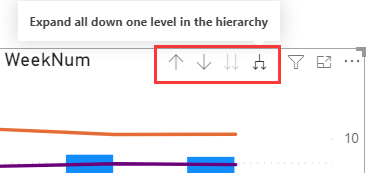
Is there a way to lock/disable the Expand option, so that the chart can only keep the pre-defined hierarchy?

h_l_0-1614527037570.png


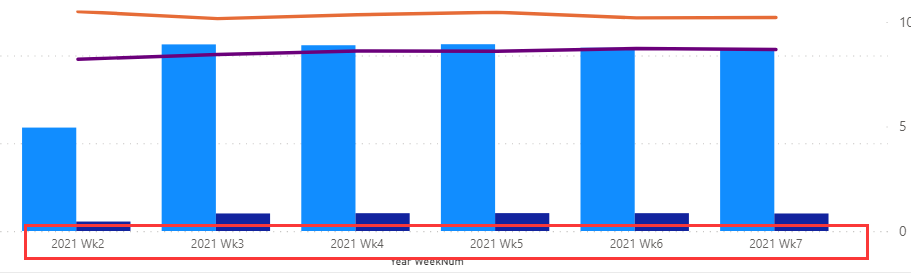
following is the expected chart, fixed the Year-WeekNum, don't allow drill up to "Year", or expand to "Day" or any level


h_l_1-1614527112050.png


Thanks.

H


1 ACCEPTED SOLUTION
Greg_Deckler
Community Champion
Community Champion

@Anonymous It will still appear for you as the report author while editing in Desktop but should not appear for users when published. 


Follow on LinkedIn
@ me in replies or I'll lose your thread!!!
Instead of a Kudo, please vote for this idea
Become an expert!: Enterprise DNA
External Tools: MSHGQM
YouTube Channel!: Microsoft Hates Greg
Latest book!:
DAX For Humans

DAX is easy, CALCULATE makes DAX hard...

View solution in original post

4 REPLIES 4
Greg_Deckler
Community Champion
Community Champion

@Anonymous It will still appear for you as the report author while editing in Desktop but should not appear for users when published. 


Follow on LinkedIn
@ me in replies or I'll lose your thread!!!
Instead of a Kudo, please vote for this idea
Become an expert!: Enterprise DNA
External Tools: MSHGQM
YouTube Channel!: Microsoft Hates Greg
Latest book!:
DAX For Humans

DAX is easy, CALCULATE makes DAX hard...
Anonymous
Not applicable

Thank you!

Greg_Deckler
Community Champion
Community Champion

@Anonymous Try using the visual header settings:

Solved: I'd like to disable the drill up/drill down option - Microsoft Power BI Community


Follow on LinkedIn
@ me in replies or I'll lose your thread!!!
Instead of a Kudo, please vote for this idea
Become an expert!: Enterprise DNA
External Tools: MSHGQM
YouTube Channel!: Microsoft Hates Greg
Latest book!:
DAX For Humans

DAX is easy, CALCULATE makes DAX hard...
Anonymous
Not applicable

Hi Greg_Deckler,


thanks for reply. I've turned off everything, but the option is still working.

h_l_1-1614530351697.png


Helpful resources

Announcements
November Power BI Update Carousel

Power BI Monthly Update - November 2025

Check out the November 2025 Power BI update to learn about new features.

Fabric Data Days Carousel

Fabric Data Days

Advance your Data & AI career with 50 days of live learning, contests, hands-on challenges, study groups & certifications and more!

FabCon Atlanta 2026 carousel

FabCon Atlanta 2026

Join us at FabCon Atlanta, March 16-20, for the ultimate Fabric, Power BI, AI and SQL community-led event. Save $200 with code FABCOMM.

Top Solution Authors
Top Kudoed Authors