cancel
Showing results for 
Search instead for 
Did you mean: 

The Power BI Data Visualization World Championships is back! Get ahead of the game and start preparing now! Learn more

Reply
Anonymous
Not applicable

line graph display

hi 

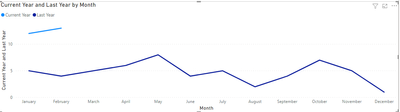
i have a line graph showing data for entire last year and current year 2 months but my current year data is displaying in right side 

i am looking for data to be displayed left side below jan 2020 i want jan 2021.


greeshma_0-1613555819060.png


1 ACCEPTED SOLUTION
v-xulin-mstf
Community Support
Community Support

Hi @Anonymous,


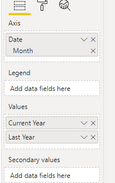
You can use date hieracrchy as:

v-xulin-mstf_0-1613634067118.png

Here is the output:

v-xulin-mstf_1-1613634168693.png


Best Regards,

Link


View solution in original post

3 REPLIES 3
SpiroswayGR
Resolver III
Resolver III

@Anonymous 

Did you create a calendar table that connected with your Data table ? If no , then you need to create it. You can find million scripts to create it , if you can't find any let me know.


Then connect calendar table with your "Date" field as a key with your data table.


Then Create a measure for current year :  Revenue_CY = Sum(gross_sales)

For LY you need to create a measure like this : Revenue_LY = Calculate(Revenue_CY ,sameaslastperiod(calendar[date])) or Revenue_LY = Calculate(Revenue_CY ,dateadd(calendar[date],-1,Year))


Hope that can work for you as worked for me.


Don't forget to give thumbs up 👍and accept this as a solution if it helped you.

v-xulin-mstf
Community Support
Community Support

Hi @Anonymous,


You can use date hieracrchy as:

v-xulin-mstf_0-1613634067118.png

Here is the output:

v-xulin-mstf_1-1613634168693.png


Best Regards,

Link


avatorl
Impactful Individual

You need to use common Axis X for both lines. Make a chart with 2021 line only. Then create a measure for last year data (it must return Jan 2020 value if selected period is Jan 2021 and so on, you can use https://docs.microsoft.com/en-us/dax/sameperiodlastyear-function-dax) and use this measure for your second line.

Helpful resources

Announcements
Power BI DataViz World Championships

Power BI Dataviz World Championships

The Power BI Data Visualization World Championships is back! Get ahead of the game and start preparing now!

November Power BI Update Carousel

Power BI Monthly Update - November 2025

Check out the November 2025 Power BI update to learn about new features.

FabCon Atlanta 2026 carousel

FabCon Atlanta 2026

Join us at FabCon Atlanta, March 16-20, for the ultimate Fabric, Power BI, AI and SQL community-led event. Save $200 with code FABCOMM.