Get certified for free when you join Fabric Data Days 2026 and dive into Fabric, Power BI, SQL, AI, and other essential data skills.
Join nowTry your skills in the Power BI Dataviz World Championship! Round one ends June 26. Join now
Hi,
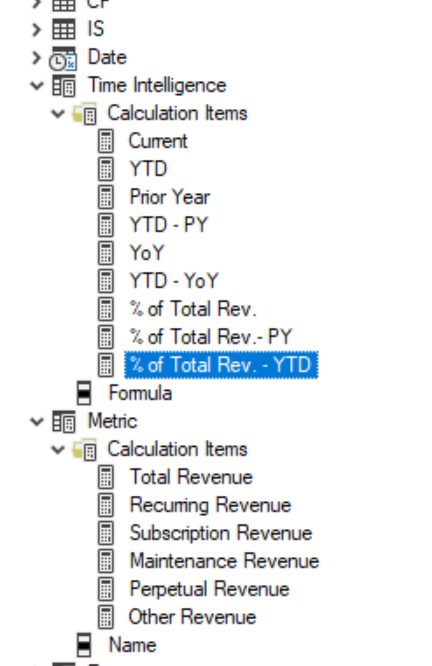
I have built two calculation groups in my report. Please see picture below. I am trying to use [Total Revenue] in the DAX code
in my DAX code the following way. The following code snippet is used in the definition of another calculation item, % of Total Rev - YTD.
VAR _YTDTotalRev = Calculate ([Toal Revenue], 'Time Intelligence' [Formula] = "YTD").
This gives an error: The value for [Total Revenue] cannot be determined. Either the column does not exist, or there is no current row for this column.
In the definitive guide to dax, chapter 9, the book uses [Sales Amount] calculation item in DAX expression. I'm wondering why I am getting an error when I tried to use a calculation item while definining another calculation item. How can I use one calculation item in another without rewriting the code? Any help would be appreciated.
@RS_123 , is it typo here on the community . or you type wrong formula
VAR _YTDTotalRev = Calculate ([Toal Revenue], 'Time Intelligence' [Formula] = "YTD").
VAR _YTDTotalRev = Calculate ([Total Revenue], 'Time Intelligence' [Formula] = "YTD").
Typo in the community. I have the correct measure name in my model.
Don't miss out on Data Days, June 15 through August 7. Learn Fabric, Power BI, SQL, AI and more.
Check out the May 2026 Power BI update to learn about new features.
| User | Count |
|---|---|
| 24 | |
| 22 | |
| 21 | |
| 20 | |
| 14 |
| User | Count |
|---|---|
| 58 | |
| 52 | |
| 41 | |
| 33 | |
| 31 |