FabCon is coming to Atlanta
Join us at FabCon Atlanta from March 16 - 20, 2026, for the ultimate Fabric, Power BI, AI and SQL community-led event. Save $200 with code FABCOMM.
Register now!- Power BI forums
- Get Help with Power BI
- Desktop
- Service
- Report Server
- Power Query
- Mobile Apps
- Developer
- DAX Commands and Tips
- Custom Visuals Development Discussion
- Health and Life Sciences
- Power BI Spanish forums
- Translated Spanish Desktop
- Training and Consulting
- Instructor Led Training
- Dashboard in a Day for Women, by Women
- Galleries
- Data Stories Gallery
- Themes Gallery
- Contests Gallery
- QuickViz Gallery
- Quick Measures Gallery
- Visual Calculations Gallery
- Notebook Gallery
- Translytical Task Flow Gallery
- TMDL Gallery
- R Script Showcase
- Webinars and Video Gallery
- Ideas
- Custom Visuals Ideas (read-only)
- Issues
- Issues
- Events
- Upcoming Events
The Power BI Data Visualization World Championships is back! Get ahead of the game and start preparing now! Learn more
- Power BI forums
- Forums
- Get Help with Power BI
- Desktop
- Re: how to pivot a table in-memory? using summariz...
- Subscribe to RSS Feed
- Mark Topic as New
- Mark Topic as Read
- Float this Topic for Current User
- Bookmark
- Subscribe
- Printer Friendly Page


- Mark as New
- Bookmark
- Subscribe
- Mute
- Subscribe to RSS Feed
- Permalink
- Report Inappropriate Content
how to pivot a table in-memory? using summarize+addcolumns?
Hello
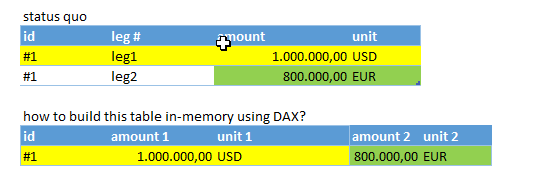
A certain record (id = "#1") ahs to numeric values stored in separates lines, c.f. screenshot. How can pivot/merge/join these two lines to so that the result is a 1-line-table stored in-memory?
I think SUMMARIZE in connection with ADDCOLUMNS seems to be possible, way, but I could not yet really succeed.
Maybe this is quite simple and somebody knows the DAX formula to get to the result in the screenshot?
Cheers
Solved! Go to Solution.


- Mark as New
- Bookmark
- Subscribe
- Mute
- Subscribe to RSS Feed
- Permalink
- Report Inappropriate Content
Hi Chefe,
According to your description, you need to create a new table based on the exist table, right?
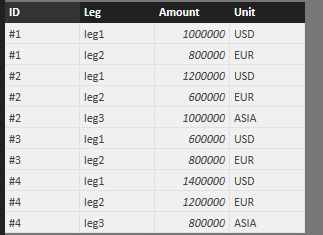
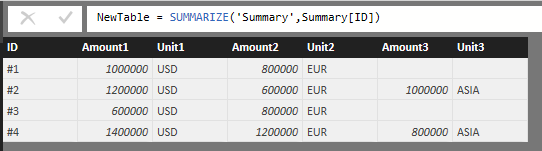
I have tested it on my local environment, here is the sample DAX for you reference.
Create a table
NewTable = SUMMARIZE('Summary',Summary[ID])
Create columns
Amount1 = LOOKUPVALUE('Summary'[Amount],'Summary'[ID],'NewTable'[ID],'Summary'[Leg],"Leg1")
Unit1 = LOOKUPVALUE('Summary'[Unit],'Summary'[ID],'NewTable'[ID],'Summary'[Leg],"Leg1")
Amount2 = LOOKUPVALUE('Summary'[Amount],'Summary'[ID],'NewTable'[ID],'Summary'[Leg],"Leg2")
Unit2 = LOOKUPVALUE('Summary'[Unit],'Summary'[ID],'NewTable'[ID],'Summary'[Leg],"Leg2")
Amount3 = LOOKUPVALUE('Summary'[Amount],'Summary'[ID],'NewTable'[ID],'Summary'[Leg],"Leg3")
Unit3 = LOOKUPVALUE('Summary'[Unit],'Summary'[ID],'NewTable'[ID],'Summary'[Leg],"Leg3")
Regards,
Charlie Liao
- Mark as New
- Bookmark
- Subscribe
- Mute
- Subscribe to RSS Feed
- Permalink
- Report Inappropriate Content
Hi Chefe,
According to your description, you need to create a new table based on the exist table, right?
I have tested it on my local environment, here is the sample DAX for you reference.
Create a table
NewTable = SUMMARIZE('Summary',Summary[ID])
Create columns
Amount1 = LOOKUPVALUE('Summary'[Amount],'Summary'[ID],'NewTable'[ID],'Summary'[Leg],"Leg1")
Unit1 = LOOKUPVALUE('Summary'[Unit],'Summary'[ID],'NewTable'[ID],'Summary'[Leg],"Leg1")
Amount2 = LOOKUPVALUE('Summary'[Amount],'Summary'[ID],'NewTable'[ID],'Summary'[Leg],"Leg2")
Unit2 = LOOKUPVALUE('Summary'[Unit],'Summary'[ID],'NewTable'[ID],'Summary'[Leg],"Leg2")
Amount3 = LOOKUPVALUE('Summary'[Amount],'Summary'[ID],'NewTable'[ID],'Summary'[Leg],"Leg3")
Unit3 = LOOKUPVALUE('Summary'[Unit],'Summary'[ID],'NewTable'[ID],'Summary'[Leg],"Leg3")
Regards,
Charlie Liao
- Mark as New
- Bookmark
- Subscribe
- Mute
- Subscribe to RSS Feed
- Permalink
- Report Inappropriate Content
Hi Charlie
Thanks. Correct, but in-memory, since I do not want to add any more phyisical table objects to my data model.
Do you mind sharing that specific pbix file of yours?
Cheers, chefe
++++++++++++ edit ++++++++++++
Now I got it, thank you. Don't need to share the file now 🙂
I was totally unaware of the "calculate table" functionality 😮 making tables using DAX syntax that otherwise could only be seen using something like DAX Studio (which I cannot install on my machine unfortunately...), so it is the same coding to use in a measure... brilliant. Thanks again 😉
Though I did have to alter your code a bit:
* using =addcolumns() in the formula instead of - I guess - adding calculated columns using the UI
The syntax - which now should be usable as an interim step in any measure (?) - is now as follows:
MyNewTable =
ADDCOLUMNS(SUMMARIZE(Table2;Table2[id])
	;"fx leg amount"
	;LOOKUPVALUE(Table2[amount]
		;Table2[leg #]
		;"leg1"
		;Table2[id]
		;[id]
	)
	;"fx leg ccy"
	;LOOKUPVALUE(Table2[unit]
		;Table2[leg #]
		;"leg1"
		;Table2[id]
		;[id]
	)
	;"base leg amount"
	;LOOKUPVALUE(Table2[amount]
		;Table2[leg #]
		;"leg2"
		;Table2[id]
		;[id]
	)
	;"base leg ccy"
	;LOOKUPVALUE(Table2[unit]
		;Table2[leg #]
		;"leg2"
		;Table2[id]
		;[id]
	)
)
Problem solved. Thanks again.


- Mark as New
- Bookmark
- Subscribe
- Mute
- Subscribe to RSS Feed
- Permalink
- Report Inappropriate Content
Have you tried "Group by" in the Query Editor? It is on the Transform Tab and should provide the results you are seeking.
Did I answer your question? Mark my post as a solution!
Proud to be a Super User!
- Mark as New
- Bookmark
- Subscribe
- Mute
- Subscribe to RSS Feed
- Permalink
- Report Inappropriate Content
Thank you for the quick reply! I forgot to mention, that I do not wish to physically create a new table. I wish to use this in-memory table as an interim step in a measure calculation.
- Mark as New
- Bookmark
- Subscribe
- Mute
- Subscribe to RSS Feed
- Permalink
- Report Inappropriate Content
Then why not just write up the SUM measure/calculation. Use the identifying code on the rows and it should create the totals you need by code. Then use that calculation within the next step.
Did I answer your question? Mark my post as a solution!
Proud to be a Super User!

- Mark as New
- Bookmark
- Subscribe
- Mute
- Subscribe to RSS Feed
- Permalink
- Report Inappropriate Content
Tried the same scenario with a number of DAX functions but didn't succeed either 😞

Helpful resources

Power BI Dataviz World Championships
The Power BI Data Visualization World Championships is back! Get ahead of the game and start preparing now!

Power BI Monthly Update - December 2025
Check out the December 2025 Power BI Holiday Recap!

FabCon Atlanta 2026
Join us at FabCon Atlanta, March 16-20, for the ultimate Fabric, Power BI, AI and SQL community-led event. Save $200 with code FABCOMM.

| User | Count |
|---|---|
| 61 | |
| 46 | |
| 40 | |
| 38 | |
| 22 |


| User | Count |
|---|---|
| 176 | |
| 131 | |
| 118 | |
| 82 | |
| 54 |


