Join us at FabCon Atlanta from March 16 - 20, 2026, for the ultimate Fabric, Power BI, AI and SQL community-led event. Save $200 with code FABCOMM.
Register now!Get Fabric Certified for FREE during Fabric Data Days. Don't miss your chance! Request now
hello.
as u know,The Default behavior of RANKX expersion in dealing with blank rows is to count them as zero.
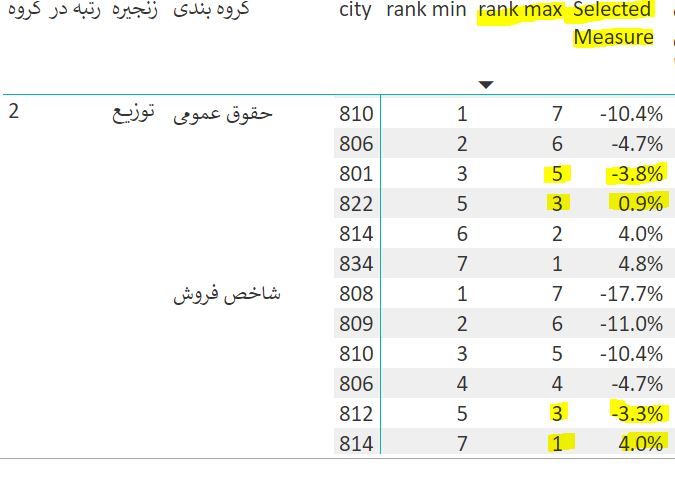
how can i override this behavior in a way it counts it as blank ( or ignore it). the problem arises in folloing picture,
please have a look
i've wrote this DAX:
rank max =
RANKX (
ALLSELECTED('1-Grouping'[کد شرکت])
,
[Selected Measure],
,
0,
Dense
)
@dombarg,
Please check if one of the following DAX returns your expected result.
rank max =
IF( NOT ( ISBLANK ( [Selected Measure]) ) ,
RANKX (
ALLSELECTED('1-Grouping'[کد شرکت])
,
[Selected Measure],
,
0,
Dense
),
BLANK())
rank max =
IF( [Selected Measure]<>0 ,
RANKX (
ALLSELECTED('1-Grouping'[کد شرکت])
,
[Selected Measure],
,
0,
Dense
),
BLANK())
Regards,
Lydia
@dombarg,
I am not very clear about your requirement. Could you please share sample data of your original table and post expected result here? Also we need to know the DAX of selected Measure.
Regards,
Lydia
assume selected measures as SUM.
Look at the highlighted numbers and their relevant RANK.
The BI deal with zero as value and attribute a rank to them.how can i tell to "BI that ignore zero please!"
Check out the November 2025 Power BI update to learn about new features.
Advance your Data & AI career with 50 days of live learning, contests, hands-on challenges, study groups & certifications and more!