
cancel
Showing results for 
Search instead for 
Did you mean: 

Learn from the best! Meet the four finalists headed to the FINALS of the Power BI Dataviz World Championships! Register now

Reply
Anonymous
Not applicable

how to extract the count of a repeatable character in a text

Hello!


I have a column is a text, like aa,bb,aa,aa,aa,cc,aa,aa,.. I need to count how many times aa has appeared in this text. 
table is like this
ID       Action
001     aa,bb,aa,aa,aa,cc,aa,aa
002     bb,cc,aa,aa,aa,cc,aa,aa,aa,aa,aa

003     aa,dd,dd,aa,aa,aa

I need to add a column to show how many times aa appeared in action for each id. 

Thank you in advance for your kind help!

1 ACCEPTED SOLUTION
MDodds
Resolver II
Resolver II

Hi DuoHappy,


Try creating a new calculated column with the following DAX:


NumberofAs = LEN('Table'[Action])-LEN(SUBSTITUTE('Table'[Action],"a",""))
 
It should produce a result like so:
MDodds_0-1667990784214.png


Just be careful of case sensitivity.


Good luck, reach out if you need more help!

View solution in original post

4 REPLIES 4
Analystmate
Helper II
Helper II

@Anonymous

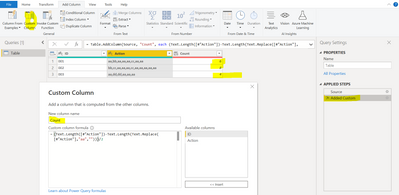
You can try a new custom column in the example below by using Power Query  

Count M Code for custom column  (Text.Length([#"Action"])-Text.Length(Text.Replace([#"Action"],"aa","")))/2


Analystmate_0-1667992903324.png


Anonymous
Not applicable

Hi @MDodds , Thank you very much! It is a very smart way! As I am looking for aa instead of a, I think the formula should be :  NumberofAAs = (LEN('Table'[Action])-LEN(SUBSTITUTE('Table'[Action],"aa","")))/2, right? 

Spot on, good result.

MDodds
Resolver II
Resolver II

Hi DuoHappy,


Try creating a new calculated column with the following DAX:


NumberofAs = LEN('Table'[Action])-LEN(SUBSTITUTE('Table'[Action],"a",""))
 
It should produce a result like so:
MDodds_0-1667990784214.png


Just be careful of case sensitivity.


Good luck, reach out if you need more help!

Helpful resources

Announcements
Join our Fabric User Panel

Join our Fabric User Panel

Share feedback directly with Fabric product managers, participate in targeted research studies and influence the Fabric roadmap.

February Power BI Update Carousel

Power BI Monthly Update - February 2026

Check out the February 2026 Power BI update to learn about new features.

FabCon Atlanta 2026 carousel

FabCon Atlanta 2026

Join us at FabCon Atlanta, March 16-20, for the ultimate Fabric, Power BI, AI and SQL community-led event. Save $200 with code FABCOMM.