Join us at FabCon Atlanta from March 16 - 20, 2026, for the ultimate Fabric, Power BI, AI and SQL community-led event. Save $200 with code FABCOMM.
Register now!The Power BI Data Visualization World Championships is back! It's time to submit your entry. Live now!
Hi,
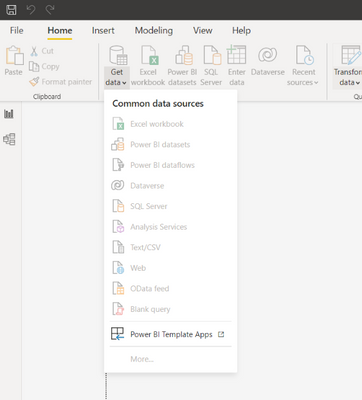
I created a new report and connected to a data source using power bi datasets so there is a live connection to my main model. However, I need to change the connection to a different model and i don't see a way to delete the old or replace it with the new. I saw a edit source option before and now it seems gone - see below.
Solved! Go to Solution.
Hi, @jnrezk ;
As far as I know, it replaces the old data set, and I did A test.
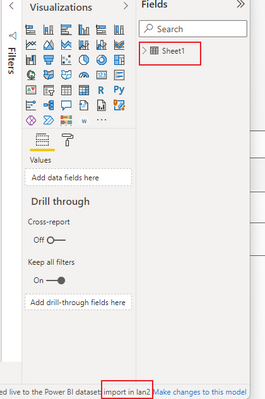
First, I connected data set A.
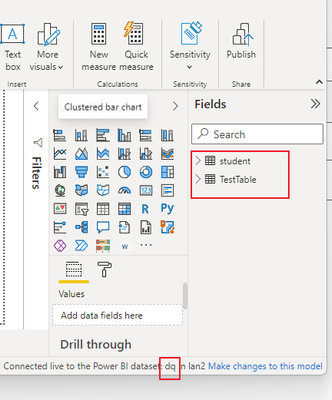
Second, change to dataset B.
As we could see, the dataset haved changed.
Best Regards,
Community Support Team_ Yalan Wu
If this post helps, then please consider Accept it as the solution to help the other members find it more quickly.
Hi, @jnrezk ;
As far as I know, it replaces the old data set, and I did A test.
First, I connected data set A.
Second, change to dataset B.
As we could see, the dataset haved changed.
Best Regards,
Community Support Team_ Yalan Wu
If this post helps, then please consider Accept it as the solution to help the other members find it more quickly.
What if I don't have permissions to dataset A? Can I still open live connected report and change the source to dataset B? Being said that I have permissions only to dataset B.
Hi,
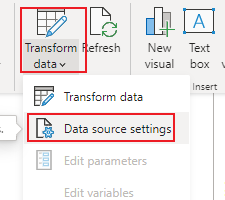
i don't know if i've really undestood your question but Data source settings is inside Tranform data
Ok I see this now. When I do it does it replace the other data live connection? because I still see in the web version that the report is connected to the old dataset still. Is there a way for me to just delete the live connection altogether & re-add it under data source? @amitchandak @serpiva64
The Power BI Data Visualization World Championships is back! It's time to submit your entry.
Check out the January 2026 Power BI update to learn about new features.
| User | Count |
|---|---|
| 60 | |
| 49 | |
| 30 | |
| 25 | |
| 23 |
| User | Count |
|---|---|
| 131 | |
| 103 | |
| 58 | |
| 39 | |
| 31 |