Forum Discussion

ppgandhi11's avatar
ppgandhi11
Icon for Helper V rankHelper V
8 years ago
Solved

how to display 0 values?

Hi,


I have a measure as below:


TotalDenied = CALCULATE(count(Query1[IsWithinBM]), Query1[IsWithinBM] = "N")


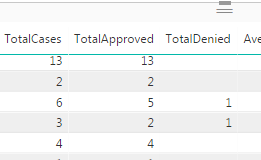
Whenever the value of TotalDenied > 0, it displays fine, but when the value is 0, the report shows blank. How can I make it display 0 instead?  Please see the attached screenshot. Thank you!

  • Anonymous's avatar
    Anonymous
    8 years ago

    Hi

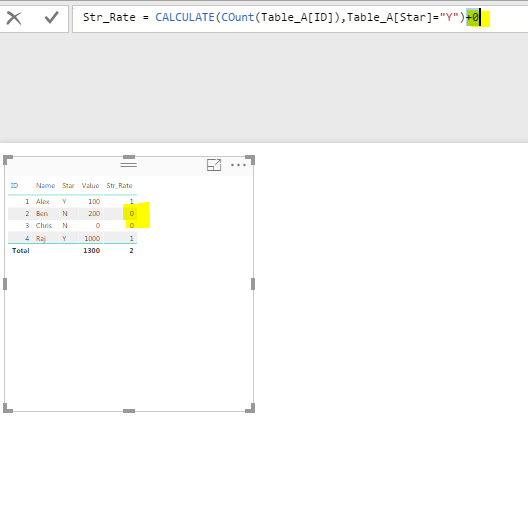
    A simple solution : Add +0 to your formula.


    CALCULATE(count(Query1[IsWithinBM]), Query1[IsWithinBM] = "N") + 0


    P.S: I got this idea few days back from a old post , dont remember exactly but i think it was Sean who posted this idea.


    Thanks
    Raj

2 Replies

  • Hi ppgandhi11


    I hope this below calculation will help you. And check the attached Pbix here


    Create  seperate measures


    Cases = SUM(Table1[TotalCases])

    Aproved = SUM(Table1[TotalApproved])


    Total Denied 1 = var denied = SUM(Table1[Total Denied])
             var aproved = [Aproved]
                 
         return IF(ISBLANK([Aproved]),denied ,IF(ISBLANK(denied),0,denied))
  • Anonymous's avatar
    Anonymous
    Not applicable

    Hi

    A simple solution : Add +0 to your formula.


    CALCULATE(count(Query1[IsWithinBM]), Query1[IsWithinBM] = "N") + 0


    P.S: I got this idea few days back from a old post , dont remember exactly but i think it was Sean who posted this idea.


    Thanks
    Raj