Join us at FabCon Atlanta from March 16 - 20, 2026, for the ultimate Fabric, Power BI, AI and SQL community-led event. Save $200 with code FABCOMM.
Register now!View all the Fabric Data Days sessions on demand. View schedule
hi guys,
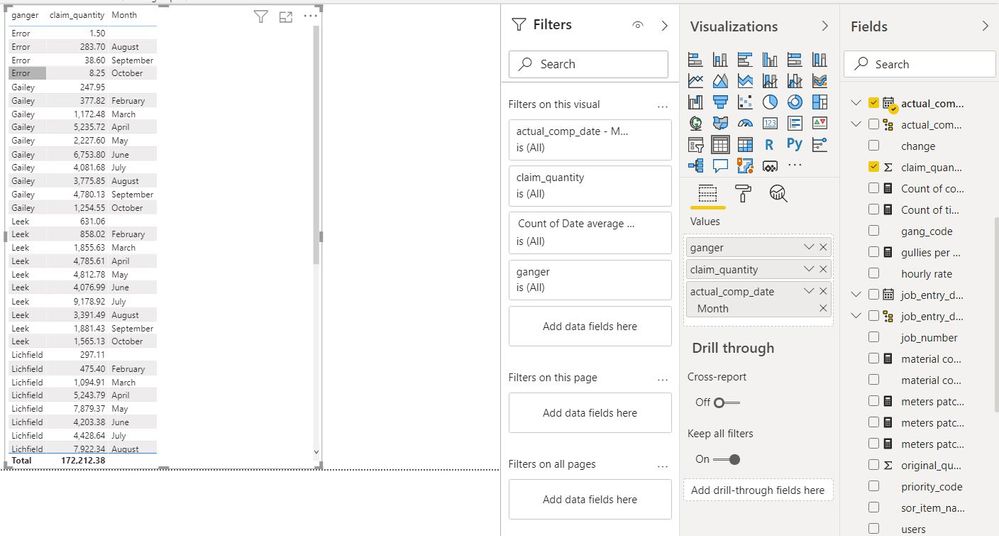
im quite new to powerbi and i am really struggling with the table visual.
i literally want to show the data below......but with months as the columns and the combined total for each "ganger"
so i can see the monthly cariance. its easy enough to show in bar charts but i cant understand how i do it using the table visual
please help x
Solved! Go to Solution.
@fstupot ,
Try Visual Matrix to collapse and expand the icon, Screenshot is attached to put the column names according to your need.
Hi @fstupot ,
Is your issue solved now?
Best Regards,
Kelly
Did I answer your question? Mark my post as a solution!
@fstupot ,
Try Visual Matrix to collapse and expand the icon, Screenshot is attached to put the column names according to your need.
Change the visual type to the Matrix visual, it is to the right of the standard table in the visuals selection area.
You can then drop months into the columns section.
https://docs.microsoft.com/en-us/power-bi/visuals/desktop-matrix-visual
I'd suggest you create a date table.
https://www.sqlbi.com/articles/creating-a-simple-date-table-in-dax/
Proud to be a Super User!
Check out the November 2025 Power BI update to learn about new features.
Advance your Data & AI career with 50 days of live learning, contests, hands-on challenges, study groups & certifications and more!