Huge last-minute discounts for FabCon Vienna from September 15-18, 2025
Supplies are limited. Contact info@espc.tech right away to save your spot before the conference sells out.
Get your discount- Power BI forums
- Get Help with Power BI
- Desktop
- Service
- Report Server
- Power Query
- Mobile Apps
- Developer
- DAX Commands and Tips
- Custom Visuals Development Discussion
- Health and Life Sciences
- Power BI Spanish forums
- Translated Spanish Desktop
- Training and Consulting
- Instructor Led Training
- Dashboard in a Day for Women, by Women
- Galleries
- Data Stories Gallery
- Themes Gallery
- Contests Gallery
- Quick Measures Gallery
- Notebook Gallery
- Translytical Task Flow Gallery
- TMDL Gallery
- R Script Showcase
- Webinars and Video Gallery
- Ideas
- Custom Visuals Ideas (read-only)
- Issues
- Issues
- Events
- Upcoming Events
Score big with last-minute savings on the final tickets to FabCon Vienna. Secure your discount
- Power BI forums
- Forums
- Get Help with Power BI
- Desktop
- help with dax calculate column
- Subscribe to RSS Feed
- Mark Topic as New
- Mark Topic as Read
- Float this Topic for Current User
- Bookmark
- Subscribe
- Printer Friendly Page

- Mark as New
- Bookmark
- Subscribe
- Mute
- Subscribe to RSS Feed
- Permalink
- Report Inappropriate Content
help with dax calculate column
I need to create calculate column that add the last day rate if it is empty. I need that all date have rates .
Thanks !!!
date rate all rates
1/11/17 5
2/11/17
3/11/17
4/11/17 4
5/11/17
6/11/17 4.8
Solved! Go to Solution.


- Mark as New
- Bookmark
- Subscribe
- Mute
- Subscribe to RSS Feed
- Permalink
- Report Inappropriate Content
Hi @yoav20007,
Why don't you do this in the query editor.
Insert a custom column with the following syntax:
All Rates = [Rate]
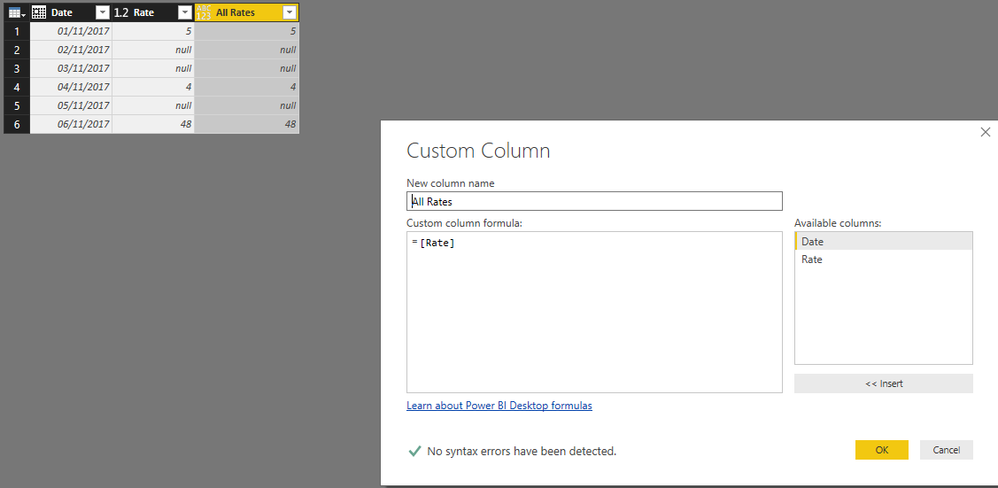
Then right click on the new column header and select fill down final result below:
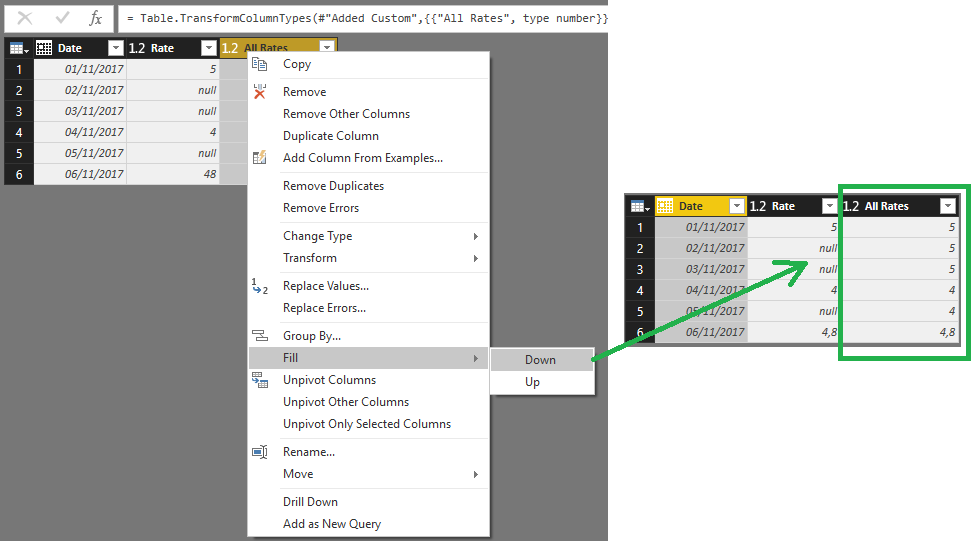
Regards,
MFelix
Regards
Miguel Félix
Did I answer your question? Mark my post as a solution!
Proud to be a Super User!
Check out my blog: Power BI em Português

- Mark as New
- Bookmark
- Subscribe
- Mute
- Subscribe to RSS Feed
- Permalink
- Report Inappropriate Content
Hi @yoav20007
Try this calculated column
=
VAR Daybefore =
    PREVIOUSDAY ( Table1[date] )
RETURN
    IF (
        ISBLANK ( Table1[Rates] ),
        CALCULATE (
            VALUES ( Table1[Rates] ),
            FILTER ( ALL ( Table1 ), Table1[date] = Daybefore )
        ),
        Table1[Rates]
    )
Regards
Zubair
Please try my custom visuals
- Mark as New
- Bookmark
- Subscribe
- Mute
- Subscribe to RSS Feed
- Permalink
- Report Inappropriate Content
Thanks @Zubair_Muhammad
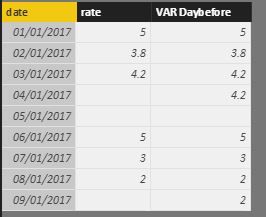
But when i have more than 1 day blanks rates it's dosn't work.
I need to repeat the same rate
- Mark as New
- Bookmark
- Subscribe
- Mute
- Subscribe to RSS Feed
- Permalink
- Report Inappropriate Content
Hi @yoav20007
Try this
=
IF (
    ISBLANK ( Table1[Rates] ),
    CALCULATE (
        LASTNONBLANK ( Table1[Rates], Table1[Rates] ),
        FILTER ( Table1, Table1[date] < EARLIER ( Table1[date] ) )
    ),
    Table1[Rates]
)
Regards
Zubair
Please try my custom visuals
- Mark as New
- Bookmark
- Subscribe
- Mute
- Subscribe to RSS Feed
- Permalink
- Report Inappropriate Content
Thanks @Zubair_Muhammad
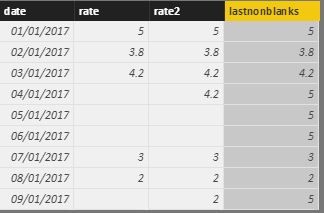
I try .
But it dosn't works. That's the result . the same number for all of them.
- Mark as New
- Bookmark
- Subscribe
- Mute
- Subscribe to RSS Feed
- Permalink
- Report Inappropriate Content
@yoav20007
Hmmm!!!! May be this one
=
IF (
    ISBLANK ( Table1[Rates] ),
    CALCULATE (
        LASTNONBLANK ( Table1[Rates], Table1[Rates] ),
        FILTER (
            Table1,
            Table1[date] < EARLIER ( Table1[date] )
                && Table1[date] > MIN ( Table1[date] )
        )
    ),
    Table1[Rates]
)
Regards
Zubair
Please try my custom visuals
- Mark as New
- Bookmark
- Subscribe
- Mute
- Subscribe to RSS Feed
- Permalink
- Report Inappropriate Content
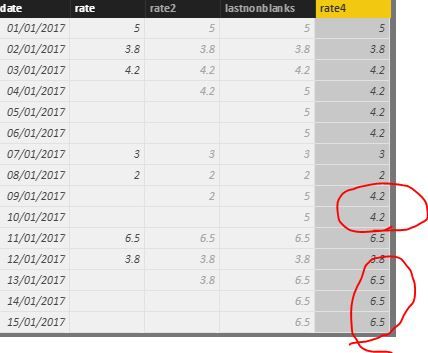
Thanks again @Zubair_Muhammad but ...
Almost 🙂
that's the result. after the first time it dosn't works.
- Mark as New
- Bookmark
- Subscribe
- Mute
- Subscribe to RSS Feed
- Permalink
- Report Inappropriate Content
Hi @yoav20007,
Why don't you do this in the query editor.
Insert a custom column with the following syntax:
All Rates = [Rate]
Then right click on the new column header and select fill down final result below:
Regards,
MFelix
Regards
Miguel Félix
Did I answer your question? Mark my post as a solution!
Proud to be a Super User!
Check out my blog: Power BI em Português- Mark as New
- Bookmark
- Subscribe
- Mute
- Subscribe to RSS Feed
- Permalink
- Report Inappropriate Content
- Mark as New
- Bookmark
- Subscribe
- Mute
- Subscribe to RSS Feed
- Permalink
- Report Inappropriate Content
how to replace 0 with earlier value?
test = IF(ISBLANK(sales[rate])=TRUE(),0,sales[rate])

Helpful resources

Power BI Monthly Update - August 2025
Check out the August 2025 Power BI update to learn about new features.

Fabric Community Update - August 2025
Find out what's new and trending in the Fabric community.

| User | Count |
|---|---|
| 66 | |
| 60 | |
| 47 | |
| 33 | |
| 32 |


| User | Count |
|---|---|
| 86 | |
| 75 | |
| 56 | |
| 50 | |
| 45 |


