

This time we’re going bigger than ever. Fabric, Power BI, SQL, AI and more. We're covering it all. You won't want to miss it.
Learn moreLevel up your Power BI skills this month - build one visual each week and tell better stories with data! Get started
Hello,
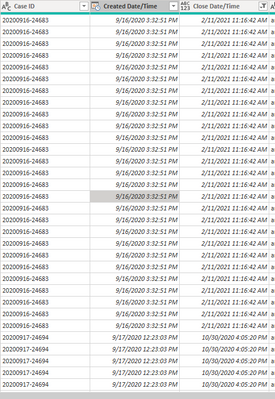
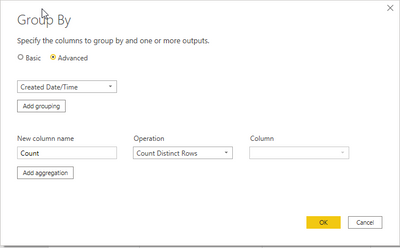
I am trying to group all my 'Create Date/Time' and 'Close Date/Time' and have a column that counts a distinct 'Case ID' . This is for a dual axis line graph (based on the dates) that counts a distinct 'Case ID'. Im trying to use the group by function in Power Query but the column is grayed out and wont let me select 'Case ID'.
Solved! Go to Solution.
Hi @sandersonmm ,
Count Distinct Rows – Displays the distinct number of rows in a grouping.
When the Group by function selects Count-related operations, Column will not display columns, but will directly affect all rows. When operations such as SUM, AVG, etc. are selected, they will be displayed.
https://docs.microsoft.com/en-us/power-query/group-by
You can also do it with the dax function:
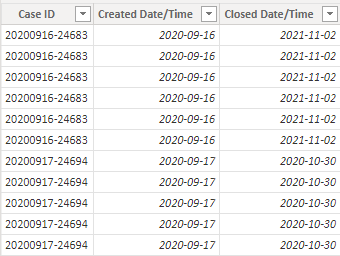
Main table:
Create calculated table.
Table 2 =
SUMMARIZE(
'Table','Table'[Created Date/Time],'Table'[Closed Date/Time],"ID",DISTINCTCOUNT('Table'[Case ID]))
Best Regards,
Liu Yang
If this post helps, then please consider Accept it as the solution to help the other members find it more quickly.
ignore the greyed out dropdown. Just click ok.
Hi @sandersonmm ,
Count Distinct Rows – Displays the distinct number of rows in a grouping.
When the Group by function selects Count-related operations, Column will not display columns, but will directly affect all rows. When operations such as SUM, AVG, etc. are selected, they will be displayed.
https://docs.microsoft.com/en-us/power-query/group-by
You can also do it with the dax function:
Main table:
Create calculated table.
Table 2 =
SUMMARIZE(
'Table','Table'[Created Date/Time],'Table'[Closed Date/Time],"ID",DISTINCTCOUNT('Table'[Case ID]))
Best Regards,
Liu Yang
If this post helps, then please consider Accept it as the solution to help the other members find it more quickly.
Can you click on Add Grouping button and from the drop down, it should allow you to choose Case ID?
Check out the April 2026 Power BI update to learn about new features.
Sign up to receive a private message when registration opens and key events begin.
If you have recently started exploring Fabric, we'd love to hear how it's going. Your feedback can help with product improvements.
| User | Count |
|---|---|
| 36 | |
| 28 | |
| 28 | |
| 20 | |
| 18 |
| User | Count |
|---|---|
| 65 | |
| 35 | |
| 33 | |
| 25 | |
| 24 |