

cancel
Showing results for 
Search instead for 
Did you mean: 

Vote for your favorite vizzies from the Power BI Dataviz World Championship submissions. Vote now!

Reply
amcneil32
Frequent Visitor

group by and show a distinct value count

Hello, I need to group by and show a distinct value count. 


amcneil32_0-1622148864423.png


For the field "Cust_Subsegment" i would want as a result something like this


amcneil32_1-1622149046614.png


I've grouped by the distinct row count aggregate, but it looks like its just giving me the total row count for each distinct row. I need a count on the distinct values instead. thanks  


amcneil32_2-1622149285446.png


1 ACCEPTED SOLUTION
amcneil32
Frequent Visitor

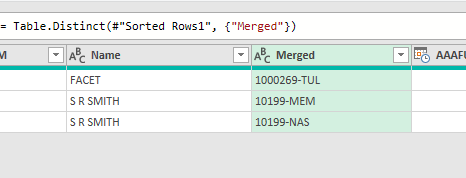
@Anonymous , i probably didn't  ask the question very well. I need to return all non-duplicate values. So from above I would need to return only 10199-MEM and  10199-NAS. I came up with a solution that appears to work. I first removed duplicates from the Merged field, which still returns one record for 1000269-TUL. I then duplicated the field, split by delimiter to get the number from the string. After that i just kept the duplicates on the number value.


amcneil32_0-1622210423695.png


amcneil32_1-1622210439546.png


amcneil32_2-1622210454543.png


amcneil32_3-1622210477960.png


View solution in original post

2 REPLIES 2
amcneil32
Frequent Visitor

@Anonymous , i probably didn't  ask the question very well. I need to return all non-duplicate values. So from above I would need to return only 10199-MEM and  10199-NAS. I came up with a solution that appears to work. I first removed duplicates from the Merged field, which still returns one record for 1000269-TUL. I then duplicated the field, split by delimiter to get the number from the string. After that i just kept the duplicates on the number value.


amcneil32_0-1622210423695.png


amcneil32_1-1622210439546.png


amcneil32_2-1622210454543.png


amcneil32_3-1622210477960.png


Anonymous
Not applicable

are you trying to count the number of times Customer Segment appears? if so you could do something like this

distinctcount(name) then you would pull out the segment to the rows and add the distinct count to the values on a matrix viz


otherwise are you trying to count the uniqe combination of accountnum, name and segment?


Helpful resources

Announcements
Power BI DataViz World Championships

Power BI Dataviz World Championships

Vote for your favorite vizzies from the Power BI World Championship submissions!

Sticker Challenge 2026 Carousel

Join our Community Sticker Challenge 2026

If you love stickers, then you will definitely want to check out our Community Sticker Challenge!

January Power BI Update Carousel

Power BI Monthly Update - January 2026

Check out the January 2026 Power BI update to learn about new features.

FabCon Atlanta 2026 carousel

FabCon Atlanta 2026

Join us at FabCon Atlanta, March 16-20, for the ultimate Fabric, Power BI, AI and SQL community-led event. Save $200 with code FABCOMM.