Join us at FabCon Atlanta from March 16 - 20, 2026, for the ultimate Fabric, Power BI, AI and SQL community-led event. Save $200 with code FABCOMM.
Register now!Get Fabric Certified for FREE during Fabric Data Days. Don't miss your chance! Request now
Hi
I am looking to create a Gantt chart with a "parent" task which will be the project, and then 5 sub-task which will show the different stages of the project. My dataset looks like the below, what do I need to do to create these sub tasks so I can get all those timelines on for each project in one view?
Thanks,
H
Hi @HCS,
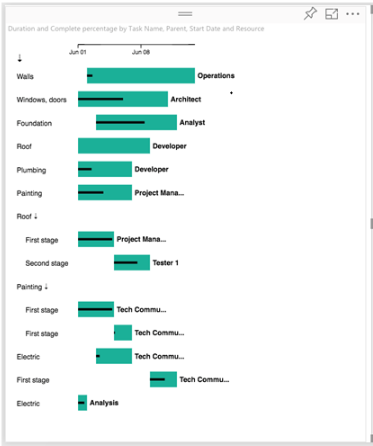
I don't what the dates mean. I would suggest you try the Gantt visual from the Marketplace. Please refer to blog/visual-awesomeness-unlocked-gantt-chart/ and the snapshot below.
Best Regards,
Dale
Hi Dale,
I am trying to make the project title the "parent" and the project phases the sub-tasks so for each project you have an appraise duration, select duration, execute duration and so forth - do you know how I can achieve this on the gantt chart?
Thanks,
H
Hi @HCS,
Is the data in the snapshot all you have? I have no idea about the sub-tasks, select duration, execute duration in your data. Can you share it here? Please refer to and download the sample from blog/visual-awesomeness-unlocked-gantt-chart/.
Best Regards,
Dale
Hi,
This is my dataset:
I am trying to create a gantt chart so that down the left hand side (the task list) are my project titles, and then by clicking an arrow down sign I can expand out those tasks to include sub-tasks such as below - do you how I do this?
Thanks,
H
Hi @HCS,
I don't aware any Drill down function in the custom visual "Gantt". Maybe you can create two separate visuals.
Best Regards,
Dale
Check out the November 2025 Power BI update to learn about new features.
Advance your Data & AI career with 50 days of live learning, contests, hands-on challenges, study groups & certifications and more!