Get certified for free when you join Fabric Data Days 2026 and dive into Fabric, Power BI, SQL, AI, and other essential data skills.
Join nowData Days is here! Join us now for 60+ days of learning, challenges, and connection. Learn more
Hello everyone,
I have a basic visualized matrix with a basic SUM([Column]) as a column in the table. The table has a inner filter and I just use "SUM" for my calculation because it needs an aggregation to be able to show the result. So the inner Filter then splits every value in the right way. The problem is tho that it shows an overall sum for this column in this table which makes no sense for this case. But I still have another column in this table where I need the overall sum, thats why I cant disable the overall sum in the format settings.
Is there a way to edit my measure SUM([Column]) so it doesn't show the overall SUM of this specific column? I'd like just a blank spot instead.
Hi @sistancy,
The solution depends on your precise case, I guess.
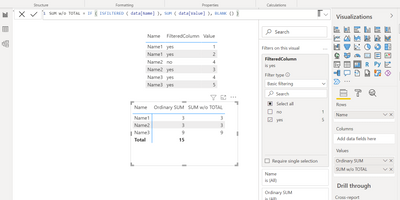
If, for example, the filiter in your case is applied to the column which is not used in the row section of your matrix, you can apply a solution like the one on the screenshot below.
Best Regards,
Alexander
Don't miss out on Data Days, June 15 through August 7. Learn Fabric, Power BI, SQL, AI and more.
Check out the May 2026 Power BI update to learn about new features.
| User | Count |
|---|---|
| 23 | |
| 23 | |
| 21 | |
| 17 | |
| 13 |
| User | Count |
|---|---|
| 58 | |
| 51 | |
| 40 | |
| 30 | |
| 24 |