FabCon is coming to Atlanta
Join us at FabCon Atlanta from March 16 - 20, 2026, for the ultimate Fabric, Power BI, AI and SQL community-led event. Save $200 with code FABCOMM.
Register now!- Power BI forums
- Get Help with Power BI
- Desktop
- Service
- Report Server
- Power Query
- Mobile Apps
- Developer
- DAX Commands and Tips
- Custom Visuals Development Discussion
- Health and Life Sciences
- Power BI Spanish forums
- Translated Spanish Desktop
- Training and Consulting
- Instructor Led Training
- Dashboard in a Day for Women, by Women
- Galleries
- Data Stories Gallery
- Themes Gallery
- Contests Gallery
- QuickViz Gallery
- Quick Measures Gallery
- Visual Calculations Gallery
- Notebook Gallery
- Translytical Task Flow Gallery
- TMDL Gallery
- R Script Showcase
- Webinars and Video Gallery
- Ideas
- Custom Visuals Ideas (read-only)
- Issues
- Issues
- Events
- Upcoming Events
Get Fabric Certified for FREE during Fabric Data Days. Don't miss your chance! Request now
- Power BI forums
- Forums
- Get Help with Power BI
- Desktop
- Re: distinct count and group by
- Subscribe to RSS Feed
- Mark Topic as New
- Mark Topic as Read
- Float this Topic for Current User
- Bookmark
- Subscribe
- Printer Friendly Page

- Mark as New
- Bookmark
- Subscribe
- Mute
- Subscribe to RSS Feed
- Permalink
- Report Inappropriate Content
distinct count and group by
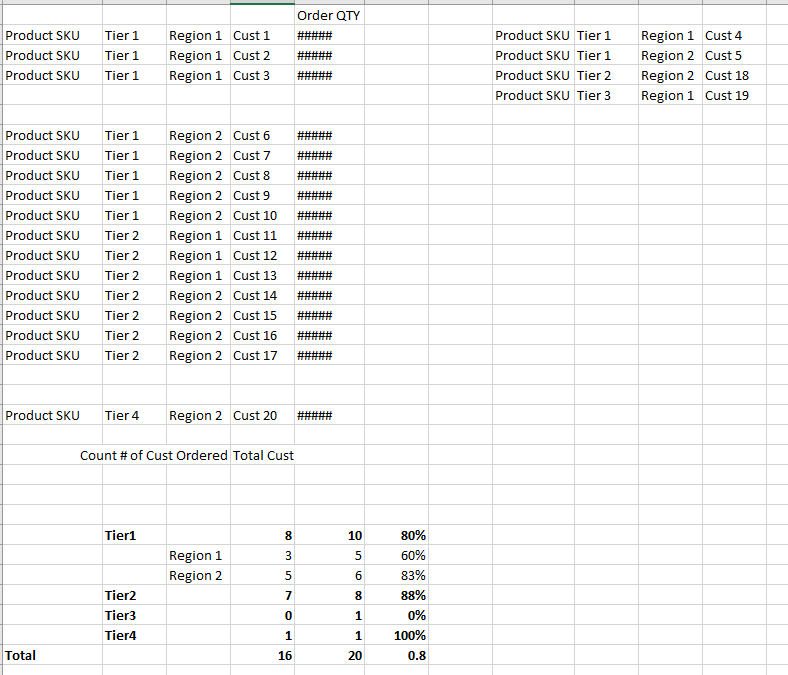
I want to find out what % of customer order by Region and Tier.
I can get the count of how many order by dropping to value and changed to distinct count,
But i cant get the total count of each group. Can anyone help with the measure please ! Thank you
Solved! Go to Solution.
- Mark as New
- Bookmark
- Subscribe
- Mute
- Subscribe to RSS Feed
- Permalink
- Report Inappropriate Content
@Anonymous
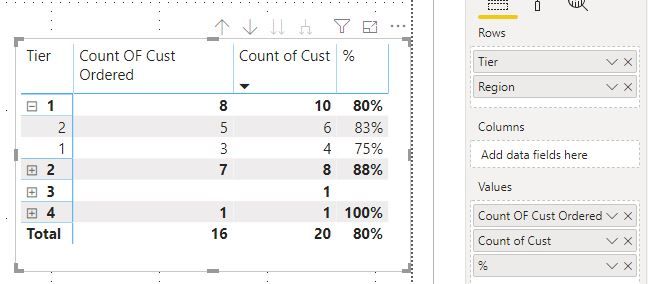
The measure should something like the follow:
Count OF Cust Ordered = CALCULATE(DISTINCTCOUNT('Table'[Cust]),ALLEXCEPT('Table','Table'[Tier],'Table'[Region]),FILTER('Table','Table'[Order]<>BLANK()))

% = [Count OF Cust Ordered]/COUNT('Table'[Cust])
Matrix:
Community Support Team _ Paul Zheng
If this post helps, then please consider Accept it as the solution to help the other members find it more quickly
- Mark as New
- Bookmark
- Subscribe
- Mute
- Subscribe to RSS Feed
- Permalink
- Report Inappropriate Content
@Anonymous
The measure should something like the follow:
Count OF Cust Ordered = CALCULATE(DISTINCTCOUNT('Table'[Cust]),ALLEXCEPT('Table','Table'[Tier],'Table'[Region]),FILTER('Table','Table'[Order]<>BLANK()))

% = [Count OF Cust Ordered]/COUNT('Table'[Cust])
Matrix:
Community Support Team _ Paul Zheng
If this post helps, then please consider Accept it as the solution to help the other members find it more quickly


- Mark as New
- Bookmark
- Subscribe
- Mute
- Subscribe to RSS Feed
- Permalink
- Report Inappropriate Content
Hello @Anonymous,
What do you mean by count of each group? Can you share the expected result based on the sample data shared?
Cheers!
Vivek
https://www.vivran.in/
Connect on LinkedIn
- Mark as New
- Bookmark
- Subscribe
- Mute
- Subscribe to RSS Feed
- Permalink
- Report Inappropriate Content
@vivran22 The result is in the bottom session
# OF Order | Total # of Cust | % Cust ordered
Tier 1
Region 1
- Mark as New
- Bookmark
- Subscribe
- Mute
- Subscribe to RSS Feed
- Permalink
- Report Inappropriate Content
@Anonymous
There are multiple ways of achieving this. One below is without using any measures
Here is the sample dataset I have created for this purpose:
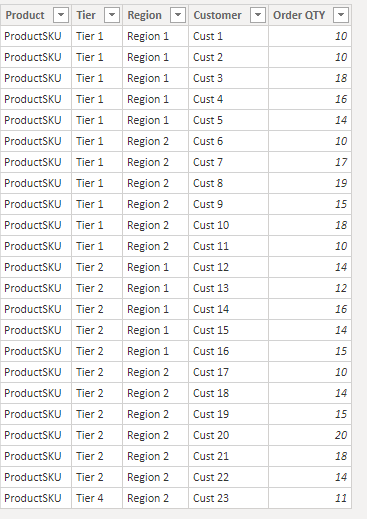
Then I have used the matrix visual, and dragged Order Quantity thrice under Values:

- I selected Count from the field properties
- I selected Sum from field properties
- I selected Sum from field properties > Show Value as > Percent of column total

Cheers!
Vivek
If it helps, please mark it as a solution
Kudos would be a cherry on the top 🙂
https://www.vivran.in/
Connect on LinkedIn
- Mark as New
- Bookmark
- Subscribe
- Mute
- Subscribe to RSS Feed
- Permalink
- Report Inappropriate Content
@vivran22 thank your very much for your help. but NO. thats not what i am looking for.
I am looking for % of #Cust place an order. (Yes - ordered; NO - didnt ordered) . Like 10 out of 20 ordered. 50% placed order.
In your example. every cust had ordered. thats 100% placed order...
but not every Cust is in the fact or transcation table; so thats why i cut out 4 cust in my example. total 20 cust only 16 had ordered.
- Mark as New
- Bookmark
- Subscribe
- Mute
- Subscribe to RSS Feed
- Permalink
- Report Inappropriate Content
@Anonymous
You requirement was not as detailed in your orignal post. Basis your recent input, may I suggest you to have a separate table for maintaing list of customers:
Customer table:

and separate table for sales order:
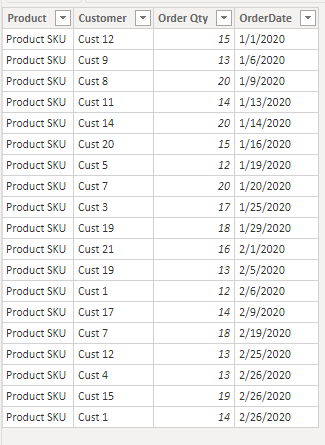
Create the relationship between these two tables:
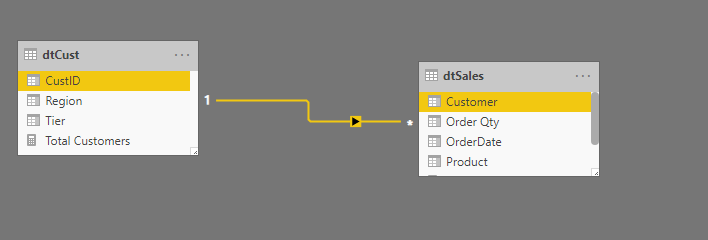
and then use following measures to get the desired results:
Total Customers = COUNTROWS(dtCust)

Customer Ordered = DISTINCTCOUNT(dtSales[Customer])

% Ordered = DIVIDE([Customer Ordered],[Total Customers])
Result:
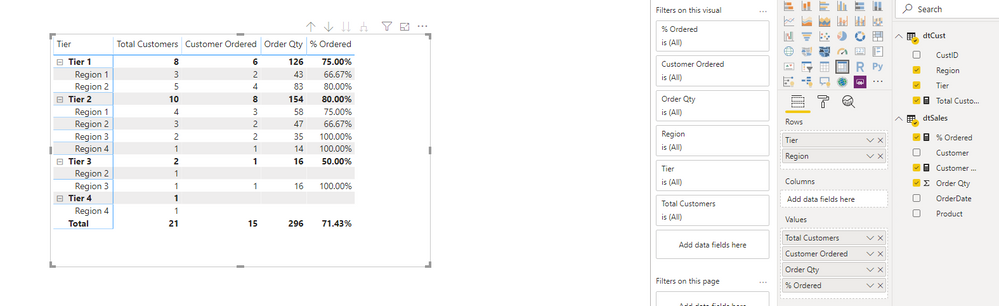
Cheers!
Vivek
If it helps, please mark it as a solution
Kudos would be a cherry on the top 🙂
https://www.vivran.in/
Connect on LinkedIn


- Mark as New
- Bookmark
- Subscribe
- Mute
- Subscribe to RSS Feed
- Permalink
- Report Inappropriate Content
Hi @Anonymous ,
Just wanted to check if you are trying to do this in excel?
In excel you can create a Pivot table for "Product" column.
If this helps please give Kudos and mark it as a Solution! 🙂
Thanks,
Pragati
- Mark as New
- Bookmark
- Subscribe
- Mute
- Subscribe to RSS Feed
- Permalink
- Report Inappropriate Content
@Pragati11 No. i am trying to do it in Power BI. just use EXCEL to explain my need. lol...
And no, i need to know what % of Cust order. ( like x% )
Helpful resources

Power BI Monthly Update - November 2025
Check out the November 2025 Power BI update to learn about new features.

Fabric Data Days
Advance your Data & AI career with 50 days of live learning, contests, hands-on challenges, study groups & certifications and more!

FabCon Atlanta 2026
Join us at FabCon Atlanta, March 16-20, for the ultimate Fabric, Power BI, AI and SQL community-led event. Save $200 with code FABCOMM.


| User | Count |
|---|---|
| 102 | |
| 79 | |
| 57 | |
| 51 | |
| 46 |


