
Get certified for free when you join Fabric Data Days 2026 and dive into Fabric, Power BI, SQL, AI, and other essential data skills.
Join nowJuly 28 - August 9 | Final Round of the Power BI Dataviz World Championships. This is your chance. Learn more
hi every one,
I need help.
I need to list date form 2 datas based on below tables.
I have data in table one and I need resulte the data in table 2
Solved! Go to Solution.
Hey,
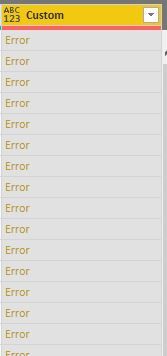
hit one of the Error values and provide the error information that you receive.
Regards,
Tom
Hey,
there are two possibilities.
Assuming your data looks like this:
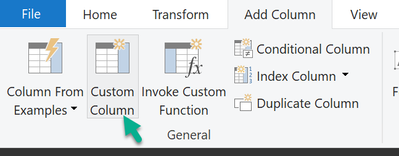
In Power Query just, create a new custom column:
Enter this formula, please be aware that the column names might not match:
List.Dates([Start], Number.From([End]) - Number.From([Start]) + 1, #duration(1 , 0 , 0 , 0))
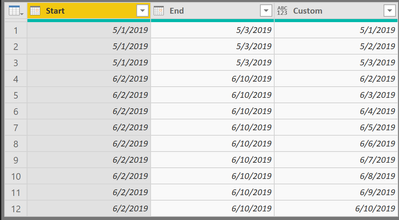
Then the final move expand the list to new rows:
And voila:
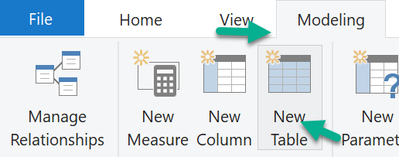
The DAX solution looks like this, create a new table :
Before you can create your new table it's necessary to create a dedicated Calendar table like so (using DAX):
Calendar =
CALENDAR("2019-01-01", "2019-12-31")
Then you create this DAX statement to create your new table, please be aware, that the name of the table that contains the Start and End column is called 'Table2':
the new table =
GENERATE(
'Table2'
, DATESBETWEEN('Calendar'[Date] , [Start] , [End])
)
The result fo course is the same 🙂
My recommendation, use the Power Query approach.
Regards,
Tom
Hey,
hit one of the Error values and provide the error information that you receive.
Regards,
Tom
thanks @TomMartens ,
can you tell me how we can optimize data because I have many records after apply your solution and there is a delay to apply data to the data model.
Regards,
Join us in Barcelona for FabCon and SQLCon, the Fabric, Power BI, SQL, and AI community event. Save €200 with code FABCMTY200.
If you love stickers, then you will definitely want to check out our community sticker challenge, Barcelona edition!
Check out the July 2026 Power BI update to learn about new features.
| User | Count |
|---|---|
| 25 | |
| 23 | |
| 22 | |
| 17 | |
| 14 |
| User | Count |
|---|---|
| 27 | |
| 24 | |
| 20 | |
| 20 | |
| 19 |