cancel
Showing results for 
Search instead for 
Did you mean: 

The Power BI Data Visualization World Championships is back! Get ahead of the game and start preparing now! Learn more

Reply
Anonymous
Not applicable

data type in field pane never show data type icon

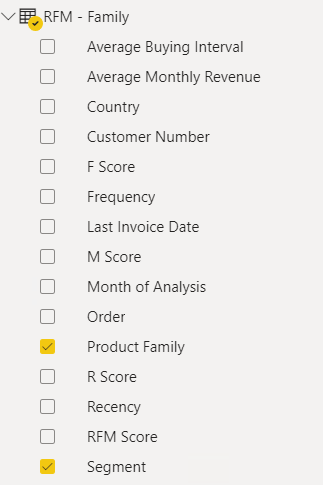
I noticed this in my desktop for a long time. I have quite recent version of PBI desktop. Data types are well defined in power query. After loading, I dont see any data type icons on the left of the column in the field pane. The only icon I see are measures, and calculated columns. It doesnt affect much as I always create explit measures out of these numeric fields but just wonder, if there is a desktop setting that controls it?


See below, like the scores, are numeric, and dates should show date type icon. Nothing shows but they are still in the right data type. 


Thanks!
NM


Capture.PNG

2 REPLIES 2
amitchandak
Super User
Super User

@Anonymous , It should not happen with all columns, The column with Summarization -> Don't Summarize will not have any icon


Under model view, You have a property pane. Open that, and then select multiple columns using shift or Ctrl and you can change properties

Share with Power BI Enthusiasts: Full Power BI Video (20 Hours) YouTube
Microsoft Fabric Series 60+ Videos YouTube
Microsoft Fabric Hindi End to End YouTube
Anonymous
Not applicable

Thank you @amitchandak . As you pointed out, the model view does show the numeric fields (see below) - but not the report view, or data view. Is this by design?

Capture.PNG

Helpful resources

Announcements
November Power BI Update Carousel

Power BI Monthly Update - November 2025

Check out the November 2025 Power BI update to learn about new features.

Fabric Data Days Carousel

Fabric Data Days

Advance your Data & AI career with 50 days of live learning, contests, hands-on challenges, study groups & certifications and more!

FabCon Atlanta 2026 carousel

FabCon Atlanta 2026

Join us at FabCon Atlanta, March 16-20, for the ultimate Fabric, Power BI, AI and SQL community-led event. Save $200 with code FABCOMM.

Top Solution Authors
Top Kudoed Authors