cancel
Showing results for 
Search instead for 
Did you mean: 

The Power BI Data Visualization World Championships is back! Get ahead of the game and start preparing now! Learn more

Reply
NanardPet
Regular Visitor

data still filtered even though slicer deleted

Hello,

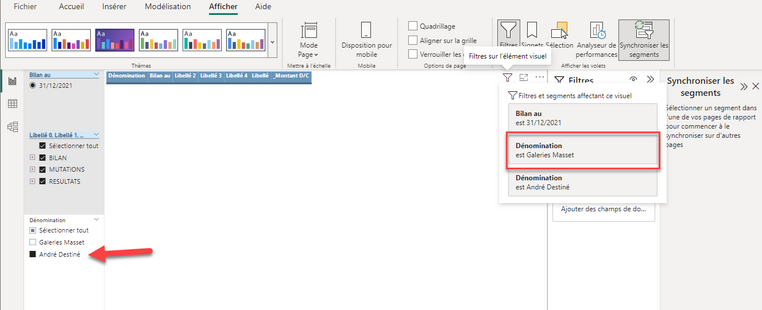
I removed a slicer related to companies. It was synced across multiple visuals. Despite the deletion, the filters remain active on these visuals and only display the last company selected before the slicer was deleted.

I recreated a new slicer related to companies, and despite this same field, the last filter remains active:

NanardPet_0-1672087866360.png


How can I delete the filter caused by the hidden slicer ?


Many thanks, as I am new to Power BI


Bernard


1 ACCEPTED SOLUTION

I tried to follow your suggestion, but the slicer stayed hidden somewhere, impacting the visuals. So the only solution was to create new tabs ant to copy the visuals in those new tabs : the copy didn't take the filter and it works now fine.

View solution in original post

3 REPLIES 3
Anonymous
Not applicable

HI @NanardPet,

If the filter still remains in the filter panel, it means they do not remove completely. I’d like to suggest you refer to the following document to checking the sync slicer on each report pages and turn off the interactions before removing them.

Slicers in Power BI - Power BI | Microsoft Learn

If the above also not help with your scenario, can you please share some more detail information about these? (e.g. power bi desktop version and the data source types, detail operations steps)

How to Get Your Question Answered Quickly  

Regards,

Xiaoxin Sheng

Was having this issue after I synced a slicer across 5 different pages. When I cleared the master slicer that was synced and then deleted it, all my visuals were still filtering based on the slicer. So I reverted back, unsynced all the slicers and then had to delete each one from each page. Then delete the master slicer and all went back to normal. Thanks1 

I tried to follow your suggestion, but the slicer stayed hidden somewhere, impacting the visuals. So the only solution was to create new tabs ant to copy the visuals in those new tabs : the copy didn't take the filter and it works now fine.

Helpful resources

Announcements
Power BI DataViz World Championships

Power BI Dataviz World Championships

The Power BI Data Visualization World Championships is back! Get ahead of the game and start preparing now!

November Power BI Update Carousel

Power BI Monthly Update - November 2025

Check out the November 2025 Power BI update to learn about new features.

FabCon Atlanta 2026 carousel

FabCon Atlanta 2026

Join us at FabCon Atlanta, March 16-20, for the ultimate Fabric, Power BI, AI and SQL community-led event. Save $200 with code FABCOMM.