Join us at FabCon Atlanta from March 16 - 20, 2026, for the ultimate Fabric, Power BI, AI and SQL community-led event. Save $200 with code FABCOMM.
Register now!Vote for your favorite vizzies from the Power BI Dataviz World Championship submissions. Vote now!
Hello, I have 2 tables that I'm trying to link or merge them into one table using DAX. Each row in Table1 represent a date for an employee leave. Table2 represent employee's population in each month/year. I need to create a measure that will show percentage of employees on leave per day. Below are examples:
Table1 (note that no employee is repeated on the same day):
| Leave Date | Emp Name |
| 1/1/2022 | ABC |
| 1/1/2022 | GHI |
| 1/2/2022 | ABC |
| 1/2/2022 | DEF |
| 1/2/2022 | GHI |
| 2/10/2022 | ABC |
| 2/11/2022 | ABC |
| 2/12/2022 | ABC |
Table2: (shows all active employees whether he/she had leave date or not)
| Cal Year Month | Emp Name |
| 2022 Jan | ABC |
| 2022 Jan | DEF |
| 2022 Jan | GHI |
| 2022 Jan | JKL |
| 2022 Feb | ABC |
| 2022 Feb | DEF |
| 2022 Feb | GHI |
| 2022 Feb | JKL |
| 2022 Feb | MNO |
| 2022 Feb | PQR |
Expected Results in the report:
| Day | No. of Employees on leave | Population | % on leave |
| 1/1/2022 | 3 | 4 | 75% |
| 1/2/2022 | 1 | 4 | 25% |
| 1/3/2022 | 0 | 4 | 0% |
| 1/4/2022 | 0 | 4 | 0% |
| …. | 4 | ||
| 2/10/2022 | 1 | 6 | 17% |
| 2/11/2022 | 1 | 6 | 17% |
| 2/12/2022 | 1 | 6 | 17% |
Is it possible to create a combined table in DAX that will muliply each employee in a yearMonth in Table2 by number of days in a the month (below is an example), or is there a better way of creating a relationship using a linking date table?
| Date | Emp Name | Leave Date |
| 1/1/2022 | ABC | 1/1/2022 |
| 1/2/2022 | ABC | |
| 1/3/2022 | ABC | |
| 1/4/2022 | ABC | |
| 1/5/2022 | ABC | |
| 1/6/2022 | ABC | |
| 1/7/2022 | ABC | |
| 1/8/2022 | ABC | |
| 1/9/2022 | ABC | |
| 1/10/2022 | ABC | |
| 1/11/2022 | ABC | |
| …… | ABC | |
| 1/1/2022 | DEF | |
| 1/2/2022 | DEF | |
| 1/3/2022 | DEF | |
| 1/4/2022 | DEF | |
| ….. | DEF | |
| 1/1/2022 | GHI | 1/1/2022 |
| 1/2/2022 | GHI | |
| 1/3/2022 | GHI | |
| …… |
Hi @Maha1 ,
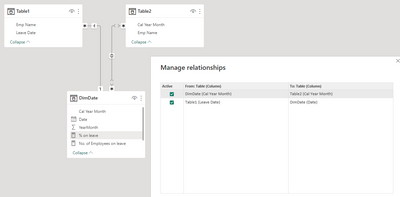
Here I suggest you to create a DimDate table and then create relationships based on it.
DimDate =
ADDCOLUMNS (
CALENDAR (
EOMONTH ( MIN ( Table1[Leave Date] ), -1 ) + 1,
EOMONTH ( MAX ( Table1[Leave Date] ), 0 )
),
"YearMonth",
YEAR ( [Date] ) * 100
+ MONTH ( [Date] ),
"Cal Year Month", FORMAT ( [Date], "YYYY MMM" )
)
Relationship:
For your request 1:
Measures:
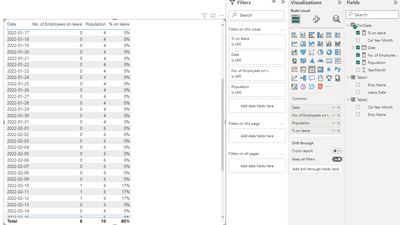
No. of Employees on leave = CALCULATE(COUNT(Table1[Emp Name])) + 0Population = CALCULATE(COUNT(Table2[Emp Name]))% on leave =
DIVIDE([No. of Employees on leave],[Population])
Result is as below.
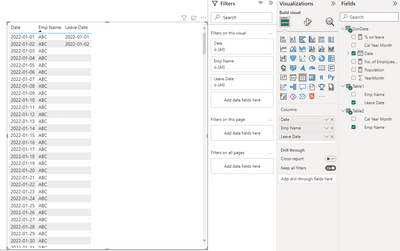
For your request 2:
Best Regards,
Rico Zhou
If this post helps, then please consider Accept it as the solution to help the other members find it more quickly.
Greetings @Anonymous ,
I don't have the version to create Many to Many relationship. I'm trying to create the table using the below DAX formula, but I'm still facing issues. Where I cannot select the columns start and end dates of Table2 inside the CALENDAR function.
New Table = GENERATE(
Table2,
CALENDAR( Table2[Start Date], Table2[End Date] )
) ,
Vote for your favorite vizzies from the Power BI World Championship submissions!
If you love stickers, then you will definitely want to check out our Community Sticker Challenge!
Check out the January 2026 Power BI update to learn about new features.
| User | Count |
|---|---|
| 56 | |
| 53 | |
| 40 | |
| 17 | |
| 16 |
| User | Count |
|---|---|
| 122 | |
| 108 | |
| 44 | |
| 32 | |
| 26 |