Hi, @ayoubb
You mau try to create a custom in 'Query Editor' or create a calculated column/measure in Power BI Desktop. I created data to reproduce your scenario. The pbix file is attached in the end.
Table:

Query Editor:
You may create a custom column as below.
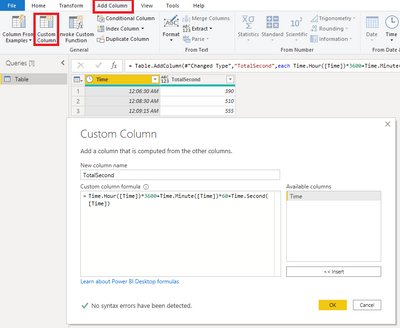
Here is the code in 'Advanced Editor'.
let
    Source = Table.FromRows(Json.Document(Binary.Decompress(Binary.FromText("i45WMjCwMjCzMjZQitWBcCyQOZZWhqZKsbEA", BinaryEncoding.Base64), Compression.Deflate)), let _t = ((type nullable text) meta [Serialized.Text = true]) in type table [Time = _t]),
    #"Changed Type" = Table.TransformColumnTypes(Source,{{"Time", type time}}),
    Custom1 = Table.AddColumn(#"Changed Type","TotalSecond",each Time.Hour([Time])*3600+Time.Minute([Time])*60+Time.Second([Time])
)
in
    Custom1
Calculated column:
TotalSecond Column = HOUR([Time])*3600+MINUTE([Time])*60+SECOND([Time])
Or
Measure:
TotalSecond Measure =
var _time = SELECTEDVALUE('Table'[Time])
return
HOUR(_time)*3600+MINUTE(_time)*60+SECOND(_time)
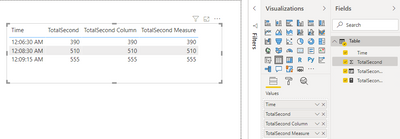
Result:
Best Regards
Allan
If this post helps, then please consider Accept it as the solution to help the other members find it more quickly.


