Join us at FabCon Atlanta from March 16 - 20, 2026, for the ultimate Fabric, Power BI, AI and SQL community-led event. Save $200 with code FABCOMM.
Register now!View all the Fabric Data Days sessions on demand. View schedule
hi,
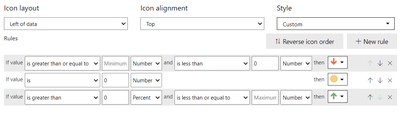
I am trying to apply conditional formatting for icons for a measure columnin table. it should show For positive values, green up arrow, for '0' value yellow icon and for negative values red icon. What should be the 'Rule' in the conditional format settings? i tried different settings but not working.
pls help..
Solved! Go to Solution.
Hi @srk_powerbi
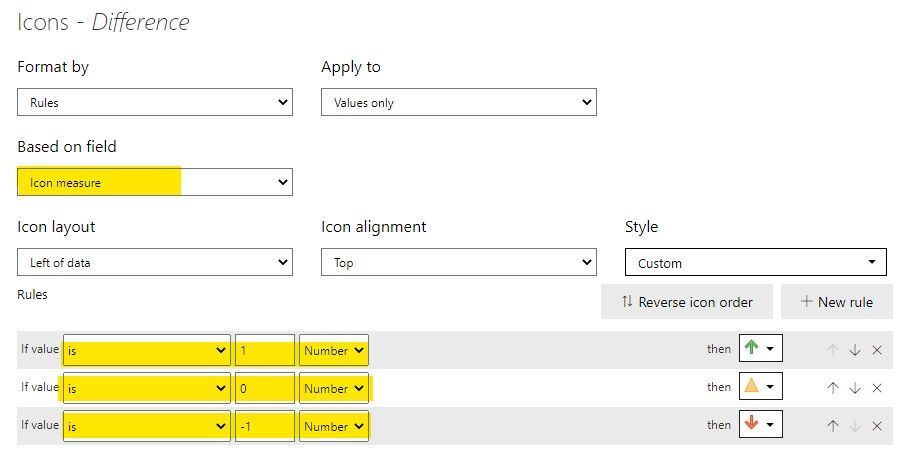
You can add a measure in the model to help set conditional formatting. For example,
Icon measure =
SWITCH (
TRUE (),
[Difference] > 0, 1,
[Difference] = 0, 0,
[Difference] < 0, -1
)
[Difference] is the measure in the table which this icon formatting should be based on. Then set it up like below.
Result:
Kindly let me know if this helps.
Community Support Team _ Jing
If this post helps, please Accept it as the solution to help other members find it.
@srk_powerbi This may help you
Proud to be a Super User!
that did not work..
Hi @srk_powerbi
You can add a measure in the model to help set conditional formatting. For example,
Icon measure =
SWITCH (
TRUE (),
[Difference] > 0, 1,
[Difference] = 0, 0,
[Difference] < 0, -1
)
[Difference] is the measure in the table which this icon formatting should be based on. Then set it up like below.
Result:
Kindly let me know if this helps.
Community Support Team _ Jing
If this post helps, please Accept it as the solution to help other members find it.
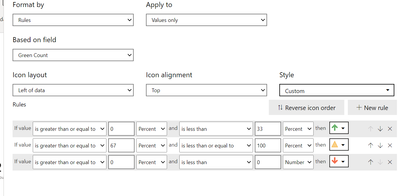
Can you do this with percentages. The numbers did not work. Thanks!
Check out the November 2025 Power BI update to learn about new features.
Advance your Data & AI career with 50 days of live learning, contests, hands-on challenges, study groups & certifications and more!