cancel
Showing results for 
Search instead for 
Did you mean: 

Data Days is here! Join us now for 60+ days of learning, challenges, and connection. Learn more

Reply
thebrinery
Frequent Visitor

comparing sales averages with multiple filters

Hi all,


Looking to compare the sales of two products. I want to be able to compare the total and average unit sales for stores that sell Product A only, stores that sell Product B only, and stores that sell both Product A and B. I am stuck determining the best custom measure that can filter for both the store and the product. Any insight?


I also wanted to see the distinct count of stores that sell each product and successfully wrote a customer measure for stores that sell Product A only and Product B only, but the function did not work when I tried to filter for both in one measure:

"Count of A & B Stores = CALCULATE(DISTINCTCOUNT('Portal Data'[Store]),FILTER('Portal Data',[Description]="SAUERKRAUT A" && [Description]="SAUERKRAUT B"))

How did I go wrong here? The card read the measure as Blank.


Thanks for helping us become Power BI Wizards!

1 ACCEPTED SOLUTION
Anonymous
Not applicable

@thebrinery,

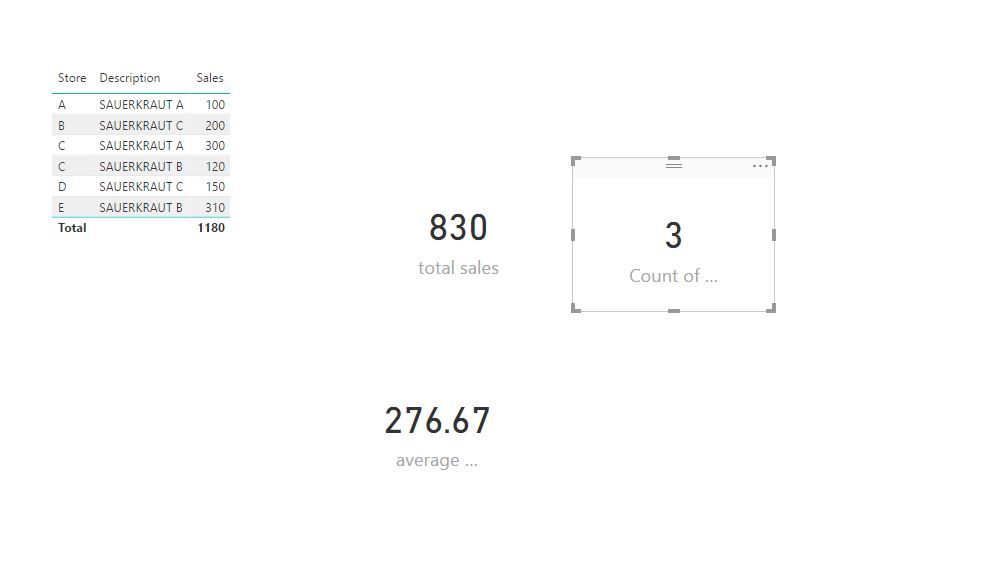
I make a test using the following sample data, and create the measures below.
1.JPG

Count of A&B stores = CALCULATE(DISTINCTCOUNT('Portal Data'[Store]),FILTER('Portal Data','Portal Data'[Description]="SAUERKRAUT A" || 'Portal Data'[Description]="SAUERKRAUT B"))

total sales = CALCULATE(SUM('Portal Data'[Sales]),FILTER('Portal Data','Portal Data'[Description]="SAUERKRAUT A" || 'Portal Data'[Description]="SAUERKRAUT B"))

average sales = [total sales]/[Count of A&B stores]

If the above DAX don’t help, please share sample data of your  table and post expected result here. Do mask sensitive data before you uploading sample data.


Regards,
Lydia

View solution in original post

1 REPLY 1
Anonymous
Not applicable

@thebrinery,

I make a test using the following sample data, and create the measures below.
1.JPG

Count of A&B stores = CALCULATE(DISTINCTCOUNT('Portal Data'[Store]),FILTER('Portal Data','Portal Data'[Description]="SAUERKRAUT A" || 'Portal Data'[Description]="SAUERKRAUT B"))

total sales = CALCULATE(SUM('Portal Data'[Sales]),FILTER('Portal Data','Portal Data'[Description]="SAUERKRAUT A" || 'Portal Data'[Description]="SAUERKRAUT B"))

average sales = [total sales]/[Count of A&B stores]

If the above DAX don’t help, please share sample data of your  table and post expected result here. Do mask sensitive data before you uploading sample data.


Regards,
Lydia

Helpful resources

Announcements
Fabric Data Days is here Carousel

Fabric Data Days 2026

Don't miss out on Data Days, June 15 through August 7. Learn Fabric, Power BI, SQL, AI and more.

May Power BI Update Carousel

Power BI Monthly Update - May 2026

Check out the May 2026 Power BI update to learn about new features.

Power BI DataViz World Championships carousel

Power BI DataViz World Championships - June 2026

A new Power BI DataViz World Championship is coming this June! Don't miss out on submitting your entry.