cancel
Showing results for 
Search instead for 
Did you mean: 

Get Fabric Certified for FREE during Fabric Data Days. Don't miss your chance! Request now

Reply
michael_bdd
Frequent Visitor

compare number of records on two dates and show waterfall chart

Hi exerts,


I have a requirement on creating a waterfall chart for my data set. There are three columns in my data set, like below,


DateTeamItemId
12/31/2019A112
12/31/2019A111
12/31/2019B110
1/31/2020A112
1/31/2020A113
1/31/2020B114

As shown in the table, team A had two items on 12/31/2019 (111 and 112), on 1/31/2020, this team added another item (113), but removed one item (111). Similarly, team B had one item (110) on 12/31/2019, and team B removed this item on 1/31/2020 and added one new item(114). There could be many dates in my table and many teams. User should be able to choose any two dates to compare.


Now I want to create a waterfall chart, in which there are four bars, the first bar show the total number of items for all teams on 12/31/2019, in this case, it is 3. The last bar shows the number of items for all teams on 1/31/2020, so it should be 3.


The second bar show the number of newly added items for both teams, in this case, it should be 2, because each team added one new item. and this bar should be a stacked bar showing numbers for each team..

The third bar show the number of remved items, and it should be 2 in this case. The final chart should look like something below,

Untitled.png

How can I achieve this?


Thanks,

Michael

1 ACCEPTED SOLUTION
v-lid-msft
Community Support
Community Support

Hi @michael_bdd ,


Sorry for that but, we did not find an effective way to put legend (teams) in single bar with the build-in waterfall chart, but we can archieve the new and decomissioned bar by creating a table and a measure:


table:
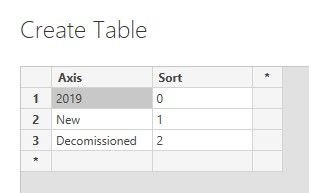
 

1.jpg


Measure:

Value = 
SWITCH (
    SELECTEDVALUE ( 'AxisTable'[Axis] ),
    "2019", CALCULATE (
        DISTINCTCOUNT ( 'Table'[ItemId] ),
        FILTER ( 'Table', YEAR ( 'Table'[Date] ) = 2019 )
    ),
    "New", SUMX (
        DISTINCT ( 'Table'[ItemId] ),
        VAR i = [ItemId]
        RETURN
            IF (
                CALCULATE (
                    COUNTROWS ( 'Table' ),
                    FILTER ( 'Table', 'Table'[ItemId] = i && YEAR ( 'Table'[Date] ) = 2020 )
                ) > 0
                    && CALCULATE (
                        COUNTROWS ( 'Table' ),
                        FILTER ( 'Table', 'Table'[ItemId] = i && YEAR ( 'Table'[Date] ) = 2019 )
                    ) = 0,
                1,
                0
            )
    ),
    "Decomissioned", - SUMX (
        DISTINCT ( 'Table'[ItemId] ),
        VAR i = [ItemId]
        RETURN
            IF (
                CALCULATE (
                    COUNTROWS ( 'Table' ),
                    FILTER ( 'Table', 'Table'[ItemId] = i && YEAR ( 'Table'[Date] ) = 2019 )
                ) > 0
                    && CALCULATE (
                        COUNTROWS ( 'Table' ),
                        FILTER ( 'Table', 'Table'[ItemId] = i && YEAR ( 'Table'[Date] ) = 2020 )
                    ) = 0,
                1,
                0
            )
    )
)
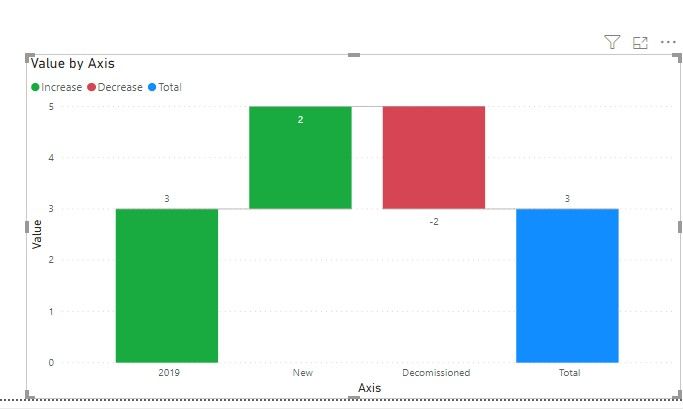
 2.jpg


By the way, PBIX file as attached.


Best regards,


Community Support Team _ Dong Li
If this post helps, then please consider Accept it as the solution to help the other members find it more quickly.

View solution in original post

3 REPLIES 3
v-lid-msft
Community Support
Community Support

Hi @michael_bdd ,


Sorry for that but, we did not find an effective way to put legend (teams) in single bar with the build-in waterfall chart, but we can archieve the new and decomissioned bar by creating a table and a measure:


table:


1.jpg


Measure:

Value = 
SWITCH (
    SELECTEDVALUE ( 'AxisTable'[Axis] ),
    "2019", CALCULATE (
        DISTINCTCOUNT ( 'Table'[ItemId] ),
        FILTER ( 'Table', YEAR ( 'Table'[Date] ) = 2019 )
    ),
    "New", SUMX (
        DISTINCT ( 'Table'[ItemId] ),
        VAR i = [ItemId]
        RETURN
            IF (
                CALCULATE (
                    COUNTROWS ( 'Table' ),
                    FILTER ( 'Table', 'Table'[ItemId] = i && YEAR ( 'Table'[Date] ) = 2020 )
                ) > 0
                    && CALCULATE (
                        COUNTROWS ( 'Table' ),
                        FILTER ( 'Table', 'Table'[ItemId] = i && YEAR ( 'Table'[Date] ) = 2019 )
                    ) = 0,
                1,
                0
            )
    ),
    "Decomissioned", - SUMX (
        DISTINCT ( 'Table'[ItemId] ),
        VAR i = [ItemId]
        RETURN
            IF (
                CALCULATE (
                    COUNTROWS ( 'Table' ),
                    FILTER ( 'Table', 'Table'[ItemId] = i && YEAR ( 'Table'[Date] ) = 2019 )
                ) > 0
                    && CALCULATE (
                        COUNTROWS ( 'Table' ),
                        FILTER ( 'Table', 'Table'[ItemId] = i && YEAR ( 'Table'[Date] ) = 2020 )
                    ) = 0,
                1,
                0
            )
    )
)

 2.jpg


By the way, PBIX file as attached.


Best regards,


Community Support Team _ Dong Li
If this post helps, then please consider Accept it as the solution to help the other members find it more quickly.

Thank you @v-lid-msft very much, this is good enough. 

Hi,

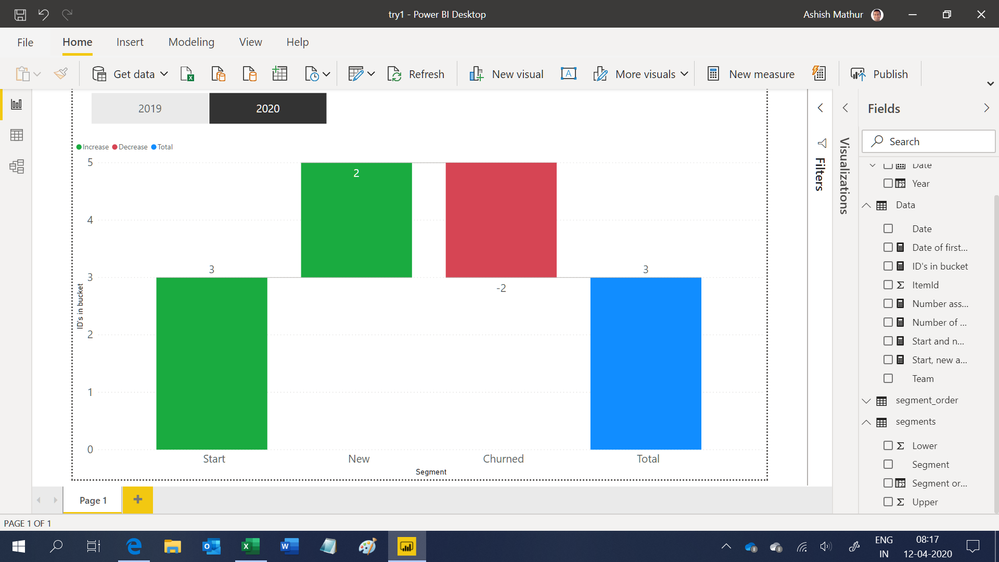
I have adopted a different approach to solve this problem.  There is no hard coding of years in my formula.  However, since i am not very confident of my formulas, I'd like to do some further testing with more data.  Could you kinldy share some more data for me to test my solution.

Thank you.

Untitled.png


Regards,
Ashish Mathur
http://www.ashishmathur.com
https://www.linkedin.com/in/excelenthusiasts/

Helpful resources

Announcements
November Power BI Update Carousel

Power BI Monthly Update - November 2025

Check out the November 2025 Power BI update to learn about new features.

Fabric Data Days Carousel

Fabric Data Days

Advance your Data & AI career with 50 days of live learning, contests, hands-on challenges, study groups & certifications and more!

FabCon Atlanta 2026 carousel

FabCon Atlanta 2026

Join us at FabCon Atlanta, March 16-20, for the ultimate Fabric, Power BI, AI and SQL community-led event. Save $200 with code FABCOMM.

Top Solution Authors
Top Kudoed Authors