Forum Discussion
columnas personalizadas
Good afternoon.
Can custom columns be created in power bi desktop as can be done in Lumira? The option in Power BI is "New quick measure"?
Thank you.
Greetings companions.
Anonymous
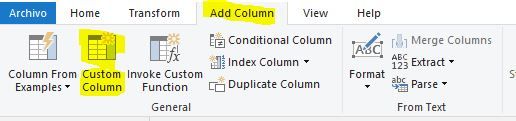
You can add a custom column either in Power Query
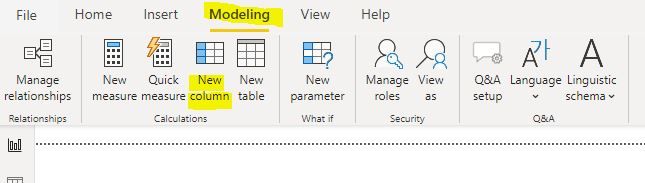
or in the actual model:
Hi Anonymous ,
You could create columns using the ways that Paul suggested.
The option of Quick Measure is used for creating measures. They do not store their values directly in data model. And they don't use any RAM for storage purpose. Calculated columns do. You could reference the blogs to learn more.
https://www.sqlbi.com/articles/calculated-columns-and-measures-in-dax/
And please take a look at the documents about how to create columns in Power BI. Hope they can help you.
Add a custom column in Power BI Desktop
Tutorial: Create calculated columns in Power BI Desktop
Best Regards,
Xue Ding
If this post helps, then please consider Accept it as the solution to help the other members find it more quickly.
3 Replies
- PaulDBrown
Community Champion
Anonymous
You can add a custom column either in Power Query
or in the actual model:
- v-xuding-msft
Community Support
Hi Anonymous ,
You could create columns using the ways that Paul suggested.
The option of Quick Measure is used for creating measures. They do not store their values directly in data model. And they don't use any RAM for storage purpose. Calculated columns do. You could reference the blogs to learn more.
https://www.sqlbi.com/articles/calculated-columns-and-measures-in-dax/
And please take a look at the documents about how to create columns in Power BI. Hope they can help you.
Add a custom column in Power BI Desktop
Tutorial: Create calculated columns in Power BI Desktop
Best Regards,
Xue Ding
If this post helps, then please consider Accept it as the solution to help the other members find it more quickly.
- v-xuding-msft
Community Support
Hi Anonymous ,
Could you tell me if your problem has been solved? If it is, kindly mark the helpful answer as solutions if you feel that makes sense. Welcome to share your own solution. More people will benefit from here.