cancel
Showing results for 
Search instead for 
Did you mean: 

View all the Fabric Data Days sessions on demand. View schedule

Reply
Anonymous
Not applicable

column chart only permits count and count distinct, not actual value

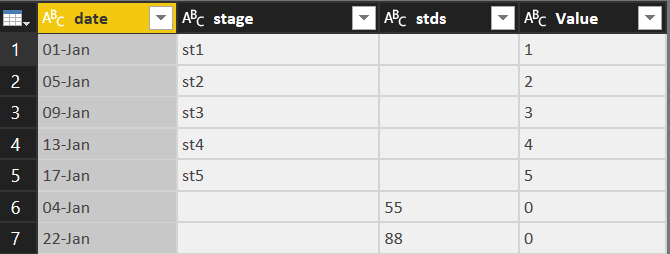
I have:


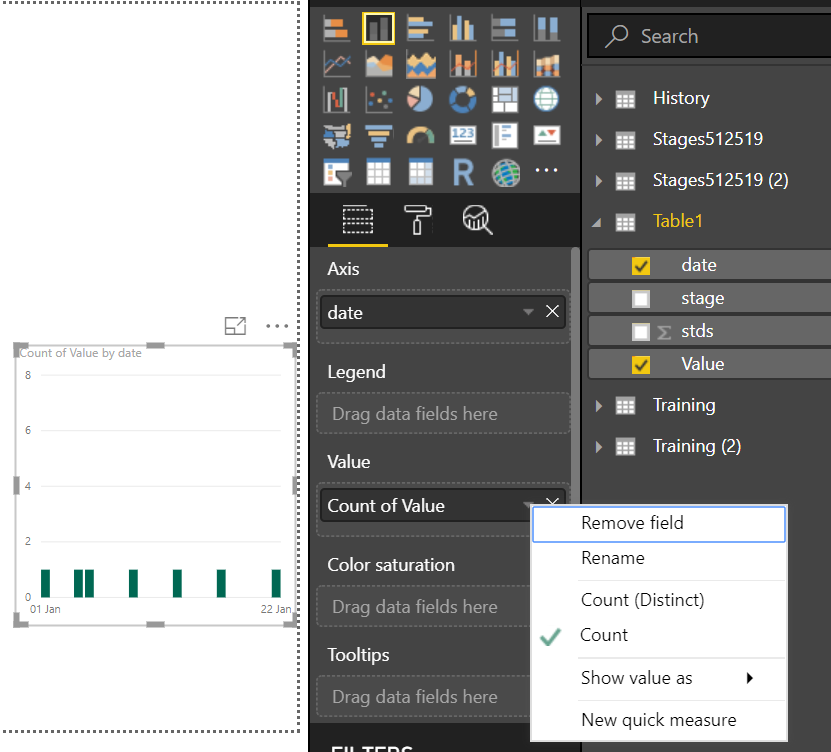
Capture.PNGCapture1.PNG


and want to plot value vs date, but when I add value, only options are count and count distinct.


How can I get the actual values?

I want to see the columns growing as the date changes

1 ACCEPTED SOLUTION
Vvelarde
Community Champion
Community Champion

@Anonymous


Hi, Change data type from Text to Number and try again


Regards


Victor


Lima - Peru

View solution in original post

2 REPLIES 2
Anonymous
Not applicable

Hi @Anonymous


The "Value" is defined as Char type column, hence you are seeing only count. Make the type as Number to see other aggregated functions like SUM etc.


Thanks
Raj

Vvelarde
Community Champion
Community Champion

@Anonymous


Hi, Change data type from Text to Number and try again


Regards


Victor


Lima - Peru

Helpful resources

Announcements
November Power BI Update Carousel

Power BI Monthly Update - November 2025

Check out the November 2025 Power BI update to learn about new features.

Fabric Data Days Carousel

Fabric Data Days

Advance your Data & AI career with 50 days of live learning, contests, hands-on challenges, study groups & certifications and more!

FabCon Atlanta 2026 carousel

FabCon Atlanta 2026

Join us at FabCon Atlanta, March 16-20, for the ultimate Fabric, Power BI, AI and SQL community-led event. Save $200 with code FABCOMM.

Top Solution Authors
Top Kudoed Authors