Share feedback directly with Fabric product managers, participate in targeted research studies and influence the Fabric roadmap.
Sign up nowGet Fabric certified for FREE! Don't miss your chance! Learn more
I created the following two New Columns:
1) Completed Past Due = SWITCH(TRUE(), CV_EC[Task Due Date] < CV_EC[Task Finished Date] && NOT(ISBLANK(CV_EC[Task Finished Date])) && CV_EC[Status]="Completed", 1, BLANK())
2) Completed On-Time = SWITCH(TRUE(), CV_EC[Task Due Date] >= CV_EC[Task Finished Date] && NOT(ISBLANK(CV_EC[Task Finished Date])) && CV_EC[Status]="Completed", 1, BLANK())
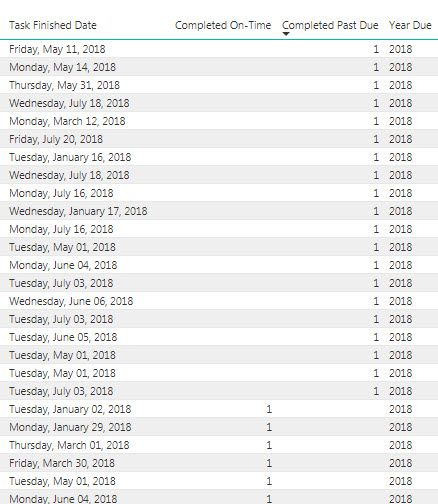
When viewing the data using a Table everything looks fine (see Table_Correct_Data). The number of records with Completed Past Due is correctly showing 20. Completed On-Time is also correct. However, when I attempt to the sum the number Completed Past Due using a clustered column chart or Card the total displayed is 912 (see Graph Incorrect). I've checked that the filters are the same for the Table, clustered column chart, and Card.
Any ideas on how to fix this?
Table_Correct_Data
Graph Incorrect
Solved! Go to Solution.
Hi Yuliana,
I found the problem.
It was a data issue.
The graph is working fine now.
Thank you.
Hi @cubedweller,
It's hard to say what caused the incorrect value in chart and card visual based on current information. Would you please share your .pbix file so that I can check? Remove senssitive data before uploading.
Best regards,
Yuliana Gu
Hi Yuliana,
I found the problem.
It was a data issue.
The graph is working fine now.
Thank you.
Hi Yuliana,
I'd rather not upload my .pbix file.
I'm guessing it's just a minor issue that I'm not seeing.
Would I be better off creating a new measure instead of a new column?
If so, how should I change my new column formula (shown below) in order to work as a new measure?
Completed Past Due = SWITCH(TRUE(), CV_EC[Task Due Date] < CV_EC[Task Finished Date] && NOT(ISBLANK(CV_EC[Task Finished Date])) && CV_EC[Status]="Completed", 1, BLANK())
If you don't think this is the issue can you recommend any other ways to isolate what's causing the incorrect values?
Thank you.
If you love stickers, then you will definitely want to check out our Community Sticker Challenge!
Check out the January 2026 Power BI update to learn about new features.
| User | Count |
|---|---|
| 65 | |
| 65 | |
| 48 | |
| 21 | |
| 18 |
| User | Count |
|---|---|
| 119 | |
| 117 | |
| 38 | |
| 36 | |
| 27 |