FabCon is coming to Atlanta
Join us at FabCon Atlanta from March 16 - 20, 2026, for the ultimate Fabric, Power BI, AI and SQL community-led event. Save $200 with code FABCOMM.
Register now!- Power BI forums
- Get Help with Power BI
- Desktop
- Service
- Report Server
- Power Query
- Mobile Apps
- Developer
- DAX Commands and Tips
- Custom Visuals Development Discussion
- Health and Life Sciences
- Power BI Spanish forums
- Translated Spanish Desktop
- Training and Consulting
- Instructor Led Training
- Dashboard in a Day for Women, by Women
- Galleries
- Data Stories Gallery
- Themes Gallery
- Contests Gallery
- QuickViz Gallery
- Quick Measures Gallery
- Visual Calculations Gallery
- Notebook Gallery
- Translytical Task Flow Gallery
- TMDL Gallery
- R Script Showcase
- Webinars and Video Gallery
- Ideas
- Custom Visuals Ideas (read-only)
- Issues
- Issues
- Events
- Upcoming Events
Get Fabric Certified for FREE during Fabric Data Days. Don't miss your chance! Request now
- Power BI forums
- Forums
- Get Help with Power BI
- Desktop
- Re: check for relation with other table
- Subscribe to RSS Feed
- Mark Topic as New
- Mark Topic as Read
- Float this Topic for Current User
- Bookmark
- Subscribe
- Printer Friendly Page

- Mark as New
- Bookmark
- Subscribe
- Mute
- Subscribe to RSS Feed
- Permalink
- Report Inappropriate Content
check for relation with other table
I want to check if there is one (or more) row(s) in another table (table2), with a relation to the first table. I've found a soltion which I've tryed in my ow model but now I get the error:
- The functoin calculate is not allowed as part of a calculated column DAX expressoin in DirectQuery modus.
Is there maybe a workaround for this?
FactuurJaNee = CALCULATE(COUNTROWS(FeitFactuurregel); FILTER(FeitFactuurregel; VALUE(FeitFactuurregel[xToewijzingnummer]) = VALUE(FeitLeveringActueel[xToewijzingnr]))) > 0


- Mark as New
- Bookmark
- Subscribe
- Mute
- Subscribe to RSS Feed
- Permalink
- Report Inappropriate Content
HI, @Anonymous
After my research, you can do these as below:
Assume that we have two table as below
table1
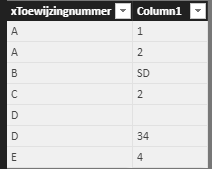
table2
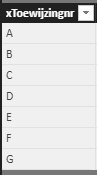
and then we can use LOOKUPVALUE Function to check whether there are values in the column of table1 exist in the column of table2 like below:
Column = LOOKUPVALUE(FeitFactuurregel[xToewijzingnummer],FeitFactuurregel[xToewijzingnummer],FeitLeveringActueel[xToewijzingnr])
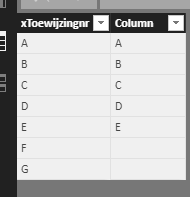
If it is not your case, please share some simple data sample and expected output. You can upload it to OneDrive or Dropbox and post the link here. Do mask sensitive data before uploading.
Best Regards,
Lin
If this post helps, then please consider Accept it as the solution to help the other members find it more quickly.
- Mark as New
- Bookmark
- Subscribe
- Mute
- Subscribe to RSS Feed
- Permalink
- Report Inappropriate Content
@v-lili6-msft: Sorry for the delay, this is the situation, but now I get the error:
The function LOOKUPVALUE is not available als part of de calculated column DAX-expression in DirectQuery models.


- Mark as New
- Bookmark
- Subscribe
- Mute
- Subscribe to RSS Feed
- Permalink
- Report Inappropriate Content
Hi, you could get a list of all records that exists in both tables if they are related with:
Number of rows in the related table = CALCULATE(COUNTROWS('Table1');RELATEDTABLE('Table2'))Would that work for you?


- Mark as New
- Bookmark
- Subscribe
- Mute
- Subscribe to RSS Feed
- Permalink
- Report Inappropriate Content
If there is a relationship between those two tables and you just want to identify the number of records related per key, then you can simply drag the Primary Key field from Table1 and any field from Table2 on to a table visual. By default, it sums up the field (if it is numeric) from table2 then you can change it to "Count" under values section of the visual.
Did I answer your question? Mark my post as a solution!
Proud to be a PBI Community Champion
- Mark as New
- Bookmark
- Subscribe
- Mute
- Subscribe to RSS Feed
- Permalink
- Report Inappropriate Content
Hi @PattemManohar, there is a relationship between the tables but not for all records in table 1 (FeitLeveringActueel) there is actually a (or more) row(s) in table 2 (FeitFactuurregel).
- Mark as New
- Bookmark
- Subscribe
- Mute
- Subscribe to RSS Feed
- Permalink
- Report Inappropriate Content
Yes, if there is no matching record found in the child table then you can't see the parent key in the counts.
To handle this, I've tried with below steps:
1. Merged both Parent and Child tables into a new table (Left Outer Join -- Parent on Left), where you can see the NULL values for non-matching in child table.
2. Add a conditional column on the child table key field, if it is null 0 else 1, I call it is as "Check" (Make sure it is numeric data type)
3. Use this new table which contains both parent and child fields along with the new field added in above step (make sure you can expanded the fields after merging). Drag ParentKey filed and Check field (change the value type to "SUM")
Then it will show the count as 0 for non-existance keys in child table.
Did I answer your question? Mark my post as a solution!
Proud to be a PBI Community Champion
- Mark as New
- Bookmark
- Subscribe
- Mute
- Subscribe to RSS Feed
- Permalink
- Report Inappropriate Content
Hi @PattemManohar, I'm a newbie so most certainly I'm doing something wrong, but for now I don't have the 'Create table' available. May it's because I',m working in the DirectQuery-modus? Is there a(nother) way to get this option available?
- Mark as New
- Bookmark
- Subscribe
- Mute
- Subscribe to RSS Feed
- Permalink
- Report Inappropriate Content
Under Power Query Editor, you can see the Merge Queries option... as below

Did I answer your question? Mark my post as a solution!
Proud to be a PBI Community Champion
- Mark as New
- Bookmark
- Subscribe
- Mute
- Subscribe to RSS Feed
- Permalink
- Report Inappropriate Content
thanks @PattemManohar, I found it.
It appears that the fields aren't of the same type.
Which is strange, because as far as I can see they both are numbers.
I'm gonna find out whats wrong and then try the rest of the steps.
Helpful resources

Power BI Monthly Update - November 2025
Check out the November 2025 Power BI update to learn about new features.

Fabric Data Days
Advance your Data & AI career with 50 days of live learning, contests, hands-on challenges, study groups & certifications and more!

FabCon Atlanta 2026
Join us at FabCon Atlanta, March 16-20, for the ultimate Fabric, Power BI, AI and SQL community-led event. Save $200 with code FABCOMM.


