
Join us at FabCon Atlanta from March 16 - 20, 2026, for the ultimate Fabric, Power BI, AI and SQL community-led event. Save $200 with code FABCOMM.
Register now!Learn from the best! Meet the four finalists headed to the FINALS of the Power BI Dataviz World Championships! Register now
Hello,
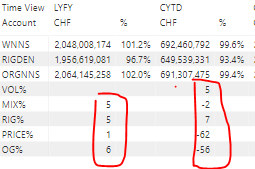
I would like to apply 2 decimals to my table, however, when the account name = "OG" ," RIG", "Price", i would need 4 decimals, is there any formula to apply different formatting?
for all the account that are in % i would like to change the formating.
I have tought about using an IF foncion + related formula for the formatting condition.
Best regards.
Anis Kerrout
Solved! Go to Solution.
@Anonymous , I think new dynamic format string can help
https://powerbi.microsoft.com/en-us/blog/deep-dive-into-the-new-dynamic-format-strings-for-measures/
@Anonymous , I think new dynamic format string can help
https://powerbi.microsoft.com/en-us/blog/deep-dive-into-the-new-dynamic-format-strings-for-measures/
THank you@amitchandak ,
I am trying to set my formating referring to a column which is " Account " and not a measure.
And i wasnt able to find a way in using the dynamic formating.
thank you for you help
Share feedback directly with Fabric product managers, participate in targeted research studies and influence the Fabric roadmap.
Check out the February 2026 Power BI update to learn about new features.
| User | Count |
|---|---|
| 50 | |
| 46 | |
| 35 | |
| 15 | |
| 14 |
| User | Count |
|---|---|
| 88 | |
| 76 | |
| 41 | |
| 26 | |
| 26 |