FabCon is coming to Atlanta
Join us at FabCon Atlanta from March 16 - 20, 2026, for the ultimate Fabric, Power BI, AI and SQL community-led event. Save $200 with code FABCOMM.
Register now!- Power BI forums
- Get Help with Power BI
- Desktop
- Service
- Report Server
- Power Query
- Mobile Apps
- Developer
- DAX Commands and Tips
- Custom Visuals Development Discussion
- Health and Life Sciences
- Power BI Spanish forums
- Translated Spanish Desktop
- Training and Consulting
- Instructor Led Training
- Dashboard in a Day for Women, by Women
- Galleries
- Data Stories Gallery
- Themes Gallery
- Contests Gallery
- QuickViz Gallery
- Quick Measures Gallery
- Visual Calculations Gallery
- Notebook Gallery
- Translytical Task Flow Gallery
- TMDL Gallery
- R Script Showcase
- Webinars and Video Gallery
- Ideas
- Custom Visuals Ideas (read-only)
- Issues
- Issues
- Events
- Upcoming Events
The Power BI Data Visualization World Championships is back! Get ahead of the game and start preparing now! Learn more
- Power BI forums
- Forums
- Get Help with Power BI
- Desktop
- Re: blank values with relationship
- Subscribe to RSS Feed
- Mark Topic as New
- Mark Topic as Read
- Float this Topic for Current User
- Bookmark
- Subscribe
- Printer Friendly Page

- Mark as New
- Bookmark
- Subscribe
- Mute
- Subscribe to RSS Feed
- Permalink
- Report Inappropriate Content
blank values with relationship
Hello All,
I have a dataset with 3 tables:
Calls (containing calls info and phone number)
Line_num ( phone number, site_id)
Site (site_id, site address)
and all the relationships working fine, however when I try to count the number of calls grouped by site address I have always a blank row counting the number of calls that are not associated to a site, I want to change this blank row to show "not available")


Solved! Go to Solution.


- Mark as New
- Bookmark
- Subscribe
- Mute
- Subscribe to RSS Feed
- Permalink
- Report Inappropriate Content
Great troubleshooting and glad I could inspire a solution for you! Please mark this post as solved so others can easily find the answer.
Cheers!
Allison
Please @mention me in your reply if you want a response.
Copying DAX from this post? Click here for a hack to quickly replace it with your own table names
Has this post solved your problem? Please Accept as Solution so that others can find it quickly and to let the community know your problem has been solved.
If you found this post helpful, please give Kudos C
I work as a Microsoft trainer and consultant, specialising in Power BI and Power Query.
www.excelwithallison.com
- Mark as New
- Bookmark
- Subscribe
- Mute
- Subscribe to RSS Feed
- Permalink
- Report Inappropriate Content
What column is used to relate the call table to the line table? Please add this to the visual from the call table.
What column is used to relate the line table to the site table? Please also add this to the visual from the line table.
These are where your blanks most likely come from - the fact that those values are either null or do not exist in the line and/or site tables. The proper way to fix this would be to add a record to the line and/or site table for these values. If you don't know the site, you can add a line to the site table with an ID column that is new/unique (such as NA001) and a Site name of Unavailable. Then in your Power Query, you can do a replace values for any null in the LineID column of the Call table to find null and replace with NA001 so that the site name 'Unavailable' is pulled through to the report rather than blank.
Please @mention me in your reply if you want a response.
Copying DAX from this post? Click here for a hack to quickly replace it with your own table names
Has this post solved your problem? Please Accept as Solution so that others can find it quickly and to let the community know your problem has been solved.
If you found this post helpful, please give Kudos C
I work as a Microsoft trainer and consultant, specialising in Power BI and Power Query.
www.excelwithallison.com
- Mark as New
- Bookmark
- Subscribe
- Mute
- Subscribe to RSS Feed
- Permalink
- Report Inappropriate Content
thanks for the reply,
actually the Line and site table does not have empty or blank rows, the difference coming from that main table which is call table does have more records than the line/site table which is ok with me but for those not matching values I want to show them as not available.
here is how the relationship works:
from Call table to line to site:
1- call.number =line.number
2.line.site_id=site.Site_Id
I've created those relations using the relationship tab not joining any tables from query editor.
- Mark as New
- Bookmark
- Subscribe
- Mute
- Subscribe to RSS Feed
- Permalink
- Report Inappropriate Content
@Anonymous
Please see this screenshot for what I mean. You will need to set the Call.Number to 'don't summarize' so that we can see where the problem is.
As you can see in my screenshot below, I have a Call.Number 4 and 5 which do not exist in my Line table, and that is causing some of the blanks. If this is your problem, it will be harder to fix. However, I also have Call.Number blank which also do not exist in my Line table, and that one is a little easier to fix:
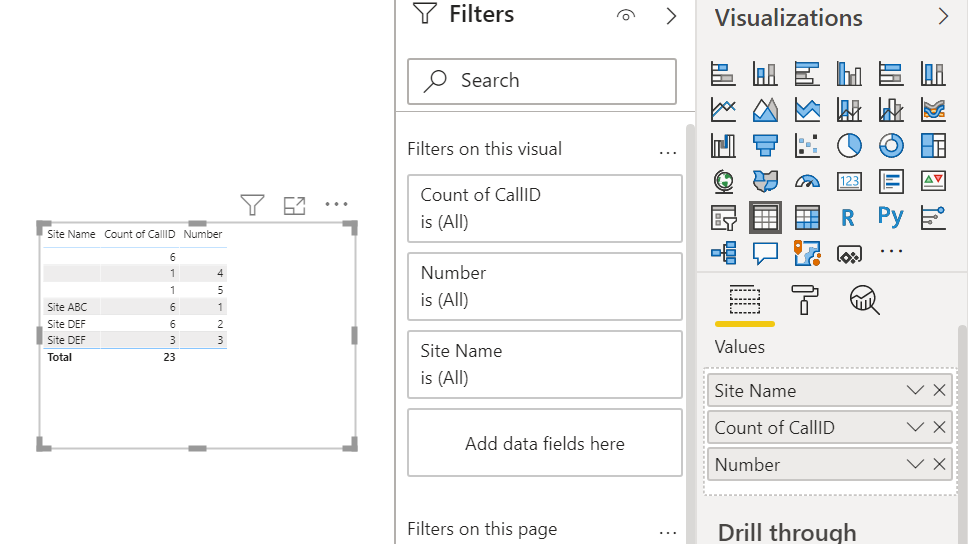
Where is your data being pulled from? Are you sure that Number is the correct matching field and that there isn't a LineNumber somewhere in the call table?
If the Call.number has null/blank/empty values and that is your problem, then click Transform Data to open the Query Editor, do a replace values to replace null with a number that you know will never be used for any other Line.Number (I have chosen a very high number in my sample);
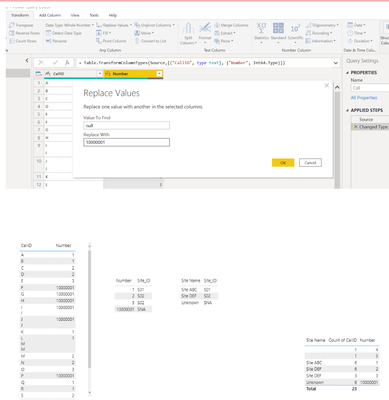
Then you will need to click Enter Data to add a row for the Line table that says
| Line.Number | SiteID |
| 10000001 | SNA |
Append this new query to the bottom of the Line table. Right click this new query and untick enable load.
Click Enter Data to add a new row for the Site table:
| SiteID | Site |
| SNA | Unknown |
Append this new query to the bottom of the Site table. Right click this new query and untick enable load.
Click Close and Apply.
Your data should update to show Site Name as 'Unknown' or unavailable or whatever you chose to type in the new table that you append to the Site table as you can see in my screenshot above.
This becomes more challenging if you actually have Call.Number for every call (like my 4 and 5), as you would then need to replace all those extra numbers with something that exists in the Line table.
Even though you are not doing the join in the query editor, the relationships still work like doing a left outer join.
Your only other option would be to simply filter the table to remove the blanks, but this will not give you an accurate count of all calls.
You can also vote for a similar idea or create your own here:
https://ideas.powerbi.com/ideas/idea/?ideaid=3a9d90d4-cf6e-46c8-9ebd-d7ca91f99d2d
It is a reasonable request.
Final (cheating) option would be to insert a text box on top of the table visual, but this is really not ideal and will impact the interactivity of the report. You could also try an Info button that has a tooltip which displays information about why the blank is there.
https://www.wiseowl.co.uk/blog/s2595/pop_ups.htm
This article is very old, so you can do so much more now with buttons, including having a message displayed just when user hovers over button (they don't even have to click), but this is a good starting point:
http://www.victorrocca.com/using-bookmarks-to-show-hide-information-in-your-power-bi-report/
Please @mention me in your reply if you want a response.
Copying DAX from this post? Click here for a hack to quickly replace it with your own table names
Has this post solved your problem? Please Accept as Solution so that others can find it quickly and to let the community know your problem has been solved.
If you found this post helpful, please give Kudos C
I work as a Microsoft trainer and consultant, specialising in Power BI and Power Query.
www.excelwithallison.com


- Mark as New
- Bookmark
- Subscribe
- Mute
- Subscribe to RSS Feed
- Permalink
- Report Inappropriate Content
I have the same problem. Kindly help.
Re: Replace blank with Not assigned - Microsoft Fabric Community
- Mark as New
- Bookmark
- Subscribe
- Mute
- Subscribe to RSS Feed
- Permalink
- Report Inappropriate Content
Hello Allison,
Many Many thanks for your detailed replay, I walked through your reply step by step for the 2 first solutions and yes they are doable if I'm using those 3 tables only, I'm using more than 7 tables in my data model for this report, however, I got an idea from your solution and it seems to be fine now.
I've joined the "call" table with "line" table using left join on "call.number=line.number" then I joined the site table on the new "Calls" merged query on "line.site_id=site.site_ID" which created null rows on the calls table, then I've replaced the null values with "Not available" and counting calls based on the call.number column group by new merged column "site.site_name"
for example
| Call.Call number | Line.line number | Site.site_id | Site.sitename |
| 123 | 123 | ABC | Site 1 |
| 234 | null | null | null |
| 456 | 456 | DEF | site 2 |
| 345 | null | null | null |
456 456 DEF site 2
then I replaced the null values from line and site table to be "Not available" and that worked!
please if you see anything issues in my solution keep me updated.
Thanks
- Mark as New
- Bookmark
- Subscribe
- Mute
- Subscribe to RSS Feed
- Permalink
- Report Inappropriate Content
Re: Replace blank with Not assigned - Microsoft Fabric Community
I have the same problem. Kindly help.
- Mark as New
- Bookmark
- Subscribe
- Mute
- Subscribe to RSS Feed
- Permalink
- Report Inappropriate Content
Great troubleshooting and glad I could inspire a solution for you! Please mark this post as solved so others can easily find the answer.
Cheers!
Allison
Please @mention me in your reply if you want a response.
Copying DAX from this post? Click here for a hack to quickly replace it with your own table names
Has this post solved your problem? Please Accept as Solution so that others can find it quickly and to let the community know your problem has been solved.
If you found this post helpful, please give Kudos C
I work as a Microsoft trainer and consultant, specialising in Power BI and Power Query.
www.excelwithallison.com
- Mark as New
- Bookmark
- Subscribe
- Mute
- Subscribe to RSS Feed
- Permalink
- Report Inappropriate Content
Thanks for explaining the data, this is helpful.
Yes, I was not expecting any blank values in the line or site tables. What is the Call.number for the additional records which are in the call table but not in the line table? As you said, it is fine to have these additional records, but if you don't have them in the line table it will always show as blank in the visual. There is currently no way to change what the 'blank' displays as, so you need to fix the problem at its source. This means you need to provide an extra record in both the line and site tables that will match the additional records in the call table.
Please can you add call.number to your table visual before site (so the order should be Number of Calls, Call.Number, Site) and let me know if the Call.Number is blank or if it has lots of different numbers, or just one number for the rows where Site is blank.
Please @mention me in your reply if you want a response.
Copying DAX from this post? Click here for a hack to quickly replace it with your own table names
Has this post solved your problem? Please Accept as Solution so that others can find it quickly and to let the community know your problem has been solved.
If you found this post helpful, please give Kudos C
I work as a Microsoft trainer and consultant, specialising in Power BI and Power Query.
www.excelwithallison.com


- Mark as New
- Bookmark
- Subscribe
- Mute
- Subscribe to RSS Feed
- Permalink
- Report Inappropriate Content
thats what I meant in the post. Apologies
So
Site ID Site Name
1 site a
2 site b
3 site c
4 site d
call site ID
10300
24 1
235 2
35 3
35 4
this is currently how its working because there is no records in Site against the call
so if you actually create that join like this
Site ID Site Name
1 site a
2 site b
3 site c
4 site d
5 No site registered
call site ID
10300 5
24 1
235 2
35 3
35 4
then you will always have a record against the call table which groups down to No site registered or what ever else you want to call it
This is asuming that Site is a list of sites, not duplicated.

- Mark as New
- Bookmark
- Subscribe
- Mute
- Subscribe to RSS Feed
- Permalink
- Report Inappropriate Content
@Anonymous , this is coming because of right join. means some site value is missing in the master table
otherwise create a new column like coalesce(Table[Site],"NA")
In table put Key from Master Table and Fact table (1-M). And check for null on one side and find the missing
- Mark as New
- Bookmark
- Subscribe
- Mute
- Subscribe to RSS Feed
- Permalink
- Report Inappropriate Content
I have tired your solution and got the same blank row.
@amitchandak wrote:In table put Key from Master Table and Fact table (1-M). And check for null on one side and find the missing
can you please elaborate more?
- Mark as New
- Bookmark
- Subscribe
- Mute
- Subscribe to RSS Feed
- Permalink
- Report Inappropriate Content
Hi @Anonymous
You could try something like this possibly with DAX
Sales (No Blank) = IF( ISBLANK([Sales]), "not available", [Sales] )
I dont think its recommended though
https://docs.microsoft.com/en-us/power-bi/guidance/dax-avoid-converting-blank


- Mark as New
- Bookmark
- Subscribe
- Mute
- Subscribe to RSS Feed
- Permalink
- Report Inappropriate Content
Hi,
Assuming you are using measure for calcualting count and you can use if condition to get the disired output.
Ex: IF( [CALL COUNT MEASURE] = BLANK(), "Not Available",[CALL COUNT MEASURE])
Appreciate a Kudos! 🙂
If this helps and resolves the issue, please mark it as a Solution! 🙂
Regards,
N V Durga Prasad
Follow me on LinkedIn.
- Mark as New
- Bookmark
- Subscribe
- Mute
- Subscribe to RSS Feed
- Permalink
- Report Inappropriate Content
thanks for you fast reply, but not doing what I'm expecting, I think it's not about the count of calls, it related to "site" table

- Mark as New
- Bookmark
- Subscribe
- Mute
- Subscribe to RSS Feed
- Permalink
- Report Inappropriate Content
Calls (containing call information and phone number)
Site (site_id, site address)
So in this case, calls contains the metric for the report and site contains the information you want to filter the metric on.
we have a left join and your visual is displaying information even when there is no connection to site?
One thing I might do it have another record in the site table for No site specifed. Basically a blank row and then join to the metrics table with the ID from Site to the ID in the calls table against the row that just default no site.
then there will always be a record of No site Specified or what ever you want to add into this default row
But I guess that is a fair bit of work to set up and there may be other work arounds
- Mark as New
- Bookmark
- Subscribe
- Mute
- Subscribe to RSS Feed
- Permalink
- Report Inappropriate Content
thanks for your fast reply, however not doing what expected as this measure replacing the count with "not ava" value, I want to replace that blank row on the top with " not ava"
Helpful resources

Power BI Monthly Update - November 2025
Check out the November 2025 Power BI update to learn about new features.

Fabric Data Days
Advance your Data & AI career with 50 days of live learning, contests, hands-on challenges, study groups & certifications and more!

FabCon Atlanta 2026
Join us at FabCon Atlanta, March 16-20, for the ultimate Fabric, Power BI, AI and SQL community-led event. Save $200 with code FABCOMM.


