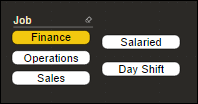
I have a report with 3 columns of attributes that I would like to combine into one multi-selectable chiclet-style slicer, since they are all somewhat similar ways to filter the data. The first has three values, the other two are Yes/No fields. Both of the Yes/No fields are such that there would never be a reason to focus on the "No" values, only the "Yes" ones. Here is an example similar to what my data looks like.
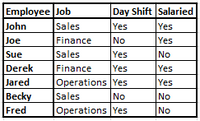
Right now, I have 3 chiclet slicers. If using my example data, the first has "Job" and has three chiclets for "Sales", "Finance", and "Operations". The other two each have two chiclets for "Yes" and "No". As I mentioned, there isn't even a need to have the "No" options, and having to use 3 chiclet slicers is cluttering up my report (This is a really large dataset with several other attributes to filter down as well).
I want to have one slicer where the user can select multiple options. What I envision would be a slicer titled "Empl Type", with buttons for "Sales", "Finance", "Operations", "Day Shift", and "Salaried". I've asked around amongst the other engineers I work with, and no one's figured out how to make this work.
If there isn't a way to do so, does anyone have an idea for at least removing the "No" options from the two "Yes/No" slicers? I could then set up the report with the three slicers so that they sort of look like just one.