cancel
Showing results for 
Search instead for 
Did you mean: 

View all the Fabric Data Days sessions on demand. View schedule

Reply
Anonymous
Not applicable

Year on Year variance without date column

I have a table with sales data in and a weekly date format like 2018-01, 2018-02, 2018-03 etc.

The week and year data comes through as text and not a date format.

I am trying to do year on year comparisons.


This is what my data looks like...


Year-Week     Sales

2017-01         500

2017-02         500

2017-03         500

...

2018-01         550

2018-02         550

2018-03         550


I want to show 


Year-Week    Sales    LastYearSales  Variance   Variance %

2018-01         550           500                50             10%

2018-02         550           500                50             10%

2018-03         550           500                50             10%


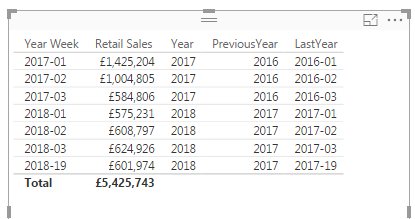
Here is an example of my data with the PreviousYear and LastYear columns created 


YoY.png


5 REPLIES 5
Anonymous
Not applicable

Hi @Anonymous,


How did you create "LastYear" column from your "Year Week" column. Please let me know.


I am dealing with the same scenario. I have Year-Month-Week column and it is in " 2020-01-W1" format. I am trying to calculate Variance% of Current year(2020-01-W1) and Last year(2019-01-W1). 


Thank you!


Regards,

Aswini C S.

v-qiuyu-msft
Community Support
Community Support

Hi @Anonymous,


Based on my test, you can refer to below steps:


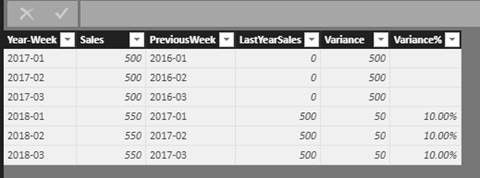
1. Create calculated columns below:
LastYearSales =
var previousweek = Sales[PreviousWeek]
var saleonpre = CALCULATE(SUM(Sales[Sales]),ALL(Sales),Sales[Year-Week] = previousweek)
return
IF(ISBLANK(saleonpre),0,saleonpre)

Variance = Sales[Sales]-Sales[LastYearSales]

Variance%=DIVIDE( Sales[Variance],Sales[LastYearSales])


11.jpg


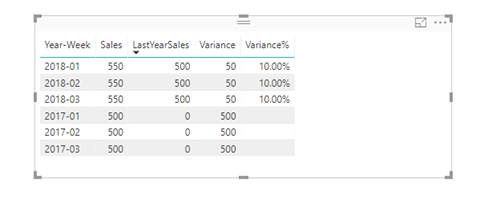
2.Create a Table visual in your report and add the [Year-Week], [Sales], [LastYearSales], [Variance], [Variance%] fields.

12.jpg


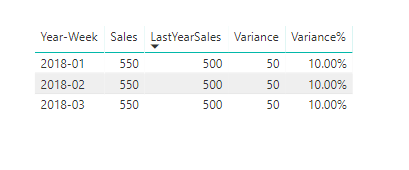
3.Filter the data that you want to show in the Table visual and you can see the result.


13.jpg14.png

You can also download the PBIX file to have a view.


Best Regards,
Qiuyun Yu

Community Support Team _ Qiuyun Yu
If this post helps, then please consider Accept it as the solution to help the other members find it more quickly.
Anonymous
Not applicable

@v-qiuyu-msft Thanks for your help I think we are nearly there 


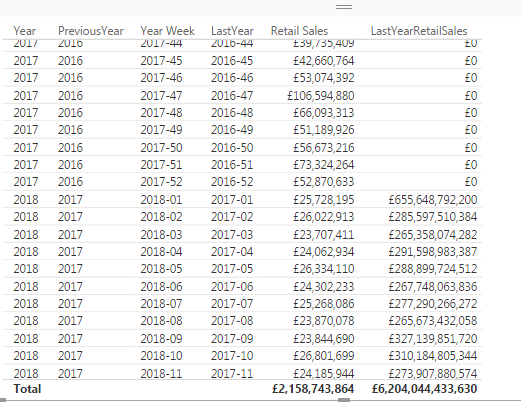
I have created the column 


LastYearRetailSales =
var previous = [LastYear]
var saleonpre = CALCULATE(SUM(MK_PAPA_CREDIT_PENETRATION_REPORTING_SERIES[Retail Sales]),ALL(MK_PAPA_CREDIT_PENETRATION_REPORTING_SERIES),MK_PAPA_CREDIT_PENETRATION_REPORTING_SERIES[Year Week] = previous)
return
IF(ISBLANK(saleonpre),0,saleonpre)


It is nearly doing what I require but the LastYearRetailSales are significantly higher


YoY2.png

Anonymous
Not applicable

@v-qiuyu-msft


Any ideas? 

Hi @Anonymous,


Which aggregation set for the LastYearRetailSales column in the table visual? Please share pbix file with us. Do remove sensitive data before removing sensitive data. 


Best Regards,
Qiuyun Yu 

Community Support Team _ Qiuyun Yu
If this post helps, then please consider Accept it as the solution to help the other members find it more quickly.

Helpful resources

Announcements
November Power BI Update Carousel

Power BI Monthly Update - November 2025

Check out the November 2025 Power BI update to learn about new features.

Fabric Data Days Carousel

Fabric Data Days

Advance your Data & AI career with 50 days of live learning, contests, hands-on challenges, study groups & certifications and more!

FabCon Atlanta 2026 carousel

FabCon Atlanta 2026

Join us at FabCon Atlanta, March 16-20, for the ultimate Fabric, Power BI, AI and SQL community-led event. Save $200 with code FABCOMM.

Top Solution Authors
Top Kudoed Authors