cancel
Showing results for 
Search instead for 
Did you mean: 

View all the Fabric Data Days sessions on demand. View schedule

Reply
Anonymous
Not applicable

YTD Calculation not working

Hi, 

I am starting to learn Power BI and i am stuck while doing YTD calculation. 


I linked 2 tables. Table 1: Customer name, Ordered Date, Revenue

Table 2: Created a DIM Table 

NEW DIMTABLE = CALENDAR(DATE(2018,1,1),DATE(2019,12,31))
 
I linked these 2 tables using many to 1 relationship. When I do the YTD revenue it is gicing me the SUM amount, not the YTD revenue. Can you please help?
 
 
1 ACCEPTED SOLUTION

Hey,


this seems odd ...

Here you will find a sample pbix file


The Revenue YTD measure looks like yours:

Revenue YTD = 
TOTALYTD(SUM('Fact'[Revenue]),'Calendar'[Date]) 

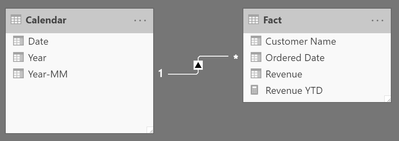
Please check your relationships, the relationships look like this:

image.png

And my sample data looks like this:

image.png


Hopefully this proivides you with the necessary hint.


Regards,

Tom


Did I answer your question? Mark my post as a solution, this will help others!

Proud to be a Super User!
I accept Kudos 😉
Hamburg, Germany

View solution in original post

3 REPLIES 3
TomMartens
Super User
Super User

Hey,


please provide the exact formula of your YTD calculation.


Besides that, maybe you want to have a look at this site: https://www.daxpatterns.com/time-patterns/


Regards,

Tom


Did I answer your question? Mark my post as a solution, this will help others!

Proud to be a Super User!
I accept Kudos 😉
Hamburg, Germany
Anonymous
Not applicable

Hi Tom, 


Thanks for the fast reply. 


YTD Revenue = TOTALYTD(sum(Data[Revenue]),'NEW DIMTABLE'[Date])
 

Hey,


this seems odd ...

Here you will find a sample pbix file


The Revenue YTD measure looks like yours:

Revenue YTD = 
TOTALYTD(SUM('Fact'[Revenue]),'Calendar'[Date]) 

Please check your relationships, the relationships look like this:

image.png

And my sample data looks like this:

image.png


Hopefully this proivides you with the necessary hint.


Regards,

Tom


Did I answer your question? Mark my post as a solution, this will help others!

Proud to be a Super User!
I accept Kudos 😉
Hamburg, Germany

Helpful resources

Announcements
November Power BI Update Carousel

Power BI Monthly Update - November 2025

Check out the November 2025 Power BI update to learn about new features.

Fabric Data Days Carousel

Fabric Data Days

Advance your Data & AI career with 50 days of live learning, contests, hands-on challenges, study groups & certifications and more!

FabCon Atlanta 2026 carousel

FabCon Atlanta 2026

Join us at FabCon Atlanta, March 16-20, for the ultimate Fabric, Power BI, AI and SQL community-led event. Save $200 with code FABCOMM.

Top Solution Authors
Top Kudoed Authors