cancel
Showing results for 
Search instead for 
Did you mean: 

We've captured the moments from FabCon & SQLCon that everyone is talking about, and we are bringing them to the community, live and on-demand. Starts on April 14th. Register now

Reply
gopu99
Frequent Visitor

YOY Difference help

Hi i have a data which will be refreshed timely

Tuition account Year
50texas2020-2021
100texas2021-2022
150texas2022-2023
200penstate2023-2024
250penstate2024-2025
300perdue2025-2026
350perdue2026-2027
400perdue2027-2028

i want to calculate the year on year change in Tuition Fee based on the Account 
i tried to create a date table but it didnt work 

Currently trying with this DAX Formula

YoY Growth =
VAR CurrentYearFee = SUM(Sheet1[Tuition ])
VAR PreviousYearFee =
    CALCULATE(
        SUM(Sheet1[Tuition ]),
        FILTER(
            ALL(Sheet1), (VALUE(Sheet1[ Year]) - 1)
        )
    )
RETURN
IF(ISBLANK(PreviousYearFee), 0, (CurrentYearFee - PreviousYearFee) / PreviousYearFee)
when i use this formul it is returning all 0 in all the rows
Please let me know any changes or things i can do to solve this thank you.

2 ACCEPTED SOLUTIONS
gopu99
Frequent Visitor

Anonymous
Not applicable

Hi @gopu99 ,

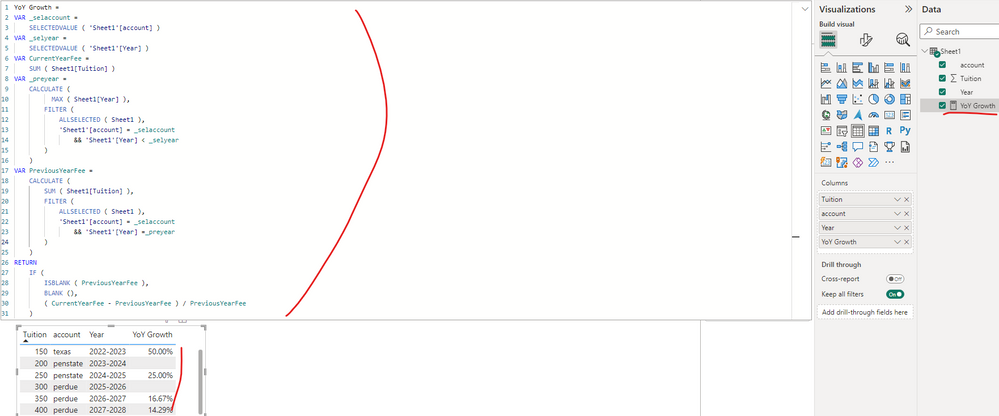
You can update the formula of measure [YoY Growth] as below, and check if that is what you want.

YoY Growth = 
VAR _selaccount =
    SELECTEDVALUE ( 'Sheet1'[account] )
VAR _selyear =
    SELECTEDVALUE ( 'Sheet1'[Year] )
VAR CurrentYearFee =
    SUM ( Sheet1[Tuition] )
VAR _preyear =
    CALCULATE (
          MAX ( Sheet1[Year] ),
        FILTER (
            ALLSELECTED ( Sheet1 ),
            'Sheet1'[account] = _selaccount
                && 'Sheet1'[Year] < _selyear
        )
    )
VAR PreviousYearFee =
    CALCULATE (
        SUM ( Sheet1[Tuition] ),
        FILTER (
            ALLSELECTED ( Sheet1 ),
            'Sheet1'[account] = _selaccount
                && 'Sheet1'[Year] =_preyear
        )
    )
RETURN 
    IF (
        ISBLANK ( PreviousYearFee ),
        BLANK (),
        ( CurrentYearFee - PreviousYearFee ) / PreviousYearFee
    )

vyiruanmsft_0-1692069415036.png

Best Regards

View solution in original post

2 REPLIES 2
Anonymous
Not applicable

Hi @gopu99 ,

You can update the formula of measure [YoY Growth] as below, and check if that is what you want.

YoY Growth = 
VAR _selaccount =
    SELECTEDVALUE ( 'Sheet1'[account] )
VAR _selyear =
    SELECTEDVALUE ( 'Sheet1'[Year] )
VAR CurrentYearFee =
    SUM ( Sheet1[Tuition] )
VAR _preyear =
    CALCULATE (
          MAX ( Sheet1[Year] ),
        FILTER (
            ALLSELECTED ( Sheet1 ),
            'Sheet1'[account] = _selaccount
                && 'Sheet1'[Year] < _selyear
        )
    )
VAR PreviousYearFee =
    CALCULATE (
        SUM ( Sheet1[Tuition] ),
        FILTER (
            ALLSELECTED ( Sheet1 ),
            'Sheet1'[account] = _selaccount
                && 'Sheet1'[Year] =_preyear
        )
    )
RETURN 
    IF (
        ISBLANK ( PreviousYearFee ),
        BLANK (),
        ( CurrentYearFee - PreviousYearFee ) / PreviousYearFee
    )

vyiruanmsft_0-1692069415036.png

Best Regards

gopu99
Frequent Visitor

Helpful resources

Announcements
New to Fabric survey Carousel

New to Fabric Survey

If you have recently started exploring Fabric, we'd love to hear how it's going. Your feedback can help with product improvements.

Power BI DataViz World Championships carousel

Power BI DataViz World Championships - June 2026

A new Power BI DataViz World Championship is coming this June! Don't miss out on submitting your entry.

Join our Fabric User Panel

Join our Fabric User Panel

Share feedback directly with Fabric product managers, participate in targeted research studies and influence the Fabric roadmap.

March Power BI Update Carousel

Power BI Community Update - March 2026

Check out the March 2026 Power BI update to learn about new features.