Hi,
I have a page with two line charts where the x-axis is a date & timestamp. At all times, I want the x-axis of chart 2 to be identical to that of chart 1. To do so, for both chart, I set a conditional format on the x-axis where the min & max are respectively the earliest & latest datetime column value used in the x-axis from chart 1.
The issue, the x-axis appears to be shifted by 5 hours. So if the min & max timestamp are respectively "1/15/2023 12:00:00 AM" & "1/15/2023 11:59:59 PM", the x-axis range is from "1/15/2023 5:00:00 AM" & "1/15/2023 4:59:59 AM". For reference, the below screenshot showcases the issue where the left & right date values show the earliest & latest values of the datetime column used to set the x-axis range. 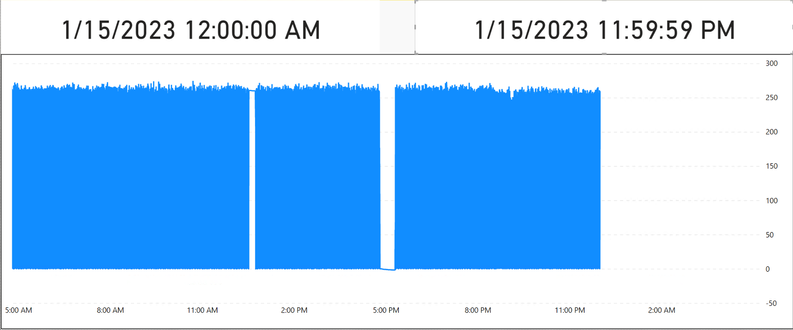
I'm in the EST time zone & suspected it has something to with EST vs UTC settings, but found no settings in Power BI that should affect the timezone. The datetime column used also doesn't specify the timezone.


