cancel
Showing results for 
Search instead for 
Did you mean: 

Get Fabric Certified for FREE during Fabric Data Days. Don't miss your chance! Request now

Reply
Analitika
Post Prodigy
Post Prodigy

Wrong sum in total

Hello,


I am getting wrong sum in table visual:


Analitika_0-1686208325430.png

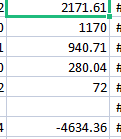
Values and sum 

Analitika_1-1686208362560.png

In excel I am getting 0 in power BI 1839. So how to resolve this issue? I also used this measure: 


sum_fix = IF(HASONEFILTER('N08-Klientai'[N08_PAV]),[day_range6],SUMX(VALUES('N08-Klientai'[N08_PAV]),[day_range6]))


And still total sum is wrong.

2 REPLIES 2
Anonymous
Not applicable

Hi @Analitika ,


Please try this measure.

total_Measure =
SUMX(
    SUMMARIZE(
        'Table',
        'Table'[RowName],
        'Table'[ColumnName],//If there are no rows or columns, please delete
        "total",[your measure]
    ),
    [total]
)

Best Regards,

Neeko Tang

If this post  helps, then please consider Accept it as the solution  to help the other members find it more quickly. 


miTutorials
Super User
Super User

Watch this to fix incorrect total in measure.


How to fix Incorrect Measure Total in PowerBI | MiTutorials - YouTube

Helpful resources

Announcements
November Power BI Update Carousel

Power BI Monthly Update - November 2025

Check out the November 2025 Power BI update to learn about new features.

Fabric Data Days Carousel

Fabric Data Days

Advance your Data & AI career with 50 days of live learning, contests, hands-on challenges, study groups & certifications and more!

FabCon Atlanta 2026 carousel

FabCon Atlanta 2026

Join us at FabCon Atlanta, March 16-20, for the ultimate Fabric, Power BI, AI and SQL community-led event. Save $200 with code FABCOMM.

Top Solution Authors
Top Kudoed Authors