Join us at FabCon Atlanta from March 16 - 20, 2026, for the ultimate Fabric, Power BI, AI and SQL community-led event. Save $200 with code FABCOMM.
Register now!The Power BI Data Visualization World Championships is back! Get ahead of the game and start preparing now! Learn more
Hi All
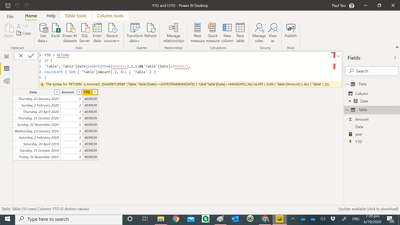
Below is My Raw Date and YTD result is wrong , cannot be YTD value for every month = 3 :-
I compute YTD amount by using expression :-
My PBI File :-
https://www.dropbox.com/s/lmfr28q7vo392gc/YTD%20and%20LYTD.pbix?dl=0
May i know where i go wrong ?
Paul Yeo
Solved! Go to Solution.
@Anonymous , If you need a column
sumx(filter('Table',[Date]<= earlier([DATE]) && year([Date]) = year(earlier([DATE]))),'Table'[Amount])
in case you need have measure, use time imtelligence with date table
YTD Sales = CALCULATE(SUM('Table'[Amount]),DATESYTD('Date'[Date],"12/31"))
To get the best of the time intelligence function. Make sure you have a date calendar and it has been marked as the date in model view. Also, join it with the date column of your fact/s. Refer :
https://radacad.com/creating-calendar-table-in-power-bi-using-dax-functions
https://www.archerpoint.com/blog/Posts/creating-date-table-power-bi
https://www.sqlbi.com/articles/creating-a-simple-date-table-in-dax/
See if my webinar on Time Intelligence can help: https://community.powerbi.com/t5/Webinars-and-Video-Gallery/PowerBI-Time-Intelligence-Calendar-WTD-YTD-LYTD-Week-Over-Week/m-p/1051626#M184
Appreciate your Kudos.
Hi Screen
Thank you for your sharing , i try copy and paste your script into my cell , it return error msg :-
The syntax for 'RETURN' is incorrect. (DAX(RETURNIF ('Table','Table'[Date]>=DATE(YEAR(MAXDATE),1,1)&&'Table'[Date]<=MAXDATE,CALCULATE ( SUM ( 'Table'[Amount] ), ALL ( 'Table' ) )))).
@Anonymous , If you need a column
sumx(filter('Table',[Date]<= earlier([DATE]) && year([Date]) = year(earlier([DATE]))),'Table'[Amount])
in case you need have measure, use time imtelligence with date table
YTD Sales = CALCULATE(SUM('Table'[Amount]),DATESYTD('Date'[Date],"12/31"))
To get the best of the time intelligence function. Make sure you have a date calendar and it has been marked as the date in model view. Also, join it with the date column of your fact/s. Refer :
https://radacad.com/creating-calendar-table-in-power-bi-using-dax-functions
https://www.archerpoint.com/blog/Posts/creating-date-table-power-bi
https://www.sqlbi.com/articles/creating-a-simple-date-table-in-dax/
See if my webinar on Time Intelligence can help: https://community.powerbi.com/t5/Webinars-and-Video-Gallery/PowerBI-Time-Intelligence-Calendar-WTD-YTD-LYTD-Week-Over-Week/m-p/1051626#M184
Appreciate your Kudos.
Hi Amit
Thank you for sharing with me your webinar , it is very helpful . i have download the example and it is very useful.
Paul
Check out the November 2025 Power BI update to learn about new features.
Advance your Data & AI career with 50 days of live learning, contests, hands-on challenges, study groups & certifications and more!
| User | Count |
|---|---|
| 58 | |
| 45 | |
| 42 | |
| 21 | |
| 18 |