This time we’re going bigger than ever. Fabric, Power BI, SQL, AI and more. We're covering it all. You won't want to miss it.
Learn moreLevel up your Power BI skills this month - build one visual each week and tell better stories with data! Get started
Given this odata string (right from MS docs), and I don't want a single team. I want a slicer for all teams.
"let Source = OData.Feed ("https://analytics.dev.azure.com/{organization}/{project}/_odata/v3.0-preview/WorkItemSnapshot? " &"$apply=filter( " &"WorkItemType eq 'User Story' " &"and (Teams/any(x:x/TeamName eq '{teamname}) or Teams/any(x:x/TeamName eq '{teamname}) or Teams/any(x:x/TeamName eq '{teamname}) " &"and StateCategory ne 'Completed' " &"and DateValue ge Iteration/StartDate " &"and DateValue le Iteration/EndDate " &"and Iteration/StartDate le now() " &"and Iteration/EndDate ge now() " &") " &"/groupby( " &"(DateValue,State,WorkItemType,Priority,Area/AreaPath,Iteration/IterationPath), " &"aggregate($count as Count, StoryPoints with sum as TotalStoryPoints) " &") " ,null, [Implementation="2.0",OmitValues = ODataOmitValues.Nulls,ODataVersion = 4]) in Source"
Why despite scouring the internet and this board for a month, I cannot replicate the simplest of Agile charts, the BurnDown filtered by a slicer for all TeamName(s) (see odata below), not Team, not TeamSK... using this odata string? I can get the total for all Teams easy.
= OData.Feed("https://analytics.dev.azure.com/(insert org)/(insert project)/_odata/v4.0-preview/Teams?&$select=TeamName,TeamSK,ProjectSK", null, [Implementation="2.0"])
Basically replicate the BurnDown widget in ADO.
Solved! Go to Solution.
Hi @Anonymous ,
Please see if this helps.
AzureDevOps-OData-SampleReports
Best Regards,
Gao
Community Support Team
If there is any post helps, then please consider Accept it as the solution to help the other members find it more quickly. If I misunderstand your needs or you still have problems on it, please feel free to let us know. Thanks a lot!
How to get your questions answered quickly -- How to provide sample data
@Anonymous
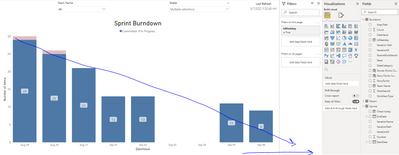
that helped.... tho my problem now is to create a linear trend line from the start of the Sprint to the End....
Basically, sum all the inprogress and committed stories at the first day of the sprint and draw a linear line to end the of the sprint (like 30 Story Points would be divided evenly across 10 days.. so 30-3, 27-3 etc for each day of the Sprint even before it's ended)
Hi @Anonymous ,
Please see if this helps.
AzureDevOps-OData-SampleReports
Best Regards,
Gao
Community Support Team
If there is any post helps, then please consider Accept it as the solution to help the other members find it more quickly. If I misunderstand your needs or you still have problems on it, please feel free to let us know. Thanks a lot!
How to get your questions answered quickly -- How to provide sample data
Check out the April 2026 Power BI update to learn about new features.
Sign up to receive a private message when registration opens and key events begin.
If you have recently started exploring Fabric, we'd love to hear how it's going. Your feedback can help with product improvements.
| User | Count |
|---|---|
| 36 | |
| 28 | |
| 28 | |
| 20 | |
| 18 |
| User | Count |
|---|---|
| 66 | |
| 36 | |
| 33 | |
| 26 | |
| 24 |