Join us at FabCon Vienna from September 15-18, 2025
The ultimate Fabric, Power BI, SQL, and AI community-led learning event. Save €200 with code FABCOMM.
Get registered- Power BI forums
- Get Help with Power BI
- Desktop
- Service
- Report Server
- Power Query
- Mobile Apps
- Developer
- DAX Commands and Tips
- Custom Visuals Development Discussion
- Health and Life Sciences
- Power BI Spanish forums
- Translated Spanish Desktop
- Training and Consulting
- Instructor Led Training
- Dashboard in a Day for Women, by Women
- Galleries
- Data Stories Gallery
- Themes Gallery
- Contests Gallery
- Quick Measures Gallery
- Notebook Gallery
- Translytical Task Flow Gallery
- TMDL Gallery
- R Script Showcase
- Webinars and Video Gallery
- Ideas
- Custom Visuals Ideas (read-only)
- Issues
- Issues
- Events
- Upcoming Events
Enhance your career with this limited time 50% discount on Fabric and Power BI exams. Ends September 15. Request your voucher.
- Power BI forums
- Forums
- Get Help with Power BI
- Desktop
- Re: Why cannot see implicit measure/aggregation op...
- Subscribe to RSS Feed
- Mark Topic as New
- Mark Topic as Read
- Float this Topic for Current User
- Bookmark
- Subscribe
- Printer Friendly Page

- Mark as New
- Bookmark
- Subscribe
- Mute
- Subscribe to RSS Feed
- Permalink
- Report Inappropriate Content
Why cannot see implicit measure/aggregation options?
Hi all,
Recently I realized that I cannot change the aggregation of a column (use as implicit measure) when I add that to a visual (e.g.: switch from sum to avg or median or don't summarize). Which is not a big thing as usually I use explicit measure, but sometimes I like to have this option for quickly testing something.
It really bothered me so I tested it and it works fine if I open a new Power BI document and when I add a few dummy rows, it works as intended (I also have the summa sign next to the value column in the columns' list).
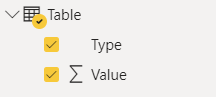
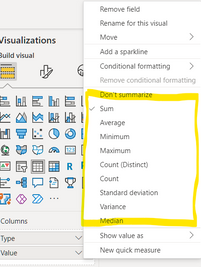
But when I'm trying to do the same with my current PBIX it's not working.
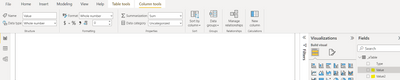
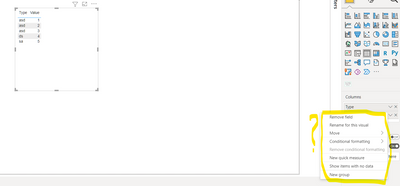
I guess I must have messed up something with the settings but couldn't figure out what. Do you have any idea/suggestion?
Thanks!
Solved! Go to Solution.


- Mark as New
- Bookmark
- Subscribe
- Mute
- Subscribe to RSS Feed
- Permalink
- Report Inappropriate Content
@Anonymous you created a calcualtion group. This switch off option of impicit measures.
You can't have both.

Showcase Report – Contoso By SpartaBI




- Mark as New
- Bookmark
- Subscribe
- Mute
- Subscribe to RSS Feed
- Permalink
- Report Inappropriate Content
@Anonymous my pleasure.
Taking it one step further, that object is called 'Discourage Implicit Measures' and it's one of the properties at the model level.
You can't edit it in PBI desktop, only through an external tool like Tabular Editor.
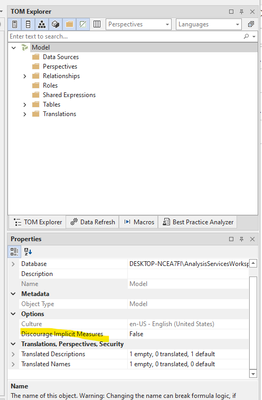
By defulat its value is 'False'. Once you create a calculation groups it's forced to 'True'. If ever you will delete all your calculation groups you will need to connect to the model through tabular editor and switch it back to 'False' in order to gain back the implicit measure capabilty.
Showcase Report – Contoso By SpartaBI

- Mark as New
- Bookmark
- Subscribe
- Mute
- Subscribe to RSS Feed
- Permalink
- Report Inappropriate Content
Well explained! It was useful.
- Mark as New
- Bookmark
- Subscribe
- Mute
- Subscribe to RSS Feed
- Permalink
- Report Inappropriate Content
@Anonymous you created a calcualtion group. This switch off option of impicit measures.
You can't have both.
Showcase Report – Contoso By SpartaBI
- Mark as New
- Bookmark
- Subscribe
- Mute
- Subscribe to RSS Feed
- Permalink
- Report Inappropriate Content
That explains this very much, thank you! I didn't know about this about calc.groups.
- Mark as New
- Bookmark
- Subscribe
- Mute
- Subscribe to RSS Feed
- Permalink
- Report Inappropriate Content
@Anonymous my pleasure.
Taking it one step further, that object is called 'Discourage Implicit Measures' and it's one of the properties at the model level.
You can't edit it in PBI desktop, only through an external tool like Tabular Editor.
By defulat its value is 'False'. Once you create a calculation groups it's forced to 'True'. If ever you will delete all your calculation groups you will need to connect to the model through tabular editor and switch it back to 'False' in order to gain back the implicit measure capabilty.
Showcase Report – Contoso By SpartaBI
- Mark as New
- Bookmark
- Subscribe
- Mute
- Subscribe to RSS Feed
- Permalink
- Report Inappropriate Content
Again, thanks for the helkp and explanation @SpartaBI . I'll keep this in mind!
Edit: I accept this as solution as well, as the 2 replies toghter can be a huge help for less experienced Tablar Editor users.
- Mark as New
- Bookmark
- Subscribe
- Mute
- Subscribe to RSS Feed
- Permalink
- Report Inappropriate Content
@Anonymous you welcome 🙂
Helpful resources

Power BI Monthly Update - August 2025
Check out the August 2025 Power BI update to learn about new features.

Fabric Community Update - August 2025
Find out what's new and trending in the Fabric community.

| User | Count |
|---|---|
| 69 | |
| 67 | |
| 62 | |
| 48 | |
| 28 |


| User | Count |
|---|---|
| 113 | |
| 77 | |
| 65 | |
| 55 | |
| 43 |


