Forum Discussion

Weighted Measure
Hello to all,
I am trying to do some dashboards for Logistics departmento and I am having trouble calculating a weighted measure.
I have the calculated columnes "Lead Time" and "Dif Date".
Lead Time : Days between date create and date receipt
Dif Date : Days between date delivery and date receipt
Sample data:
What I want to do is to weight this two measures by the quantity receipt.
What I have done is exporting the data by provider and week to another table:
Provider & Week Level (Table) =
ADDCOLUMNS(
	ALL( Table1[Provider] ; WEEKNUM ( Table1[date receipt] );
	" Total received Quantity " ; Table1[received quantity]
)
and importing that data back into the original table. This way I can divide the "Quantity Receipt" by the "total" from that provider and week.
For Weighted (column) =
DIVIDE(
	Table1[received Quantity] ; RELATED( 'Provider & Week Level'[ Total received Quantity ] )
)
Weighted Lead Time =
IF(
	HASONEFILTER(  Table1[Provider] );
	SUMX( Table1 ; [Lead Time (column)]*[For Weighted (column)] );
	BLANK()
)
This is not a really nice way to do it... but it is the only way I have found to do it.
The bad thing about this is that I can only view the weighted Lead time and Dif Date by provider and week, otherwise the measure is wrong.
"For Weighted (column)" has to be a measure that gives me the total of quantity receipt based on the filter applied on the slicers in the report.
E.G.: I would like to see the weighted lead time of the family 2 or store 3. The end user has to be able to play with all the slicers.
I hope you can help me... :smileyvery-happy:
Anonymous
If you use AllSelected instead of All maybe give you the expected result.

4 Replies
- BhaveshPatelSuper User
You can use something like this with the newly added functionality Invoke Custom Function in Query Editor for this and It would be more creative solution as you can use them for other type of tasks as well.
To do so,
1.Add a Blank query and Write the below code:
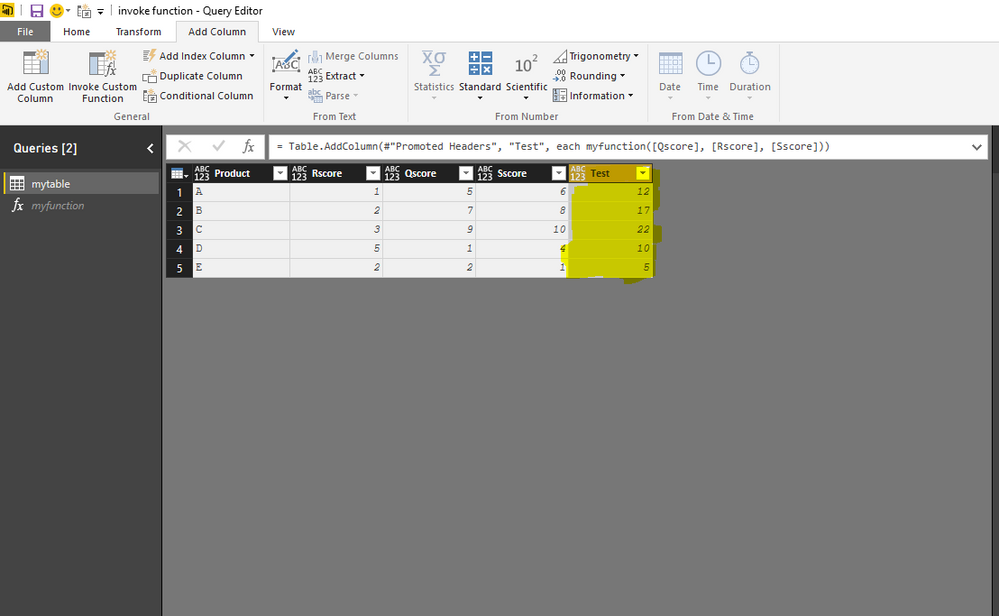
(Qscore as number, Rscore as number,Sscore as number) => Qscore + Rscore + Sscore
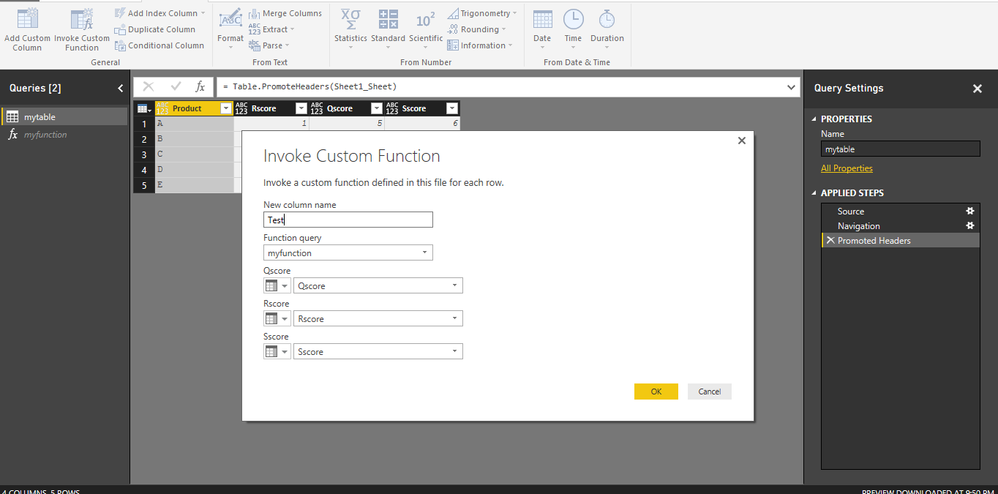
2. Go to your original query and Under the Add Column Tab, Select Invoke Custom Function.
and Choose the appropriate options and it will give you desire results.
- AnonymousNot applicable
Hello BhaveshPatel,
Thank you for the fast reply. But I dont have all the columns in the same table...
I tried with this:
Lead Time Ponderado test =
SUMX( EM ;
	[Lead Time (columna)] *
		DIVIDE( EM[Unidades] ;
			CALCULATE(
				SUM( EM[Unidades] );
				ALL( EM )
			)
		)
)
But this only applies correctly if I look at the total, if I apply any filter through a slicer sith measure isn't correct anymore.
It's the " ALL ( EM ) " from the calculate part that has to be variable, but I don't know how to do it.
- VvelardeCommunity Champion
Anonymous
If you use AllSelected instead of All maybe give you the expected result.