Hi,
I would like to create a visual that will reflect weekly movements in a specific warehouse.
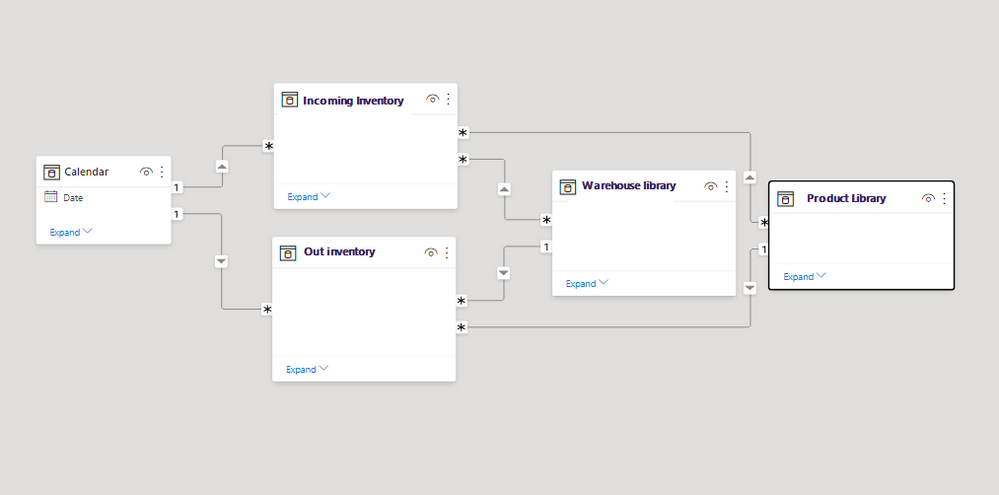
Incoming Inventory stores volumes of products that come into the warehouse, by date and product
Out Inventory stores the sales from specific warehouse,by dare and product
I'd like to create a matrix/table visual that will reflect weekly: New Arrivals QTY; Sales QTY; Stock on hand (RT). If the week filter is selected, the data must be shown with RT Stock for that specific week.
as an example:
Incoming Inventory Table
| Week | Date | Product | Warehouse | Incoming QTY |
| 11 | 3/15/2021 | Orange | P0003 | 2 |
| 11 | 3/15/2021 | Apple | P0004 | 2 |
| 11 | 3/15/2021 | Orange | P0003 | 4 |
| 11 | 3/15/2021 | Banana | P0004 | 4 |
| 11 | 3/15/2021 | Orange | P0001 | 4 |
| 11 | 3/15/2021 | Banana | P0003 | 4 |
| 11 | 3/15/2021 | Banana | P0002 | 3 |
| 11 | 3/15/2021 | Apple | P0002 | 1 |
| 11 | 3/15/2021 | Banana | P0003 | 8 |
| 11 | 3/15/2021 | Orange | P0004 | 5 |
| 12 | 3/22/2021 | Apple | P0001 | 2 |
| 12 | 3/22/2021 | Banana | P0002 | 2 |
| 12 | 3/22/2021 | Banana | P0005 | 4 |
| 12 | 3/22/2021 | Orange | P0001 | 4 |
| 12 | 3/22/2021 | Apple | P0002 | 4 |
| 12 | 3/22/2021 | Orange | P0002 | 4 |
| 12 | 3/22/2021 | Apple | P0001 | 3 |
| 12 | 3/22/2021 | Banana | P0003 | 1 |
| 12 | 3/22/2021 | Orange | P0004 | 8 |
| 12 | 3/22/2021 | Banana | P0005 | 5 |
| 13 | 3/29/2021 | Apple | P0001 | 2 |
| 13 | 3/29/2021 | Banana | P0002 | 2 |
| 13 | 3/29/2021 | Banana | P0005 | 4 |
| 13 | 3/29/2021 | Orange | P0001 | 4 |
| 13 | 3/29/2021 | Apple | P0002 | 4 |
| 13 | 3/29/2021 | Orange | P0002 | 4 |
| 13 | 3/29/2021 | Apple | P0001 | 3 |
| 13 | 3/29/2021 | Banana | P0003 | 1 |
| 13 | 3/29/2021 | Orange | P0004 | 8 |
| 13 | 3/29/2021 | Banana | P0005 | 5 |
Out Inventory Table
| Date | Product | Warehouse | QTY |
| 3/15/2021 | Orange | P0003 | 1 |
| 3/15/2021 | Apple | P0004 | 1 |
| 3/15/2021 | Orange | P0003 | 1 |
| 3/15/2021 | Banana | P0004 | 1 |
| 3/15/2021 | Orange | P0001 | 1 |
| 3/15/2021 | Banana | P0003 | 1 |
| 3/15/2021 | Banana | P0002 | 1 |
| 3/15/2021 | Apple | P0002 | 1 |
| 3/15/2021 | Banana | P0003 | 1 |
| 3/15/2021 | Orange | P0004 | 1 |
| 3/22/2021 | Apple | P0001 | 1 |
| 3/22/2021 | Banana | P0002 | 1 |
| 3/22/2021 | Banana | P0005 | 1 |
| 3/22/2021 | Orange | P0001 | 1 |
| 3/22/2021 | Apple | P0002 | 1 |
| 3/22/2021 | Orange | P0002 | 1 |
| 3/22/2021 | Apple | P0001 | 1 |
| 3/22/2021 | Banana | P0003 | 1 |
| 3/22/2021 | Orange | P0004 | 1 |
| 3/22/2021 | Banana | P0005 | 1 |
| 3/29/2021 | Apple | P0001 | 1 |
| 3/29/2021 | Banana | P0002 | 1 |
| 3/29/2021 | Banana | P0005 | 1 |
| 3/29/2021 | Orange | P0001 | 1 |
| 3/29/2021 | Apple | P0002 | 1 |
| 3/29/2021 | Orange | P0002 | 1 |
| 3/29/2021 | Apple | P0001 | 1 |
| 3/29/2021 | Banana | P0003 | 1 |
| 3/29/2021 | Orange | P0004 | 1 |
| 3/29/2021 | Banana | P0005 | 1 |
Expected result
| | | Week | Week | Week | Week | Week | Week | Week | Week | Week |
| | | 11 | 11 | 11 | 12 | 12 | 12 | 13 | 13 | 13 |
| Warehouse | Product | Incoming QTY | sales QTY | Stock | Incoming QTY | sales QTY | Stock | Incoming QTY | sales QTY | Stock |
| P0001 | Apple | | | | 5 | 2 | 3 | 5 | 2 | 6 |
| P0001 | Orange | 4 | 1 | 3 | 4 | 1 | 6 | 4 | 1 | 9 |
| P0002 | Apple | 1 | 1 | 0 | 4 | 1 | 3 | 4 | 1 | 6 |
| P0002 | Banana | 3 | 1 | 2 | 2 | 1 | 3 | 2 | 1 | 4 |
| P0002 | Orange | | | | 4 | 1 | 3 | 4 | 1 | 6 |
| P0003 | Banana | 12 | 2 | 10 | 1 | 1 | 10 | 1 | 1 | 10 |
| P0003 | Orange | 6 | 2 | 4 | | | 4 | | | 4 |
| P0004 | Apple | 2 | 1 | 1 | | | 1 | | | 1 |
| P0004 | Banana | 4 | 1 | 3 | | | 3 | | | 3 |
| P0004 | Orange | 5 | 1 | 4 | 8 | 1 | 11 | 8 | 1 | 18 |
| P0005 | Banana | | | | 9 | 2 | 7 | 9 | 2 | 14 |
Thanks!


