Forum Discussion

Anonymous's avatar
Anonymous
Not applicable
6 years ago
Solved

WebURL does not work if cell is blank

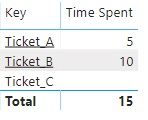
I have a key column and associated keyURL column in the table. I have configured the table with conditional formatting for key column such that the keyURL link is used as a hyperlink. I have also set Totals=On and summarized the Time Spent column. 


As you can see in the table visual, when time spent is null I no longer have URL visible for the key, Looks like a bug in Power BI.

4 Replies

  • In your time spend formula add +0 and try


    time spend = <Current calculation> + 0


    Appreciate your Kudos. In case, this is the solution you are looking for, mark it as the Solution. In case it does not help, please provide additional information and mark me with @
    Thanks. My Recent Blog -
    Winner-Topper-on-Map-How-to-Color-States-on-a-Map-with-Winners , HR-Analytics-Active-Employee-Hire-and-Termination-trend
    Power-BI-Working-with-Non-Standard-Time-Periods And Comparing-Data-Across-Date-Ranges

    Connect on Linkedin

  • Anonymous's avatar
    Anonymous
    Not applicable

    This bug is still around as of the October 2021 release.

    As long as the row has at least one measure that returns a result the link will work. If none of the measures in the row return a result then the link does not appear. Since sometimes adding a zero to a measure brings back data you don't want, an alternative is to use a measure to generate what what would normally only be in a column. For example if you had a "type" for each of the "keys" you could created a measure:

    mType = FIRSTNONBLANK(keys[type],TRUE())


    Using the "mType" measure in a table would show the same text as putting "type" in as a column, but it would allow the row to have at least one measure with a result without having to add zeros to a numeric measure.

    • Theiren's avatar
      Theiren
      Icon for Advocate I rankAdvocate I

      Thank you! Didn't know this bug disappears if at least one measure brings a result. This was a lifesaver for me, thanks!