cancel
Showing results for 
Search instead for 
Did you mean: 

The Power BI Data Visualization World Championships is back! It's time to submit your entry. Live now!

Reply
TcT85
Helper III
Helper III

WEB URL is not working with blanks

Hi,


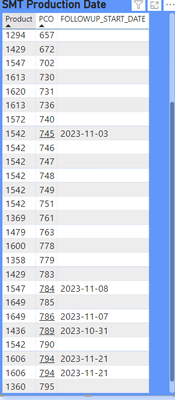
I have setup a WEB URL under PCO column, it works when there is a date in Assign dates, but when there is no date in followup_start_date the URL link is not working. 

PCO Item URL = "http://webpage/#/pct/pco/" & 'PCT_PCO'[PCOID]


I used conditional format to display the missing dates.

TcT85_2-1699358622138.png


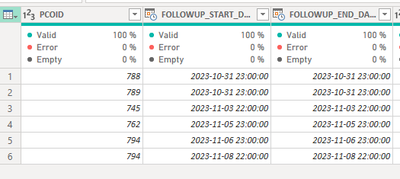
TABLE 1 just contain 2 columns 1 is PCO ID and second column is Product name

TABLE 2 only contains data where there is a date.

TcT85_3-1699361112344.png


How can I show the WEB URL under PCO ID when there are no dates for this PCO ID?

1 REPLY 1
PhilipTreacy
Super User
Super User

Hi @TcT85 


Hard to understand what you are doing as you haven't provided any code except this


PCO Item URL = "http://webpage/#/pct/pco/" & 'PCT_PCO'[PCOID]


If you are building the URL with that code then I don't see how the date column comes into it.


Can you please provide your file so I can examine your code.


regards


Phil


Did I answer your question? Then please mark my post as the solution.
If I helped you, click on the Thumbs Up to give Kudos.


Blog :: YouTube Channel :: Connect on Linkedin


Proud to be a Super User!


Helpful resources

Announcements
Power BI DataViz World Championships

Power BI Dataviz World Championships

The Power BI Data Visualization World Championships is back! It's time to submit your entry.

January Power BI Update Carousel

Power BI Monthly Update - January 2026

Check out the January 2026 Power BI update to learn about new features.

FabCon Atlanta 2026 carousel

FabCon Atlanta 2026

Join us at FabCon Atlanta, March 16-20, for the ultimate Fabric, Power BI, AI and SQL community-led event. Save $200 with code FABCOMM.