cancel
Showing results for 
Search instead for 
Did you mean: 

Get Fabric Certified for FREE during Fabric Data Days. Don't miss your chance! Request now

Reply
Anonymous
Not applicable

Values of hidden column in table visual

Hi All

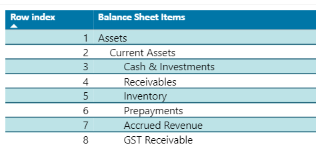
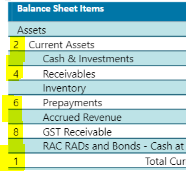
I have a row index column which I am trying to hide in a table visual, however, the values of this column still shows up in my table.


Please see below;


How can I avoide this?

Please note that text wrap is off already.


samravp_0-1656986592840.png      

samravp_1-1656986628897.png


Thanks heaps


1 ACCEPTED SOLUTION
v-kkf-msft
Community Support
Community Support

Hi @Anonymous ,


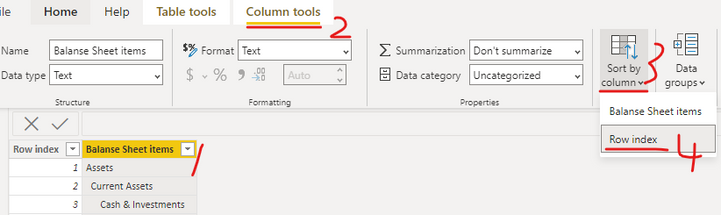
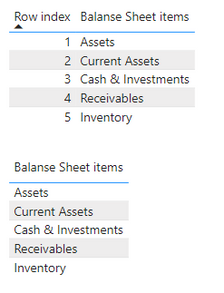
I guess you added the [Row index] column to sort correctly, so you could sort column [Balanse Sheet items] by [Row index] according to the following steps, which would eliminate the need to add the [Row index] to the visual.


vkkfmsft_0-1657172091420.png

vkkfmsft_1-1657172121298.png


If the problem is still not resolved, please provide detailed error information or the expected result you expect. Let me know immediately, looking forward to your reply.
Best Regards,
Winniz
If this post helps, then please consider Accept it as the solution to help the other members find it more quickly.

View solution in original post

3 REPLIES 3
v-kkf-msft
Community Support
Community Support

Hi @Anonymous ,


Has your problem been solved? If it is solved, please mark a reply which is helpful to you.


If the problem is still not resolved, please provide detailed error information or the expected result you expect. Let me know immediately, looking forward to your reply.


Best Regards,
Winniz

v-kkf-msft
Community Support
Community Support

Hi @Anonymous ,


I guess you added the [Row index] column to sort correctly, so you could sort column [Balanse Sheet items] by [Row index] according to the following steps, which would eliminate the need to add the [Row index] to the visual.


vkkfmsft_0-1657172091420.png

vkkfmsft_1-1657172121298.png


If the problem is still not resolved, please provide detailed error information or the expected result you expect. Let me know immediately, looking forward to your reply.
Best Regards,
Winniz
If this post helps, then please consider Accept it as the solution to help the other members find it more quickly.

amitchandak
Super User
Super User

@Anonymous , you can decrease the width and switch off auto width resize.

Also, you can make fond and background of same color

Share with Power BI Enthusiasts: Full Power BI Video (20 Hours) YouTube
Microsoft Fabric Series 60+ Videos YouTube
Microsoft Fabric Hindi End to End YouTube

Helpful resources

Announcements
November Power BI Update Carousel

Power BI Monthly Update - November 2025

Check out the November 2025 Power BI update to learn about new features.

Fabric Data Days Carousel

Fabric Data Days

Advance your Data & AI career with 50 days of live learning, contests, hands-on challenges, study groups & certifications and more!

FabCon Atlanta 2026 carousel

FabCon Atlanta 2026

Join us at FabCon Atlanta, March 16-20, for the ultimate Fabric, Power BI, AI and SQL community-led event. Save $200 with code FABCOMM.

Top Solution Authors
Top Kudoed Authors