Fabric Data Days starts November 4th!
Advance your Data & AI career with 50 days of live learning, dataviz contests, hands-on challenges, study groups & certifications and more!
Get registered- Power BI forums
- Get Help with Power BI
- Desktop
- Service
- Report Server
- Power Query
- Mobile Apps
- Developer
- DAX Commands and Tips
- Custom Visuals Development Discussion
- Health and Life Sciences
- Power BI Spanish forums
- Translated Spanish Desktop
- Training and Consulting
- Instructor Led Training
- Dashboard in a Day for Women, by Women
- Galleries
- Data Stories Gallery
- Themes Gallery
- Contests Gallery
- QuickViz Gallery
- Quick Measures Gallery
- Visual Calculations Gallery
- Notebook Gallery
- Translytical Task Flow Gallery
- TMDL Gallery
- R Script Showcase
- Webinars and Video Gallery
- Ideas
- Custom Visuals Ideas (read-only)
- Issues
- Issues
- Events
- Upcoming Events
Get Fabric Certified for FREE during Fabric Data Days. Don't miss your chance! Request now
- Power BI forums
- Forums
- Get Help with Power BI
- Desktop
- Re: Values in dropdown menu in the data source, un...
- Subscribe to RSS Feed
- Mark Topic as New
- Mark Topic as Read
- Float this Topic for Current User
- Bookmark
- Subscribe
- Printer Friendly Page

- Mark as New
- Bookmark
- Subscribe
- Mute
- Subscribe to RSS Feed
- Permalink
- Report Inappropriate Content
Values in dropdown menu in the data source, unable to match name = value in data model
Hi,
as i´m new to PBI, we need to solve an issue related to our data source (MS Dynamics).
The data source is connected via WebAPI and in the query see values only, like 620001, but in the data source there is a dropdown menu for e.g. Input channel, and the entry is "Inquiry by mail", but i don´t see this category in the query.
How do we solve this? Where do i find the right category names then?
---
This is the link to the screenshot in Dynamics:
And this is how it looks in PBI query:
Thanks for your assistance on this topic.
Best,
Johannes
Solved! Go to Solution.


- Mark as New
- Bookmark
- Subscribe
- Mute
- Subscribe to RSS Feed
- Permalink
- Report Inappropriate Content
In CRM to identify the values, you need to go to Settings | Customizations and then Customize the System. This will bring up a window and then you will need to go look at the correct entity and look at the field or option set definition. There you will find out what numbers mean what.
Follow on LinkedIn
@ me in replies or I'll lose your thread!!!
Instead of a Kudo, please vote for this idea
Become an expert!: Enterprise DNA
External Tools: MSHGQM
YouTube Channel!: Microsoft Hates Greg
Latest book!: DAX For Humans
DAX is easy, CALCULATE makes DAX hard...
- Mark as New
- Bookmark
- Subscribe
- Mute
- Subscribe to RSS Feed
- Permalink
- Report Inappropriate Content
So, this is what is known as an Option Set in Dynamics. Is this a default field or a custom field? I used to have a listing of all of the default Dynamics Option Set values for just this reason. Basically, you need to go in to Customize the system and take a look at the Option Set definitions in order to determine which values goes with what. Then you need to use an Enter Data query to create a dimension table and link it to your fact table.
Follow on LinkedIn
@ me in replies or I'll lose your thread!!!
Instead of a Kudo, please vote for this idea
Become an expert!: Enterprise DNA
External Tools: MSHGQM
YouTube Channel!: Microsoft Hates Greg
Latest book!: DAX For Humans
DAX is easy, CALCULATE makes DAX hard...
- Mark as New
- Bookmark
- Subscribe
- Mute
- Subscribe to RSS Feed
- Permalink
- Report Inappropriate Content
That specific field is a custom field.
By creating the dimension table i need to re-build the whole structure off dozens of dropdown menus - is that the only way?
Where do i find the Options set settings exactly as i´m not the main administrator of Dynamics.
Thanks for your help Greg.
Best
- Mark as New
- Bookmark
- Subscribe
- Mute
- Subscribe to RSS Feed
- Permalink
- Report Inappropriate Content
Another way would be to do find and replace in Query Editor.
Is this Dynamics CRM or Dynamics for Finance and Operations or another flavor of Dynamics?
Follow on LinkedIn
@ me in replies or I'll lose your thread!!!
Instead of a Kudo, please vote for this idea
Become an expert!: Enterprise DNA
External Tools: MSHGQM
YouTube Channel!: Microsoft Hates Greg
Latest book!: DAX For Humans
DAX is easy, CALCULATE makes DAX hard...
- Mark as New
- Bookmark
- Subscribe
- Mute
- Subscribe to RSS Feed
- Permalink
- Report Inappropriate Content
Thats a Dynamics 365 CRM instance.
But Find & Replace would mean to do the command for each line and for each new line.
---
I´m wondering if our case is solely unique to other Dynamics instances?
Any other idea how to get the names for the categories/values?
- Mark as New
- Bookmark
- Subscribe
- Mute
- Subscribe to RSS Feed
- Permalink
- Report Inappropriate Content
In CRM to identify the values, you need to go to Settings | Customizations and then Customize the System. This will bring up a window and then you will need to go look at the correct entity and look at the field or option set definition. There you will find out what numbers mean what.
Follow on LinkedIn
@ me in replies or I'll lose your thread!!!
Instead of a Kudo, please vote for this idea
Become an expert!: Enterprise DNA
External Tools: MSHGQM
YouTube Channel!: Microsoft Hates Greg
Latest book!: DAX For Humans
DAX is easy, CALCULATE makes DAX hard...
- Mark as New
- Bookmark
- Subscribe
- Mute
- Subscribe to RSS Feed
- Permalink
- Report Inappropriate Content
Hi,
as the solution is at hand, i need to know additionally if its possible to speficy what the query should report.
Normal setup of the query is to deliver the value entity of the table (here: Option set = VALUE), but i need to know if its possible to GET via the query editor the DESCRIPTION entity as well.
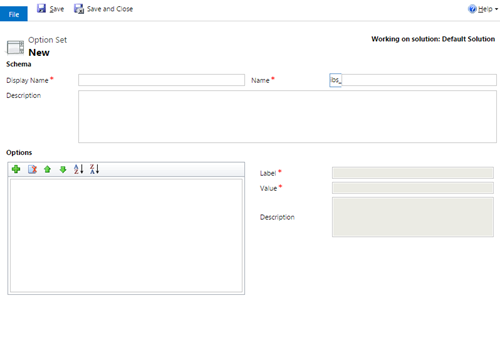
If you know any solution it would be great if you can share that with me.
Maybe its also possible to GET the LABEL entity instead of the DESCRIPTION?
No idea how to change the query editor in terms of not getting the VALUE only.
Thanks for your help!
Helpful resources

Fabric Data Days
Advance your Data & AI career with 50 days of live learning, contests, hands-on challenges, study groups & certifications and more!

Power BI Monthly Update - October 2025
Check out the October 2025 Power BI update to learn about new features.

FabCon Atlanta 2026
Join us at FabCon Atlanta, March 16-20, for the ultimate Fabric, Power BI, AI and SQL community-led event. Save $200 with code FABCOMM.


