cancel
Showing results for 
Search instead for 
Did you mean: 

Data Days is here! Join us now for 60+ days of learning, challenges, and connection. Learn more

Reply
Anonymous
Not applicable

Using related in a measure

Hi,


I have a simple query where i count the no. issues closed during each month and hence i created a date table and have a n:1 (GetIssue[Closed_date] : DateKey[Date])relationship with my date table and this is an inactive relationship so i use USERRELATIONSHIP. But my final values seem to be very less. Any insight will be helpful 
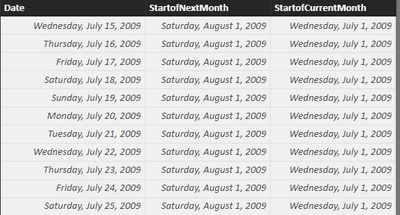
 

PowerBI.PNGDate table

Query :

ClosedBugs = CALCULATE(DISTINCTCOUNT(GetIssues[id]),FILTER(GetIssues,'GetIssues'[Closed_date] >=RELATED(DateKey[StartofCurrentMonth]) && 'GetIssues'[Closed_date]< RELATED(DateKey[StartofNextMonth]),USERELATIONSHIP(GetIssues[Closed_date],DateKey[Date])) 


Thanks,

Aishwarya

1 ACCEPTED SOLUTION
Ashish_Mathur
Super User
Super User

Hi,


Try this measure


=CALCULATE(DISTINCTCOUNT(GetIssues[id]),USERELATIONSHIP(GetIssues[Closed_date],DateKey[Date]))


Regards,
Ashish Mathur
http://www.ashishmathur.com
https://www.linkedin.com/in/excelenthusiasts/

View solution in original post

6 REPLIES 6
Ashish_Mathur
Super User
Super User

Hi,


Try this measure


=CALCULATE(DISTINCTCOUNT(GetIssues[id]),USERELATIONSHIP(GetIssues[Closed_date],DateKey[Date]))


Regards,
Ashish Mathur
http://www.ashishmathur.com
https://www.linkedin.com/in/excelenthusiasts/
Anonymous
Not applicable

Thank you! I had initially tried this out but when i combine it with additional filters it wouldnt work. Am not sure if my query with filters and calculate is wrong For example : 


ClosedBugs = CALCULATE(DISTINCTCOUNT(GetIssues[id]),FILTER(GetIssues,'GetIssues'[issuetype] ="Bug" && 'GetIssues'[Priority] in {P1,P2} ,USERELATIONSHIP(GetIssues[Closed_date],DateKey[Date])) 

Hi,


Try this


=CALCULATE(DISTINCTCOUNT(GetIssues[id]),'GetIssues'[issuetype]="Bug",'GetIssues'[Priority]="P1"||'GetIssues'[Priority]="P1", ,USERELATIONSHIP(GetIssues[Closed_date],DateKey[Date]))


Regards,
Ashish Mathur
http://www.ashishmathur.com
https://www.linkedin.com/in/excelenthusiasts/
Anonymous
Not applicable

I settled for adding filters under the visual filters, and just using distinct count and userelationship.


Got stuck with a new problem, am trying to calculate backlog bugs i.e all bugs created before the next month but closed after next month.

My query is the following but i think am going wrong with the order of precendence/filter because my values are way off. 


backLogBugs = CALCULATE(DISTINCTCOUNT(GetIssues[id]),Filter(GetIssues, (GetIssues[created]< Related(DateKey(StartofNextMonth) && GetIssues[customfield_10030] > Related(DateKey(StartofNextMonth)) || (GetIssues[created] < Related(DateKey(StartofNextMonth) && GetIssues[status.name] <> "Closed"))


Thanks for you help!

Hi,


I am not clear.  Share some data and show the expected result.


Regards,
Ashish Mathur
http://www.ashishmathur.com
https://www.linkedin.com/in/excelenthusiasts/
Anonymous
Not applicable

Hi @Anonymous,


I'd like to suggest you take a look at following blog to know how to use userelationship function in calculate column:

USERELATIONSHIP in Calculated Columns


If above not help, can you please share some sample data to test?


Regards,

Xiaoxin Sheng

Helpful resources

Announcements
Fabric Data Days is here Carousel

Fabric Data Days 2026

Don't miss out on Data Days, June 15 through August 7. Learn Fabric, Power BI, SQL, AI and more.

May Power BI Update Carousel

Power BI Monthly Update - May 2026

Check out the May 2026 Power BI update to learn about new features.

Power BI DataViz World Championships carousel

Power BI DataViz World Championships - June 2026

A new Power BI DataViz World Championship is coming this June! Don't miss out on submitting your entry.