FabCon is coming to Atlanta
Join us at FabCon Atlanta from March 16 - 20, 2026, for the ultimate Fabric, Power BI, AI and SQL community-led event. Save $200 with code FABCOMM.
Register now!- Power BI forums
- Get Help with Power BI
- Desktop
- Service
- Report Server
- Power Query
- Mobile Apps
- Developer
- DAX Commands and Tips
- Custom Visuals Development Discussion
- Health and Life Sciences
- Power BI Spanish forums
- Translated Spanish Desktop
- Training and Consulting
- Instructor Led Training
- Dashboard in a Day for Women, by Women
- Galleries
- Data Stories Gallery
- Themes Gallery
- Contests Gallery
- QuickViz Gallery
- Quick Measures Gallery
- Visual Calculations Gallery
- Notebook Gallery
- Translytical Task Flow Gallery
- TMDL Gallery
- R Script Showcase
- Webinars and Video Gallery
- Ideas
- Custom Visuals Ideas (read-only)
- Issues
- Issues
- Events
- Upcoming Events
Get Fabric Certified for FREE during Fabric Data Days. Don't miss your chance! Request now
- Power BI forums
- Forums
- Get Help with Power BI
- Desktop
- Re: Using measure as filter causes visualisation t...
- Subscribe to RSS Feed
- Mark Topic as New
- Mark Topic as Read
- Float this Topic for Current User
- Bookmark
- Subscribe
- Printer Friendly Page


- Mark as New
- Bookmark
- Subscribe
- Mute
- Subscribe to RSS Feed
- Permalink
- Report Inappropriate Content
Using measure as filter causes visualisation to hang
Hello,
I have a measure in a visualisation filter, so that I can select only records that are in a date range (selected in a slicer) (i.e. count = 1). The measure uses USERELATIONSHIP to link the slicer's date to the data tables date. But when I try filtering by 1 the visualisation hangs until it times out.
If I clear the filter and drop the measure into the table, then it loads promptly. I can also sort by that field/measure quickly.
Please do you know how go about investigating how to make the visualisation filter also work quickly? (I've tried recreating the problem in a test database without sensitive data, but I'm not getting the same problem)
Is there a way I can establish what the problem is?
Many thanks,
CM
- Mark as New
- Bookmark
- Subscribe
- Mute
- Subscribe to RSS Feed
- Permalink
- Report Inappropriate Content
You can see that the date filter is picked up and although referenced in SUMMARIZECOLUMNS isn't reducing the row set at all. Everything gets computed for every row and then at the end that table only keeps rows with [Measure] = 1.Thanks @bcdobbs but why doesn't that logic hold for the unfiltered table where the rows are sorted by the measure? It generates quickly in that situation, but doesn't it have to calculate every row just as you mention above for the filter?
Thanks


- Mark as New
- Bookmark
- Subscribe
- Mute
- Subscribe to RSS Feed
- Permalink
- Report Inappropriate Content
You're right certainly not answered yet!
Can you share the full query that the performance analyser when the matrix hangs?
Does it hang when you just have the filter measure or do you only get the issue when you have everything in?
- Mark as New
- Bookmark
- Subscribe
- Mute
- Subscribe to RSS Feed
- Permalink
- Report Inappropriate Content
Can you share the full query that the performance analyser when the matrix hangs?
The "Copy query" button in performance analyzer is ghosted out, a bit frustrating as it must know the query that it is trying to run??
Does it hang when you just have the filter measure or do you only get the issue when you have everything in?
It only hangs when I have everything in. If I just have the filter measure (and a fact table field) then it's runs quickly.


- Mark as New
- Bookmark
- Subscribe
- Mute
- Subscribe to RSS Feed
- Permalink
- Report Inappropriate Content
Hi @CloudMonkey ,
You can try importing performance analyzer data in dax studio, simplifying the analysis of slower queries in a report.
https://www.sqlbi.com/articles/importing-performance-analyzer-data-in-dax-studio/
Best Regards,
Liang
If this post helps, then please consider Accept it as the solution to help the other members find it more quickly.
- Mark as New
- Bookmark
- Subscribe
- Mute
- Subscribe to RSS Feed
- Permalink
- Report Inappropriate Content
- Mark as New
- Bookmark
- Subscribe
- Mute
- Subscribe to RSS Feed
- Permalink
- Report Inappropriate Content
- Mark as New
- Bookmark
- Subscribe
- Mute
- Subscribe to RSS Feed
- Permalink
- Report Inappropriate Content
If you've built a test pbix file can you share it anyway? Realise the speed issue won't be present but it will show us how your model is setup.
I'm assuming in your main pbix file you have a much larger amount of data. Your visual filter measure is then being triggered for every single row. What we need to do is see if we can optimise that code or alter the model to speed it up but would need to see more to help.
- Mark as New
- Bookmark
- Subscribe
- Mute
- Subscribe to RSS Feed
- Permalink
- Report Inappropriate Content
Hi @bcdobbs this is the test file https://file.io/nTOMlGKdIih3
I have a lot of other measures in the 'live' file's table, which I expect is the problem. But I'm looking for a method to establish what the exact problem is 🙂
Thanks
- Mark as New
- Bookmark
- Subscribe
- Mute
- Subscribe to RSS Feed
- Permalink
- Report Inappropriate Content
Thanks @CloudMonkey .
So to confirm my understanding you're wanting the visual to display orders that were either ordered in the selected date range or delivered in the selected date range?
How many rows does your real Sales table have?
- Mark as New
- Bookmark
- Subscribe
- Mute
- Subscribe to RSS Feed
- Permalink
- Report Inappropriate Content
Hi @bcdobbs the real datatable has about 300,000 rows
The live file only hangs when I introduce the filter measure (i.e. the equivalent of the measures "Measure" or "Measure 2" in the test file I posted)
- Mark as New
- Bookmark
- Subscribe
- Mute
- Subscribe to RSS Feed
- Permalink
- Report Inappropriate Content
Hi @CloudMonkey ,
I haven't got an instant solution but the method of diagnose would be to copy the query from Performance Analyser (View >> Performance Analyzer) and see exactly what is happening. You can paste it into DAX Studio and turn on Server Timings to see how long things are taking.
Your visual filter measure on it's own isn't bad but if I create another measure and use it in the same visual I can start to get a feel for what might be happeneing. The code that comes out looks like this:
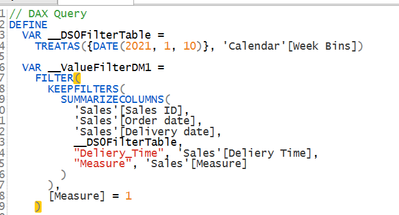
"Delivery Time" is my new measure just for a trial.
This query is what Power Bi sends when it renders the visual.
You can see that the date filter is picked up and although referenced in SUMMARIZECOLUMNS isn't reducing the row set at all. Everything gets computed for every row and then at the end that table only keeps rows with [Measure] = 1.
Some options:
1) Use two date tables with live relationships to both Order Date and Delivery Date. That will stop every row being calcualted every time.
2) I think rather than using a visual filter if you moved the USERELATIONSHIP inside your actual measures you'd get a performance benefit. You could either use two version of each measure or if you used a disconnected table to enable you to select "Order" or "Delivery" and then test using SELECTEDVALUE in the measure to determine which relationships to activate.
Hope that gives you some starting points.

Helpful resources

Power BI Monthly Update - November 2025
Check out the November 2025 Power BI update to learn about new features.

Fabric Data Days
Advance your Data & AI career with 50 days of live learning, contests, hands-on challenges, study groups & certifications and more!

FabCon Atlanta 2026
Join us at FabCon Atlanta, March 16-20, for the ultimate Fabric, Power BI, AI and SQL community-led event. Save $200 with code FABCOMM.


