Forum Discussion

Using SQL Authentication
Just experienced a very strange problem in Power BI Desktop. It seems like it is stuck to Windows Authentication when trying to connect to a SQL Server ??? So how do I connect with SQL Authentication?? This problem exists even when trying to connect to an Azure Database as well so this of course will not work.. Any suggestions??
11 Replies
- Greg_DecklerCommunity Champion
In File | Options and settings | Data source settings, you can go in and edit the credentials of your existing data sources.
- AnonymousNot applicable
Hmm. Very strange.. Now it works fine !!? Hmm.. Well thanks for ur help anyway :)
 v-sadadiMicrosoft Employee
I Could not refresh the dataset published on the Power BI site with SQL Authentication credentials as we do not have an option for Database credentials on the Power BI site. Please suggest.
- v-sadadiMicrosoft EmployeeHi Team,I get the below error when I try refresh the Dataset published on the Power BI site.Something went wrong.Failed to load data sources. Please try again later.Activity ID3d57f514-e112-c34f-68e8-6200f56160caRequest IDfe8adc00-5033-1143-d182-17eb1ca83c8fStatus code404TimeFri Dec 04 2015 12:07:55 GMT+0530 (India Standard Time)Version11.0.9168.906Cluster URIhttps://df-msit-scus.analysis.windows.net
Any quick help is highly appreciated.
Thanks
Satya
 cousNew Member
Thanks Greg_Deckler! I have no idea how my credentials got saved in correctly, but that did the trick for me. I was able to connect to my SQL Server DB using SSMS and a Power Pivot, but not Power BI. Had a hunch that it was tied to my credentials.
- ashishrjPower Participant
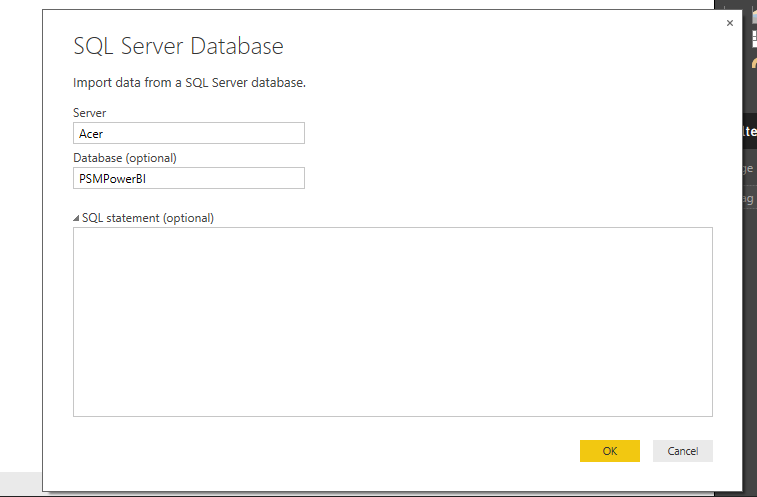
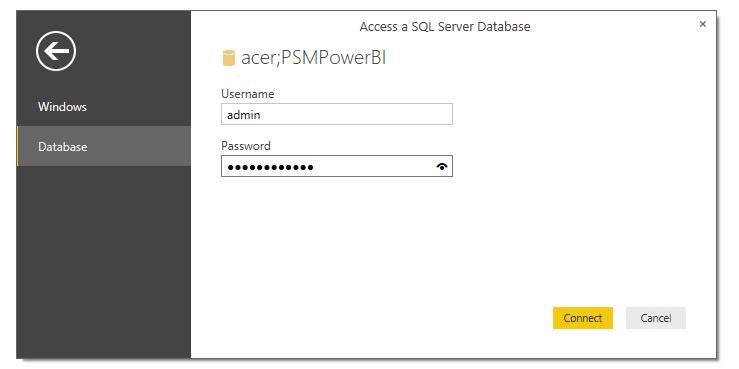
Anonymous I don't think this a an issue. I tried connecting many times and worked well. For your reference follow the steps below:
After entering server name and database name (optional), select Database and enter username and password and hit connect. Tried connecting even SQL Database on Azure VM and worked. Hope this helps!
 tbmccoyFrequent Visitor
Hi all,
I can confirm that skipping past the credential management screen is still a behavior in version 2.40.4554.421 64-bit (October 2016). This appears to manifest itself when your domain account already has access to the server.
I expect that this behavior was probably intended as a *feature*, but it is in fact a bit of a pain. The issue is that, by default, my personal domain account (which has elevated privileges in the db) gets used in fetching objects/data for the report. Like many devs, my default db privileges allow me access to data that is well beyond the scope of any single report. It's not at all clear to me what will happen when I pass this off to other devs/users to maintain. I expect it would either introduce a security hole, or stop connecting to the data. Neither option is good.
As per smoupre's suggestion suggestion, you can change to sqlAuth later, although this is a nuisance at best...
HTH,
__T
 rpschlakNew Member
As of Version: 2.48.4792.721 64-bit (July, 2017) it is still a nuisance. PowerBI, in erratic fashion, skips past asking for the account name if the current user has access to the DB with Windows credentials. Yes, additional steps in other locations can be taken to fix the issue so that the account with the proper DB grants to tables and procs is active.
Please fix this.