Forum Discussion

Userelationship does not return correct value in measure
Hi I have the below (simplified)
Weighting Table
uID
Weighting
Data Table
uID_ALL
uID_ALL_Aged
Weight (taken from weighting table using RELATED function)
I have two relationships between the two, one active and one inactive.
Active = uID - uID_ALL
InActive = uID - uID_ALL_Aged
I am trying to create a measure on the inactive relationship (should give me a different weight value) using the code below
ScoreAgedWeighted = CALCULATE([ScoreAged] * AVERAGE('Data Table'[Weight]), USERELATIONSHIP('Data Table'[uID_ALL_Aged], 'Weighting Table'[uID]))This does not work. It returns the value of the active relationship.
If I manually swap over the relationships in 'Manage Relationships' so that uID_ALL_Aged is the active one the formula above uses the correct weight value.
Hope all that makes sense, any ideas on whats wrong?
looks like the related function with use relationships might not actually work
see this article. the suggestion is to use lookupvalue instead.
https://www.sqlbi.com/articles/userelationship-in-calculated-columns/
Applying USERELATIONSHIP to RELATED
If one creates a calculated column in FactInternetSales, one might want to use RELATED choosing the relationship to use. Unfortunately, this is not possible. For example, in order to denormalize the day name of week of the order date, one writes:
FactInternetSales[DayOrder] =RELATED(DimDate[EnglishDayNameOfWeek])But what if the user wants to obtain the day name of week of the due date? They cannot use CALCULATE and RELATEDtogether, so they have to use this syntax instead:
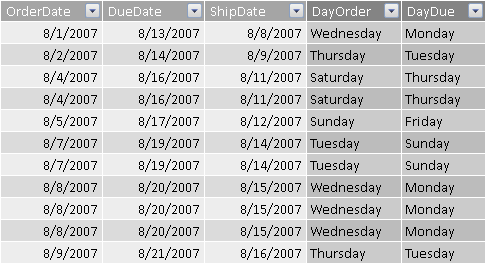
123456789FactInternetSales[DayDue] =CALCULATE(CALCULATE(VALUES(DimDate[EnglishDayNameOfWeek]),FactInternetSales),USERELATIONSHIP(DimDate[DateKey], FactInternetSales[DueDateKey]),ALL(DimDate))Two CALCULATE are required in this case: the outermost CALCULATE applies the USERELATIONSHIP to the innermost CALCULATE, and the ALL ( DimDate ) filter removes the existing filter that would be generated by the context transition. The innermost CALCULATE applies FactInternetSales to the filter condition. Thanks to the active USERELATIONSHIP, its filter propagates to the lookup DimDate table using the DueDateKey relationship instead of the OrderDateKey relationship. The result is visible in the following screenshot.
Though this syntax works, it is strongly advised not to use it. Indeed, it is hard to understand and it is easy to write incorrect DAX code here. A better approach is using LOOKUPVALUE instead, which does not require the relationship at all.
123456FactInternetSales[DayDue] =LOOKUPVALUE(DimDate[EnglishDayNameOfWeek],DimDate[DateKey],FactInternetSales[DueDateKey])

4 Replies
- vanessafvg
Community Champion
KP-PowerBI can you show a screenshot of your relationships with the table?
 KP-PowerBIFrequent Visitor
Here are the relationships
- vanessafvg
looks like the related function with use relationships might not actually work
see this article. the suggestion is to use lookupvalue instead.
https://www.sqlbi.com/articles/userelationship-in-calculated-columns/
Applying USERELATIONSHIP to RELATED
If one creates a calculated column in FactInternetSales, one might want to use RELATED choosing the relationship to use. Unfortunately, this is not possible. For example, in order to denormalize the day name of week of the order date, one writes:
FactInternetSales[DayOrder] =RELATED(DimDate[EnglishDayNameOfWeek])But what if the user wants to obtain the day name of week of the due date? They cannot use CALCULATE and RELATEDtogether, so they have to use this syntax instead:
123456789FactInternetSales[DayDue] =CALCULATE(CALCULATE(VALUES(DimDate[EnglishDayNameOfWeek]),FactInternetSales),USERELATIONSHIP(DimDate[DateKey], FactInternetSales[DueDateKey]),ALL(DimDate))Two CALCULATE are required in this case: the outermost CALCULATE applies the USERELATIONSHIP to the innermost CALCULATE, and the ALL ( DimDate ) filter removes the existing filter that would be generated by the context transition. The innermost CALCULATE applies FactInternetSales to the filter condition. Thanks to the active USERELATIONSHIP, its filter propagates to the lookup DimDate table using the DueDateKey relationship instead of the OrderDateKey relationship. The result is visible in the following screenshot.
Though this syntax works, it is strongly advised not to use it. Indeed, it is hard to understand and it is easy to write incorrect DAX code here. A better approach is using LOOKUPVALUE instead, which does not require the relationship at all.
123456FactInternetSales[DayDue] =LOOKUPVALUE(DimDate[EnglishDayNameOfWeek],DimDate[DateKey],FactInternetSales[DueDateKey])- KP-PowerBIFrequent Visitor
Thanks for the info.
So i removed the relationship between the weighting table and the data table (just in case there is some confusion in how i retrieved the weight values) and then created two columns in the data table with LOOKUPVALUE function:
Weight
Weight = LOOKUPVALUE('Weightings Table'[Weighting],'Weightings Table'[uID],'Data Table'[uID_ALL])WeightAged
WeightAged = LOOKUPVALUE('Weightings Table'[Weighting],'Weightings Table'[uID],'Data Table'[uID_ALL_Aged])I then used the appropriate column for the measures e.g.
ScoreAgedWeighted = [ScoreAged] * AVERAGE('Data Table'[WeightAged])All good now thanks.