Join us at FabCon Atlanta from March 16 - 20, 2026, for the ultimate Fabric, Power BI, AI and SQL community-led event. Save $200 with code FABCOMM.
Register now!The Power BI Data Visualization World Championships is back! Get ahead of the game and start preparing now! Learn more
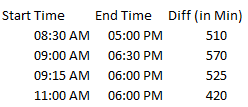
I need help in building a free form where user to input field "start time and end time" and then aggregate it to find total minutes. Maybe a simple parameters maybe have 2 different forms then a measure to calculate it. Below is excel, how would I achieve this in pbi? Thank you all.
Excel model:
Solved! Go to Solution.
Hi @Tevon713 ,
Here are the steps you can follow:
1. Home – Advanced Editor --Put the following code .
Generate a calendar table with HH:MM:S and copy the columns, then copy the table
let
Source = List.Times(#time(0,0,0),24*60*60,#duration(0,0,0,1)),
#"Converted to Table" = Table.FromList(Source, Splitter.SplitByNothing(), null, null, ExtraValues.Error),
#"Renamed Columns" = Table.RenameColumns(#"Converted to Table",{{"Column1", "Time"}}),
#"Changed Type" = Table.TransformColumnTypes(#"Renamed Columns",{{"Time", type time}}),
#"Duplicated Column" = Table.DuplicateColumn(#"Changed Type", "Time", "Time - Copy")
in
#"Duplicated Column"
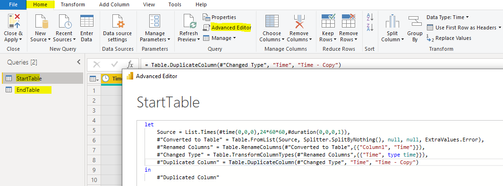
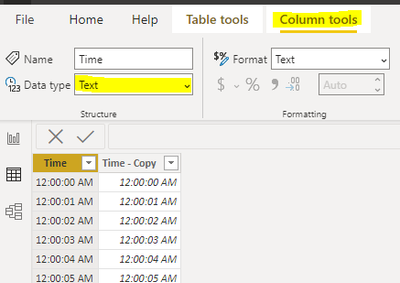
2. Convert the columns [Time] of both tables to text, Column tools – Text.
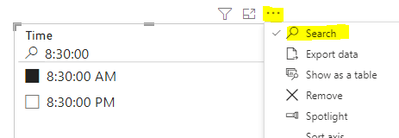
3. Generate a slicer for the [Time] of both tables - click the ellipsis -Search - then you can enter the date on this.
4. Create measure.
Measure =
var _starttimetext=SELECTEDVALUE('StartTable'[Time])
var _endtimetext=SELECTEDVALUE('EndTable'[Time])
var _start=MAXX(FILTER(ALL(StartTable),'StartTable'[Time]=_starttimetext),[Time - Copy])
var _end=MAXX(FILTER(ALL(EndTable),'EndTable'[Time]=_endtimetext),[Time - Copy])
return
DATEDIFF(_start,_end,MINUTE)
5. Result:
Best Regards,
Liu Yang
If this post helps, then please consider Accept it as the solution to help the other members find it more quickly
Hi @Tevon713 ,
Here are the steps you can follow:
1. Home – Advanced Editor --Put the following code .
Generate a calendar table with HH:MM:S and copy the columns, then copy the table
let
Source = List.Times(#time(0,0,0),24*60*60,#duration(0,0,0,1)),
#"Converted to Table" = Table.FromList(Source, Splitter.SplitByNothing(), null, null, ExtraValues.Error),
#"Renamed Columns" = Table.RenameColumns(#"Converted to Table",{{"Column1", "Time"}}),
#"Changed Type" = Table.TransformColumnTypes(#"Renamed Columns",{{"Time", type time}}),
#"Duplicated Column" = Table.DuplicateColumn(#"Changed Type", "Time", "Time - Copy")
in
#"Duplicated Column"
2. Convert the columns [Time] of both tables to text, Column tools – Text.
3. Generate a slicer for the [Time] of both tables - click the ellipsis -Search - then you can enter the date on this.
4. Create measure.
Measure =
var _starttimetext=SELECTEDVALUE('StartTable'[Time])
var _endtimetext=SELECTEDVALUE('EndTable'[Time])
var _start=MAXX(FILTER(ALL(StartTable),'StartTable'[Time]=_starttimetext),[Time - Copy])
var _end=MAXX(FILTER(ALL(EndTable),'EndTable'[Time]=_endtimetext),[Time - Copy])
return
DATEDIFF(_start,_end,MINUTE)
5. Result:
Best Regards,
Liu Yang
If this post helps, then please consider Accept it as the solution to help the other members find it more quickly
Thanks @Anonymous. Not exactly what I'm seeking, but I can find way around it. Thank you again.
Check out the November 2025 Power BI update to learn about new features.
Advance your Data & AI career with 50 days of live learning, contests, hands-on challenges, study groups & certifications and more!