This time we’re going bigger than ever. Fabric, Power BI, SQL, AI and more. We're covering it all. You won't want to miss it.
Learn moreGet Fabric Certified for FREE during AI Skills Fest. This week only. Secure your voucher now.
Hi all,
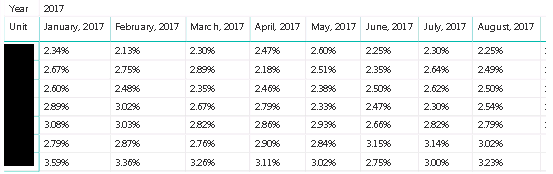
I have a matrix as shown below, which is meant to go into a PBI report for end-users.
The row header is shown at the lowest level of hierarchy (business units, redacted in photo).
The column headers given are months, and the cell values are a user-defined measure which changes based on a filter.
The method I used to build the measures is found here:
The problem I'm running into is sorting. When sorting by the measure, the user is only able to sort by the grand total column (not shown).
However, my users are requesting to be able to sort by each column (as you would in Excel) where you can select a column and sort the entire table based on that column.
The use case would be to see which buisness unit is the highest/lowest (and what order the rest fall in) for each month.
There are several hundred buisness units, so visual inspection is not possible.
Hi @Anonymous,
Unfortunately, it is not supported to sort the Matrix by the values under a specific column. You could submit this feature request at ideas page.
Best regards,
Yuliana Gu
Check out the May 2026 Power BI update to learn about new features.
Sign up to receive a private message when registration opens and key events begin.
If you have recently started exploring Fabric, we'd love to hear how it's going. Your feedback can help with product improvements.
| User | Count |
|---|---|
| 25 | |
| 24 | |
| 22 | |
| 21 | |
| 19 |
| User | Count |
|---|---|
| 51 | |
| 48 | |
| 44 | |
| 21 | |
| 21 |